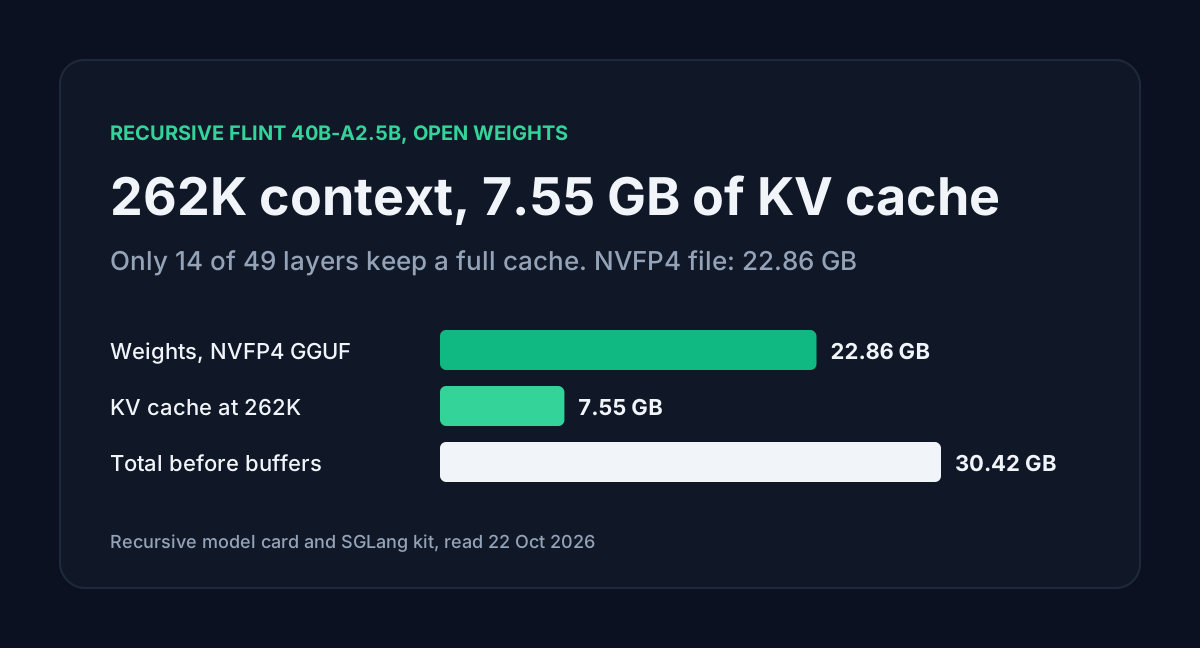
Recursive released Flint on 21 October 2026, an Apache 2.0 coding model with 39.8 billion parameters and about 2.5 billion active per token. The headline numbers are speed and benchmarks: more than 125 tokens per second on an M4 Pro MacBook Pro, and 74.2% on SWE-bench Verified in Recursive's own runs.
The detail I cared about is memory. Flint's full 262,144-token context costs 7.55 GB of KV cache, because only 14 of its 49 layers keep the whole history. A calculator that assumes every layer does will tell you 26.31 GB. I worked the numbers from config.json and the file sizes on Hugging Face, then checked them against Recursive's setup guides.
Table of contents
- Flint specs and download sizes
- Only 14 layers keep a full KV cache
- Memory by context length
- The 48 GB requirement
- Running Flint on a Mac with rec
- Ollama, llama.cpp and coding harnesses
- The BF16 checkpoint on server GPUs
- FAQ
- Sources
Flint specs and download sizes
From the model card and config.json on Hugging Face, read on 22 October:
| Flint | |
|---|---|
| Total parameters | 39.8B (39,785,287,456 in the safetensors header) |
| Active per token | About 2.5B, including the output head |
| Layers | 49: 2 dense, then 47 MoE |
| Experts | 256 routed, 6 per token, plus a shared expert |
| Attention | 32 query heads, 4 KV heads, head_dim 128 |
| Context | 262,144 tokens, prompt and output combined |
| Knowledge cutoff | June 2026 |
| License | Apache 2.0 |
The launch post says Flint supports up to 512K tokens but recommends staying within 256K. The model card and every local recipe use 262,144.
Recursive ships four sets of weights, and the sizes differ more than the names suggest:
| Repo | Format | Size | Meant for |
|---|---|---|---|
RecursiveSI/flint | BF16 safetensors | 79.59 GB | SGLang on one B300 or H200 |
RecursiveSI/flint-nvfp4-gguf | NVFP4 GGUF | 22.86 GB | llama.cpp on NVIDIA |
RecursiveSI/flint-int4 | MLX INT4 | 22.57 GB | rec on Apple Silicon |
RecursiveSI/flint-int4-gguf | Q4_1 GGUF | 25.99 GB | llama.cpp on Metal |
The Q4_1 file is 3 GB bigger than the MLX one with the same INT4 codes. Its model card says why: embeddings and other floating tensors are stored as F32.
Recursive's benchmark claims, all from its own release evaluations: 54.9% on Terminal-Bench 2.1, 89.7% on SWE-bench Pro v2 and 74.2% on SWE-bench Verified. It says the NVFP4 build lands within 0.7 points of BF16. I haven't run any of these.
Only 14 layers keep a full KV cache
Flint mixes two attention types. The layer_types list in config.json has 14 full-attention layers and 35 sliding-window layers. A sliding layer only looks at the current token and the 512 before it, so its cache stops growing at 513 tokens.
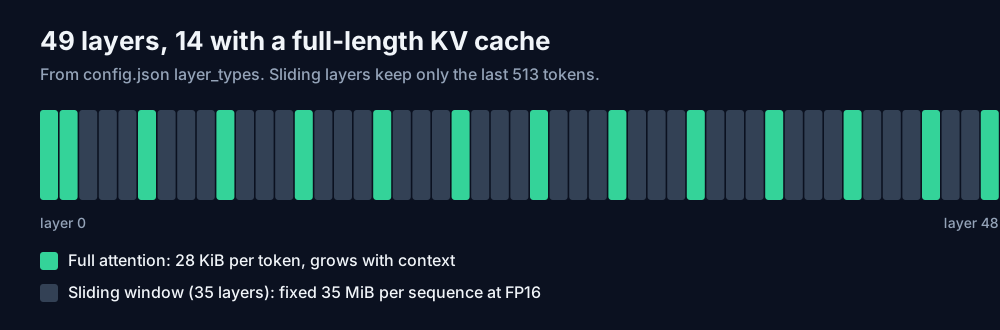
Per token, one full-attention layer stores a key and a value for each of 4 KV heads at 128 dimensions. At FP16 that's 4 x 128 x 2 x 2 = 2,048 bytes. Across 14 layers it's 28 KiB per token, which matches the figure in Recursive's SGLang notes.
The 35 sliding layers would add 70 KiB per token if they cached everything. They don't. They hold 513 tokens each, which comes to a fixed 35 MiB per sequence whatever the context.
Memory by context length
Weights plus KV cache, FP16 cache, one sequence. Compute buffers and the OS come on top, so treat these as floors.
| Context | KV cache | NVFP4 total | Q4_1 total | KV if all 49 layers cached |
|---|---|---|---|---|
| 32,768 | 0.98 GB | 23.84 GB | 26.97 GB | 3.29 GB |
| 131,072 | 3.79 GB | 26.66 GB | 29.79 GB | 13.15 GB |
| 262,144 | 7.55 GB | 30.42 GB | 33.55 GB | 26.31 GB |
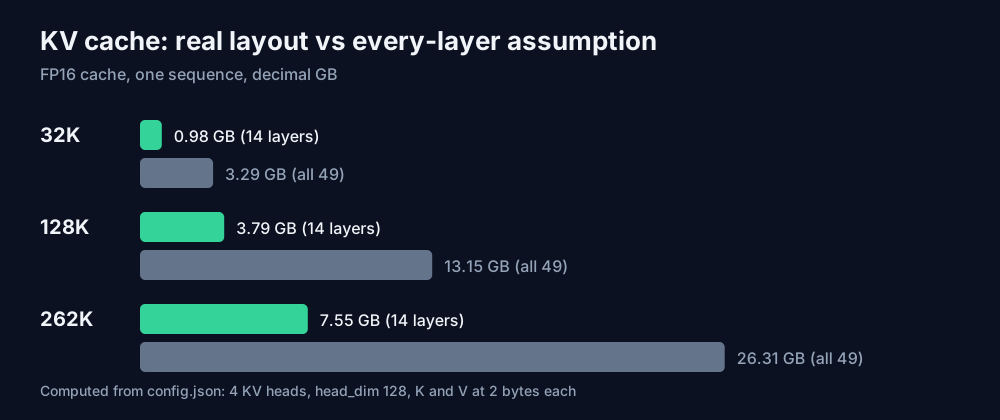
The last column is the trap. A tool that multiplies per-layer KV by all 49 layers adds almost 19 GB at full context that Flint never allocates, and it would tell a 32 GB card owner to cut the context in half. The llama.cpp recipes keep the compact cache on by leaving --swa-full unset. Pass that flag and the sliding layers cache every token, which puts you back near the last column.
The AI VRAM Calculator now has a Flint preset with layers set to the 14 full-attention layers, the same way it handles Kolibri-1 and Reflection Beam. Its 4-bit weight figure is computed from the parameter count, so compare it with the real file sizes above.
The 48 GB requirement
Every Recursive guide asks for at least 48 GB: of unified memory on a Mac, of GPU memory on NVIDIA. The table above says 30.42 GB covers NVFP4 weights and a full-length cache. The gap goes to compute buffers, the OS and everything else open on the machine, and the guides don't break it down.
On a Mac that 48 GB is shared with macOS, your editor and the test suite the agent keeps running. On a discrete NVIDIA card it's VRAM alone, and the cards Recursive tested on are B300, RTX PRO 6000 Blackwell, RTX Spark and DGX Spark. A 32 GB card holds the 22.86 GB file plus a 128K cache on paper, at 26.66 GB, but that's outside the tested list. Recursive's setup page says partial CPU offload may let the model load but can substantially change performance.
Running Flint on a Mac with rec
rec is Recursive's own engine for Apple Silicon. It checks your chip and memory before downloading and refuses anything other than an M4 Pro, M5 Pro or M5 Max with 48 GB or more. The M4 Max and older chips aren't on that list, so on those use llama.cpp or Ollama instead (our Ollama MLX guide covers the Apple Silicon side). You also need about 30 GB of free disk and Node.js 22.
curl -fsSL https://raw.githubusercontent.com/recursive-oss/rec/main/install.sh | bash
export PATH="$HOME/.local/bin:$PATH"
rec doctor

# from your project directory
rec launch pi
Recursive recommends Pi over OpenCode. It cites informal reports of roughly 1.5x faster workflows with Pi's lighter harness. To use another client, run rec serve and point it at http://127.0.0.1:11500/v1 with model flint and the key from rec auth token. That token is a credential, so keep it out of shared config files.
The engine handles one generation at a time, and overlapping requests can get HTTP 429. A harness that fires subagents in parallel will hit that. Run them in sequence, or use llama.cpp with more slots.
Ollama, llama.cpp and coding harnesses
Ollama has a packaged build:
ollama run flint:40b-a2b-qat-int4
ollama launch opencode   # also: pi, codex, vscode
For llama.cpp you need a release with Flint support. The NVIDIA recipe from the NVFP4 model card:
hf download RecursiveSI/flint-nvfp4-gguf flint-nvfp4.gguf pi-models.json opencode.json \
  --local-dir flint-nvfp4-gguf

llama-server -m flint-nvfp4-gguf/flint-nvfp4.gguf \
  --alias flint -ngl all -c 262144 -np 1 \
  -fa on -ctk f16 -ctv f16 --jinja \
  --temp 1 --top-p 0.95 --top-k 20 --min-p 0 \
  --host 127.0.0.1 --port 8080
Two settings break agents if you get them wrong. Flint always reasons, with no switch and no budget, and the reasoning counts toward the output limit. On GPQA-Diamond it used a median of 4.3K reasoning tokens and about 5% of answers went past 32K, so give it max_tokens of at least 32,768 on hard tasks. Second, send reasoning_content back with each assistant message when you replay history. The client configs Recursive ships set a 65,536-token generation budget.
top_k isn't a standard OpenAI field. The local server sets it at startup with --top-k 20. Through the Python client, pass it as extra_body={"top_k": 20}.
The BF16 checkpoint on server GPUs
The full-precision weights are 79.59 GB, and the SGLang kit needs one GPU with at least 141 GB per replica: B300, B200 or H200. Recursive says outright that 80 GB GPUs are not supported, because the weights alone fill one. Tensor, expert and pipeline parallelism, FP8 KV cache and speculative decoding are listed as not validated, so you can't split it across two 80 GB cards the supported way.
The SGLang servers listen on 0.0.0.0 without authentication by default. Publish the port only on localhost or a private network, or add --api-key.
If you want to try Flint before downloading anything, Recursive's docs point to hosted Flint on OpenCode's free tier, subject to capacity and rate limits, and to OpenRouter, which lists a free recursive/flint-v1.0:free route at the moment. Direct API access is for select partners only, and there's no published per-token price yet, which is why it isn't in our API Cost Calculator.
FAQ
Does Flint run on a 24 GB GPU? Not fully on the GPU. The smallest file is 22.57 GB for MLX and 22.86 GB for NVFP4 GGUF, which leaves almost nothing for the cache and buffers. Partial CPU offload may load it, at a cost in speed Recursive doesn't quantify.
Can I fine-tune Flint? Recursive lists Unsloth as a supported local app, but Transformers modeling code isn't included yet, so standard training scripts won't load it. Our Unsloth vs Ollama guide covers the general workflow once support lands.
Is the 512K context usable locally? The local recipes and the hosted configuration all use 262,144 tokens. At 524,288 tokens the full-attention cache would be 15.03 GB, but no recipe documents that setting.
Sources
- Recursive, "Introducing Flint" (recursive.com/updates/introducing-recursive-flint, read 22 October 2026): parameters, speeds, 512K context note, quantization method, supported runtimes.
- Recursive, Flint model card and
config.json(huggingface.co/RecursiveSI/flint, created 21 October 2026, read 22 October 2026): specifications, layer types, benchmarks, generation settings. - Recursive, SGLang serving kit README (huggingface.co/RecursiveSI/flint,
sglang/README.md, read 22 October 2026): GPU requirements, KV cache per token, reasoning token statistics, auth warning. - Recursive, model cards for flint-nvfp4-gguf, flint-int4-gguf and flint-int4 (huggingface.co/RecursiveSI, read 22 October 2026): file sizes, llama.cpp commands, 48 GB recommendation.
- Recursive docs: getting started, choose your setup, rec, Ollama, llama.cpp, generation settings, release resources, FAQ (docs.recursive.com, read 22 October 2026).
- KV cache sizes and memory totals are calculated by ToolMintX from
config.jsonand the Hugging Face file sizes.


