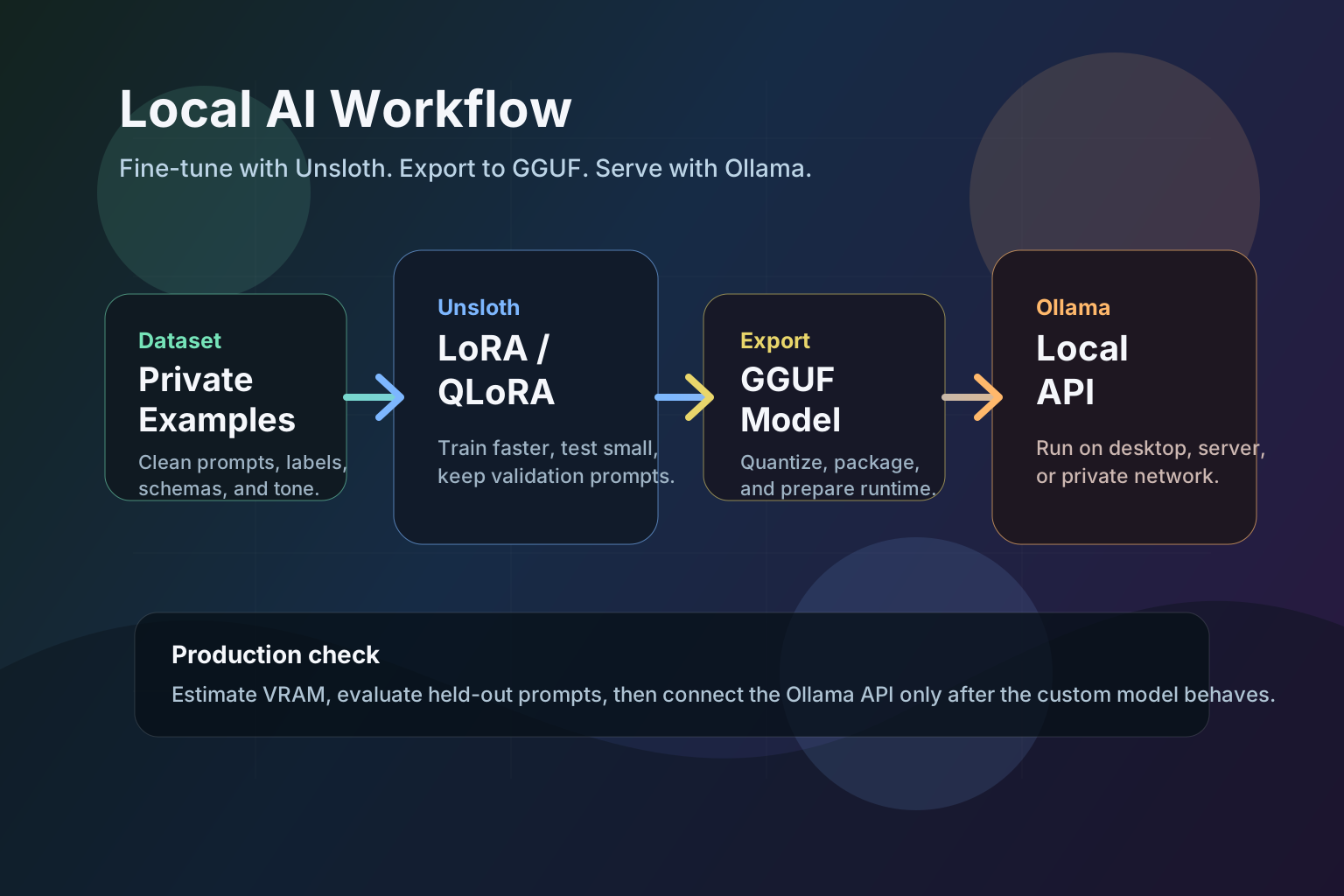
Unsloth and Ollama aren't alternatives. Unsloth fine-tunes an open model on your data and exports it to GGUF. Ollama runs a model, yours or a stock one, as a local chat app and HTTP API. If you only want to run a model locally, Ollama alone is enough. You need Unsloth only when the model has to learn new behaviour from your own examples.
That is where Unsloth and Ollama pair well. Unsloth focuses on efficient fine-tuning and model export. Ollama focuses on packaging and running models locally with a simple Modelfile, terminal commands, and a local HTTP API. Together, they give developers a realistic path from private data to a local custom assistant without building a full model-serving platform from scratch.
This guide explains the workflow, the hardware planning step, and the places where teams should slow down before they fine-tune.
Unsloth vs Ollama: which one do you need?
Short answer: usually both, because they do not overlap. Unsloth is a training tool. Ollama is a runtime. If you are choosing between them, you are probably at one of these two points:
| Your situation | What you need |
|---|---|
| You want to run an existing open model locally | Ollama alone is enough |
| You want a model that behaves differently on your own data | Unsloth to train, then Ollama to run it |
| You already fine-tuned somewhere else and need a local API | Ollama alone |
| You want faster or lower-VRAM fine-tuning than stock training scripts | Unsloth |
Picking one over the other only makes sense when you skip a stage. Neither replaces the other.
Unsloth is useful when you want to adapt a base model with LoRA or QLoRA instead of fully retraining it. Its docs and repository position the project around faster training, lower VRAM use, support for many open model families, and export paths such as GGUF. That matters because the practical blocker for most local AI teams is not the idea of fine-tuning. It is memory, setup time, and the gap between a training notebook and a usable local model.
Ollama solves a different part of the pipeline. It gives the finished model a predictable runtime:
| Stage | Tool | What it handles |
|---|---|---|
| Choose base model | Unsloth plus model hub | Start with a Llama, Mistral, Gemma, Qwen, or similar supported model |
| Adapt on data | Unsloth | LoRA or QLoRA fine-tuning with a smaller memory footprint than full training |
| Export | Unsloth | Save or convert the result for deployment, including GGUF and Ollama flows |
| Package locally | Ollama | Build a local model from a Modelfile, GGUF file, or adapter |
| Serve | Ollama | Run from terminal or expose a local API for apps and scripts |
The key benefit is separation. You can treat fine-tuning as an experiment, then only promote the best result into Ollama once it passes evaluation.
Plan VRAM before you train
The biggest mistake is starting with the biggest model your internet connection can download. Local AI is a memory budget problem first and a model-name problem second.
Before you pick a base model, open the ToolMintX AI VRAM Calculator and estimate both of these scenarios:
- Inference memory: what you need to run the exported model in Ollama.
- Fine-tuning memory: what you need while training LoRA or QLoRA adapters.
Those are not the same number. Fine-tuning needs additional memory for optimizer state, gradients, activations, context length, and batch settings. If you need a deeper refresher, pair this workflow with our Local LLM VRAM Guide.
As a practical starting point:
| Hardware class | Sensible first experiment |
|---|---|
| 8 GB VRAM | Small 3B-8B model, short context, inference-first testing |
| 12-16 GB VRAM | 7B-14B QLoRA experiment with careful batch size |
| 24 GB VRAM | 14B-27B LoRA or QLoRA tests, depending on quantization and context |
| 48 GB memory | Larger models, longer context, heavier evaluation loops |
| 80 GB GPU | Large-model experiments, team serving, or serious benchmark runs |
Treat the fine-tuning rows as a floor, not a promise. For QLoRA, sequence length moves memory more than model size does: Llama 3.1 8B at rank 16 needs about 8.6 GiB at 2,048 tokens and about 18.5 GiB at 8,192. Our QLoRA VRAM breakdown shows how much context each card can train at.
Use smaller pilot runs before long training jobs. A clean 8B or 14B adapter that solves the task is more valuable than an expensive 70B experiment that nobody can reproduce.
The local workflow
1. Pick the base model by task, not hype
Choose the base model around the job you want it to perform:
| Task | What to prioritize |
|---|---|
| Customer support | Instruction following, tone control, low hallucination rate |
| Code assistant | Repository reasoning, tool-call style output, long context |
| Document extraction | Structured output, table handling, stable JSON |
| Internal knowledge assistant | RAG compatibility, citation behavior, privacy constraints |
| Creative writing | Style transfer, latency, controllable temperature |
If you are still choosing a model family, start with our guide to trending local AI models in 2026.
2. Prepare a narrow dataset
Fine-tuning is strongest when the target behavior is narrow and repeated. Good examples include:
- "Rewrite support replies in our brand voice."
- "Convert messy invoices into this JSON schema."
- "Answer internal engineering questions using this response format."
- "Generate code review summaries using our team checklist."
Avoid dumping random documents into a training set and expecting the model to become a general company brain. If the information changes often, retrieval-augmented generation is usually safer than fine-tuning. Fine-tune behavior, format, tone, and repeated reasoning patterns. Retrieve facts that go stale.
3. Fine-tune with Unsloth
Unsloth notebooks and docs typically revolve around loading a supported base model, applying PEFT/LoRA settings, training on a dataset, and saving the resulting adapter or merged model.
Keep these settings conservative for the first run:
| Setting | First-run advice |
|---|---|
| Epochs | Start low, often 1-3 for instruction data |
| Learning rate | Use model-family guidance instead of guessing high |
| Rank | Start with moderate LoRA rank before increasing complexity |
| Context length | Match the real production prompt size |
| Validation set | Keep examples out of training so you can catch memorization |
The goal of the first run is not perfection. The goal is to prove that the model learns the behavior without breaking its base ability.
4. Evaluate before exporting
Before moving into Ollama, test the model on prompts it did not see during training.
Use a small evaluation sheet:
| Check | What to look for |
|---|---|
| Format stability | Does it return the expected JSON, markdown, or tone every time? |
| Refusal behavior | Does it reject tasks it should not perform? |
| Drift | Did fine-tuning make general answers worse? |
| Long-context behavior | Does it still work with realistic input length? |
| Regression prompts | Does it fail older prompts that the base model handled well? |
Do not skip this step. Exporting a bad adapter into a local runtime only makes the bad behavior easier to call from scripts.
5. Export to GGUF or an Ollama-compatible flow
Unsloth documents an Ollama export path that converts the fine-tuned result into llama.cpp GGUF formats and can generate the Modelfile Ollama needs. Ollama also supports importing GGUF files and GGUF adapters directly.
This is the step where most people lose a working fine-tune. The weights export correctly and the chat template and context window do not travel with them, so the model answers with gibberish or quietly ignores its system prompt. Why an Unsloth fine-tune breaks in Ollama at 2048 tokens covers both failures and how to tell them apart.
A simple GGUF model Modelfile can look like this:
FROM ./custom-support-model.Q4_K_M.gguf

PARAMETER temperature 0.4
PARAMETER top_p 0.9

SYSTEM You are ToolMintX Support Assistant. Answer clearly, ask for missing context, and return structured steps when useful.
Then create and run the model:
ollama create toolmintx-support -f ./Modelfile
ollama run toolmintx-support
For adapters, Ollama's import docs show a FROM base model plus an ADAPTER path. The important detail is that the adapter must match the base model used during fine-tuning.
6. Use Ollama as a local API
Once the model is created, it can be called from local scripts, internal tools, or browser-first workflows. A minimal API call looks like this:
curl http://localhost:11434/api/generate \
  -d '{
    "model": "toolmintx-support",
    "prompt": "Summarize this support ticket and suggest next steps."
  }'
That local API is the bridge from "I trained a model" to "my application can use it." It also keeps sensitive prompts on your own machine or private network, depending on how you deploy Ollama.
Where this stack fits best
Unsloth plus Ollama is a strong fit when:
- You need a local assistant with a consistent tone or output format.
- You want to fine-tune on examples that should not be sent to a cloud API.
- You prefer a small local service over a complex serving stack.
- You are experimenting with several model families before choosing one.
- You want a repeatable path from training notebook to desktop inference.
It is not always the right answer. If your model needs live company data, use retrieval. If you need high concurrency, monitor latency and throughput before promising production performance. If your task requires strict factual accuracy, build an evaluation set and citation workflow before deployment.
A practical checklist
Use this order for a first local AI pipeline:
- Define the task in one sentence.
- Pick a model small enough to test quickly.
- Estimate memory with the AI VRAM Calculator.
- Create 100-500 high-quality examples before scaling the dataset.
- Fine-tune with Unsloth using conservative LoRA settings.
- Evaluate on held-out prompts.
- Export to GGUF or an Ollama-compatible model.
- Create the Ollama
Modelfile. - Test terminal inference.
- Connect the local API to the actual app.
That workflow keeps the project grounded. It lets you learn from fast, small experiments before spending serious GPU time.
FAQ
Is Unsloth better than Ollama?
Neither is better, because they do not compete. Unsloth is a fine-tuning library that adapts a model's weights. Ollama is a runtime that serves a finished model over a local API. A typical project uses Unsloth once during training and Ollama every day after that.
Can Ollama fine-tune a model?
No. Ollama runs models and lets you set system prompts, parameters and templates through a Modelfile, which changes behaviour without changing weights. Actual fine-tuning on your own examples needs a training tool such as Unsloth.
Do I need Unsloth if I only want to run a local model?
No. If an off-the-shelf model already does the job, install Ollama, pull the model and you are finished. Reach for Unsloth only when prompting cannot get you the tone, format or domain behaviour you need.
Can I use an Unsloth fine-tuned model in Ollama?
Yes, and that is the intended path. Export the fine-tuned model to GGUF, write a Modelfile pointing at the file, then run ollama create to register it. After that it behaves like any other local model.
Does Unsloth need less VRAM than Ollama?
They use memory for different things, so the comparison does not hold. Training with Unsloth needs room for weights, gradients, optimiser state and activations, which is far more than inference. Running the same model in Ollama mostly needs the quantised weights plus KV cache. Estimate both with the AI VRAM Calculator before you commit to a model size.
Bottom line
Unsloth and Ollama solve different halves of the same local AI problem. Unsloth helps you adapt a model efficiently. Ollama helps you run that model locally in a form that normal developer tools can call.
For 2026 local AI builders, the winning pattern is not "download the largest model." It is: choose the right base model, calculate the memory budget, fine-tune only what needs to change, export cleanly, and test the finished model in the same runtime your app will use.


