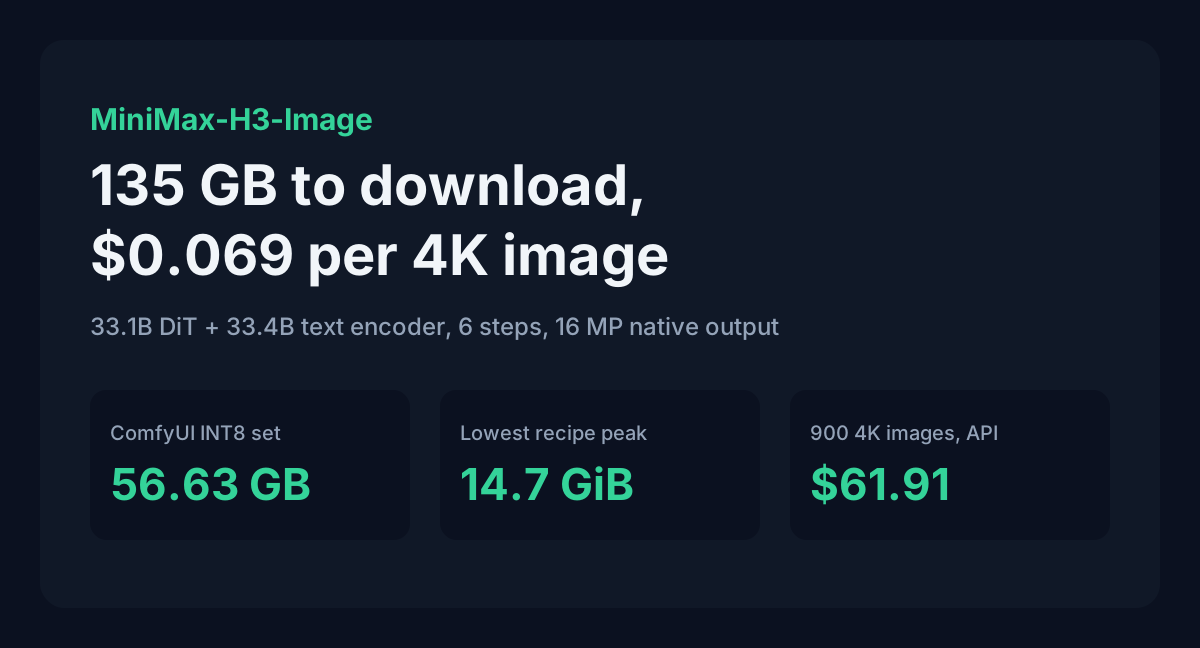
MiniMax released MiniMax-H3-Image on 10 November 2026: open weights, one checkpoint for both text-to-image and editing, and native output of about 16 megapixels (4096 x 4096) in six sampling steps with no CFG pass. The diffusion transformer has 33.1B parameters. The model card makes it sound like a single download. It isn't.
The text encoder lives in a different repository and is about as big as the image model itself. Counting both, the full BF16 set is roughly 135 GB, and the cheapest 4K API image costs $0.06879. Below are the real file sizes, which GPUs the published recipes actually cover, the API price per image, and a 900-image month costed both ways.
Table of contents
- What MiniMax released
- The download is half text encoder
- Which GPUs the recipes cover
- ComfyUI setup
- API price per image
- 900 images a month, local or API
- License limits
- FAQ
- Sources
What MiniMax released
MiniMax-H3-Image is the image branch of MiniMax-H3, the video model from July, with the audio layers removed. From the model card:
| Part | Detail |
|---|---|
| Diffusion transformer (DiT) | 33.1B params, dense single-stream, 50 layers, hidden size 5376, 56 heads, BF16 |
| Text encoder | Qwen3-VL encoder of MiniMax-H3, unchanged, about 33.4B params; the DiT reads layer 50 |
| VAE | CNN encoder, 24-layer ViT decoder, 16x downsampling, 0.58B params, FP32 |
| Sampling | 6 steps, guidance fixed at 1, no negative prompt |
| Output | About 16 MP: 4096x4096 (1:1) up to 6272x2688 (21:9); working range 4 to 20 MP |
| References | Up to 16 images per edit, addressed as <Picture 1>, <Picture 2> and so on |
| Prompt | English description of the whole image, truncated at 4,096 tokens |
The model wants a long English caption. MiniMax's API expands short prompts with H3-Image-Context-IR before generation. For local use there's an optional prompt expander, MiniMax-H3-Image-PE, which the card lists at 17.9 GB in NVFP4.
The download is half text encoder
Here are the official repo sizes, added up from the Hugging Face file list:
| Component | Repository | Size |
|---|---|---|
| DiT, BF16 (12 shards) | MiniMaxAI/MiniMax-H3-Image | 66.28 GB |
| Text encoder, BF16 (14 shards) | MiniMaxAI/MiniMax-H3, text_encoder/ | 66.71 GB |
| VAE, FP32 | MiniMaxAI/MiniMax-H3-Image | 2.34 GB |
| Prompt expander, NVFP4 (optional) | MiniMaxAI/MiniMax-H3-Image-PE | 17.9 GB |
The text encoder is slightly bigger than the image model. hf download MiniMaxAI/MiniMax-H3-Image alone won't run anything, because model_index.json pulls the encoder from the base H3 repo. SGLang's cookbook puts the total at about 135 GB and vLLM's recipe at about 127 GB. Leave room for both.
We've seen this pattern before. FLUX 3 Klein had a 9.7 GB upsampler outside its 8 GB claim, and MOSS-Image shipped a 19 GB encoder next to a 10 GB transformer. On H3-Image the gap is bigger, about 67 GB of encoder.
Comfy-Org repackaged the weights in smaller formats. File sizes from the repo, in GB and GiB:
| File | Format | GB | GiB |
|---|---|---|---|
minimax_h3_image_pruned_bf16 | DiT, pruned BF16 | 40.23 | 37.47 |
minimax_h3_image_pruned_int8_convrot | DiT, INT8 | 20.98 | 19.54 |
minimax_h3_image_pruned_w4a8 | DiT, W4A8 | 12.55 | 11.69 |
qwen3vl_32b_minimax_h3_int8_convrot | Text encoder, INT8 | 27.14 | 25.28 |
qwen3vl_32b_minimax_h3_nvfp4_awq | Text encoder, NVFP4 | 15.69 | 14.61 |
qwen3.5_9b_w4a8_gptq | Prompt expander, W4A8 | 7.34 | 6.84 |
minimax_h3_image_vae_fp16 | VAE, FP16 | 1.17 | 1.09 |
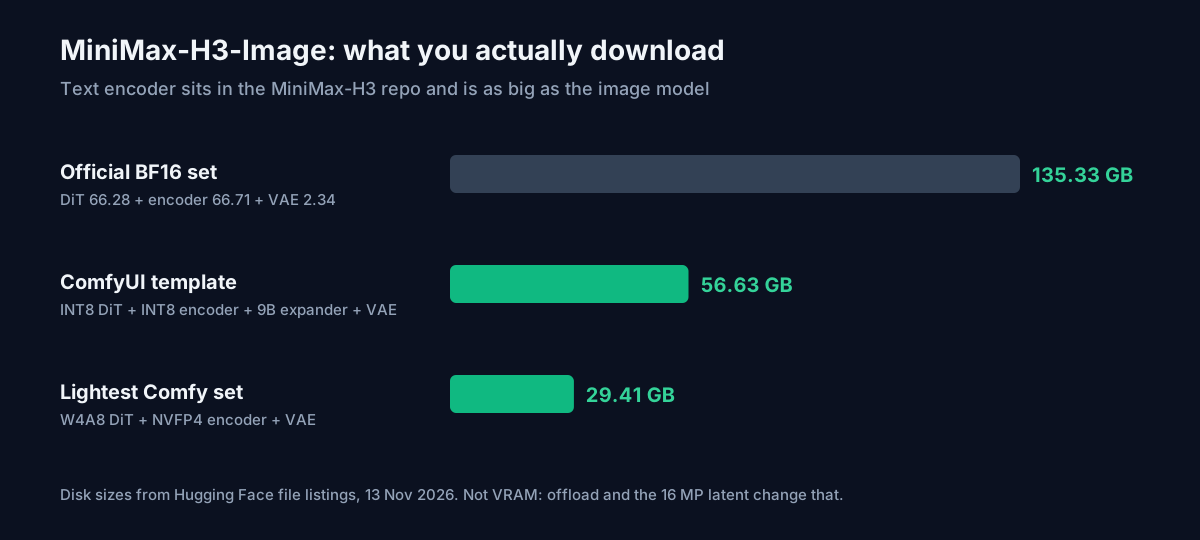
The four files the ComfyUI template uses (INT8 DiT, INT8 encoder, 9B expander, VAE) add up to 56.63 GB, or 52.74 GiB. The lightest set in the repo, W4A8 DiT plus NVFP4 encoder plus VAE, is 29.41 GB (27.39 GiB) on disk. Neither of those numbers is a VRAM figure. Comfy offloads components between steps, and the 16 MP latent adds activation memory on top. For a rough estimate of the weights alone on your card, the AI VRAM calculator takes a parameter count and precision.
Which GPUs the recipes cover
No vendor publishes a "minimum GPU" for this model. What exists are measured recipes from the vLLM and SGLang teams. These are the single-card numbers:
| Setup (source) | Peak memory | 2K image | 4K image |
|---|---|---|---|
| 1x H200, DiT and encoder layer-offloaded (vLLM) | 14.7 GiB | 8.3 s | not given |
| 1x H200, DiT resident, encoder offloaded (vLLM) | 73.4 GiB | 3.2 s | not given |
| 1x H200, resident (SGLang) | not given | 1.934 s | 10.133 s |
| 1x RTX PRO 6000 Blackwell 96 GB, BF16 (SGLang) | 92.2 GiB | 3.434 s | 18.544 s |
| 1x RTX PRO 6000 Blackwell 96 GB, FP8 (SGLang) | 50.4 GiB | 2.338 s | 14.445 s |
| 1x DGX Spark, 128 GB shared (SGLang) | about 91 GiB | 16.21 s | 84.96 s |
2K means 2048 x 2048. SGLang's 4K row is 4736 x 3552. Its times are warm pipeline medians with HTTP and PNG encoding excluded, so a real request takes a little longer.
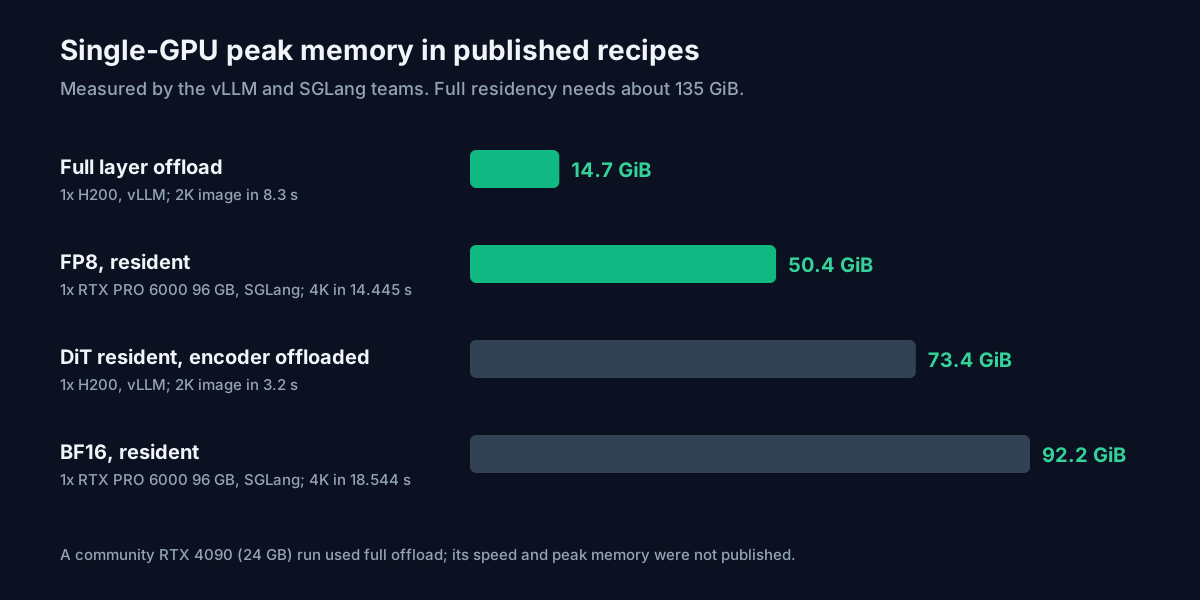
The 14.7 GiB offload row is the one that matters for consumer cards. vLLM measured it on an H200, streaming the DiT and encoder layers from host RAM, and it took 8.3 s for a 2K image against 3.2 s with the DiT resident. vLLM's recipe also documents a community run on one RTX 4090 (24 GB), which served 1024x1024 and 6272x2688 with the same layerwise offload. The recipe states that this run doesn't establish 4090 peak memory, throughput or editing support. So a 24 GB card can work, with a lot of system RAM and patience. Nobody has published how slow it is.
Full residency on one card needs an estimated 135 GiB, which means a B200 or B300. SGLang only keeps everything resident when each GPU has at least 130 GiB free.
One local catch costs you time without saying so. Both servers default to a minimum generation area of 2048 x 2048. If you ask for 1024 x 1024, the model renders 2048 x 2048 and downscales the result. A 1K image takes as long as a 2K one. Pass min_generation_area: 1024 to turn this off, and accept that MiniMax says quality changes.
ComfyUI setup
Comfy's tutorial requires ComfyUI 0.45.0 or newer and template pack 0.11.104 or newer. Put the files here:
ComfyUI/models/
├── diffusion_models/
│   └── minimax_h3_image_pruned_int8_convrot.safetensors
├── text_encoders/
│   ├── qwen3vl_32b_minimax_h3_int8_convrot.safetensors
│   └── qwen3.5_9b_w4a8_gptq.safetensors
└── vae/
    └── minimax_h3_image_vae_fp16.safetensors
Then open "MiniMax-H3-Image: Text to Image" or "MiniMax-H3-Image: Image Edit" from the template library. The settings are fixed by the distillation: sampler euler, scheduler simple, 6 steps, CFG 1, denoise 1. Anything you want kept out of the image has to go in the positive prompt, because there's no negative prompt.
The text-to-image template starts at 4 MP on purpose, so smaller cards don't run out of memory. Raise the megapixel target once you know your headroom. If an edit runs out of memory, enable the template's Resize Image/Mask node and lower its megapixels.
The template swaps the official 17.9 GB expander for the 7.34 GB Qwen3.5 9B build, so it fits beside the 21 GB DiT. It's off by default in text-to-image and on in the edit template. With it off, write the long English caption yourself. The image prompt generator gives you a starting draft to expand.
API price per image
MiniMax bills H3-Image by token. From the pricing page, read 13 November 2026:
| Model | Text input / M | Image input / M | Image output / M |
|---|---|---|---|
| MiniMax-H3-Image | $2.30 | $1.50 | $3.80 |
| MiniMax-H3-Image-Highspeed | $2.30 | $3.00 | $7.60 |
The same page gives example totals per image, which are easier to plan with:
| Task | Standard | Highspeed |
|---|---|---|
| Text-to-image, 1K | $0.02179 | $0.03529 |
| Text-to-image, 2K | $0.02333 | $0.03622 |
| Text-to-image, 4K | $0.06879 | $0.13001 |
| Edit, 1 reference, 4K output | $0.07312 | $0.13673 |
| Edit, 3 references, 2K output | $0.04177 | $0.06069 |
| Edit, 3 references, 4K output | $0.07914 | $0.15407 |
Two things in this table are easy to miss. A 2K image costs only 7% more than a 1K image, even though it has four times the pixels, so never pay for 1K. And 4K costs 2.95 times as much as 2K. Highspeed roughly doubles the 4K price, at 1.89x Standard.
MiniMax says these totals are estimates. Text input includes the tokens its prompt enhancer writes, and H3-Image-Context-IR bills at $2.30 per million input tokens, so a long expanded caption raises the price a little.
There's a launch offer. Until 17 November 2026 at 16:00 UTC, any H3-Image or Highspeed request whose final image has at least 16,600,000 pixels gets 50% off the whole request. A 4K text-to-image drops to $0.03439, and a 3-reference 4K edit to $0.03957. All of MiniMax's recommended 16 MP sizes clear the line (4096 x 4096 is 16,777,216 pixels). A 4000 x 4000 request is 16,000,000 pixels and pays full price.
900 images a month, local or API
Take a creator or small studio making 30 finished 4K images a day, about 900 a month. Per month at Standard rates:
| Workload | Per image | 900 images |
|---|---|---|
| Text-to-image, 4K | $0.06879 | $61.91 |
| Text-to-image, 4K, offer price (until Nov 17) | $0.03439 | $30.95 |
| Edit, 3 references, 4K | $0.07914 | $71.23 |
| Text-to-image, 4K, Highspeed | $0.13001 | $117.01 |
| Text-to-image, 2K | $0.02333 | $21.00 |
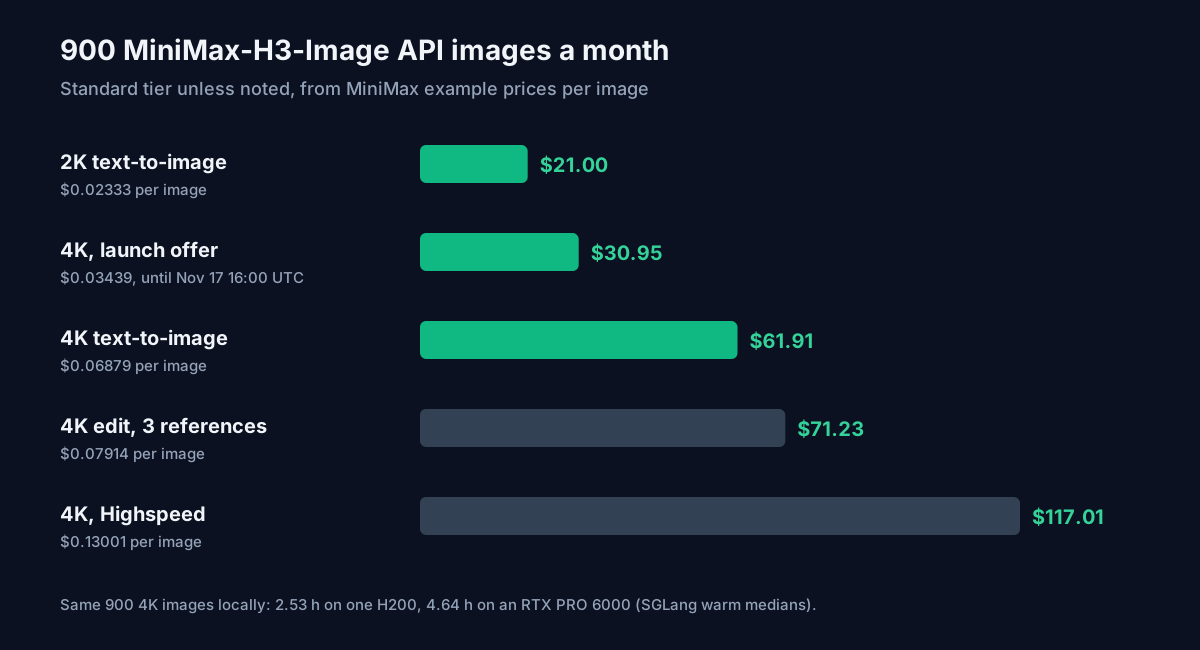
To run the same 900 4K images locally, using the SGLang warm medians:
| Hardware | Per 4K image | 900 images |
|---|---|---|
| 1x H200 | 10.133 s | 2.53 hours |
| 1x RTX PRO 6000, FP8 | 14.445 s | 3.61 hours |
| 1x RTX PRO 6000, BF16 | 18.544 s | 4.64 hours |
| 1x DGX Spark | 84.96 s | 21.24 hours |
That isn't much GPU time. If you already own a 96 GB workstation card, a month of 4K images uses under five hours of it, and local is the cheaper route. If you'd be buying or renting hardware for this model, $62 a month of API calls covers a lot of images before any GPU pays for itself. A 24 GB gaming card isn't in this table because nobody has published its speed. Run a few 2K images through the offload recipe before you count on it for 4K. To compare other image models at the same volume, the API cost calculator has per-image rates.
License limits
The weights use the MiniMax-H3-Image Community License, which differs from the base MiniMax-H3 license. You need separate written authorization from MiniMax if your annualized revenue, including affiliates, is over $1 million, or if you offer the model to third parties as a hosted service (an API, a web app, any remote access). If you do host it, the license also makes you bind users to its use restrictions and keep a way for people to report misuse. Below the revenue line and without hosting for others, the authorization clause doesn't apply, though the license's use restrictions (Section V and Exhibit A) still do.
FAQ
Can MiniMax-H3-Image run on a 24 GB GPU?
Sometimes. vLLM documents one community RTX 4090 run with full layerwise offload of the DiT and text encoder. It served 1K and 21:9 images, but the recipe doesn't give its speed, peak memory or editing support. Expect to need plenty of system RAM, since the offloaded layers live there.
Is it cheaper to ask the API for 1K images?
Barely. A 1K image costs $0.02179 and a 2K image $0.02333. Locally the server renders a 2048 x 2048 canvas for 1K requests anyway unless you lower min_generation_area.
Does the 50% offer apply to edits?
Yes, if the delivered image is at least 16,600,000 pixels and the request reaches MiniMax before 16:00 UTC on 17 November 2026. A 3-reference 4K edit drops from $0.07914 to $0.03957.
Sources
- MiniMax, MiniMax-H3-Image model card (huggingface.co/MiniMaxAI/MiniMax-H3-Image, read 13 November 2026): architecture, download table, request parameters, sizes, license summary.
- Hugging Face file listings for MiniMaxAI/MiniMax-H3-Image, MiniMaxAI/MiniMax-H3 and Comfy-Org/MiniMax-H3-Image (read 13 November 2026): per-file byte sizes used for every GB and GiB figure above.
- MiniMax, model release notes (platform.minimax.io, Release Notes, Models): H3 Image released 10 November 2026.
- MiniMax, Pricing Overview (platform.minimax.io/docs/pricing, read 13 November 2026): H3-Image token rates, example cost per image, 50% 4K offer through 17 November 2026 16:00 UTC, Context-IR rate.
- MiniMax-H3-Image Community License Agreement (LICENSE file in the MiniMaxAI/MiniMax-H3-Image repo): revenue and hosted-service authorization, downstream obligations.
- Comfy, MiniMax-H3-Image tutorial (docs.comfy.org, Tutorials, Image, MiniMax, read 13 November 2026): file list, version requirements, sampler settings, 4 MP template default, expander choice.
- vLLM Recipes, MiniMax-H3-Image page (recipes.vllm.ai, updated 12 November 2026): H200 deployment profiles, peak memory, RTX 4090 community note, 135 GiB residency estimate.
- SGLang, MiniMax-H3-Image cookbook (docs.sglang.io, Diffusion Models, MiniMax section, read 13 November 2026): measured times on H200, RTX PRO 6000 Blackwell and DGX Spark, peak memory, 130 GiB residency rule, minimum generation area.
- Download totals, monthly API costs and local GPU hours are calculated by ToolMintX from the figures above.