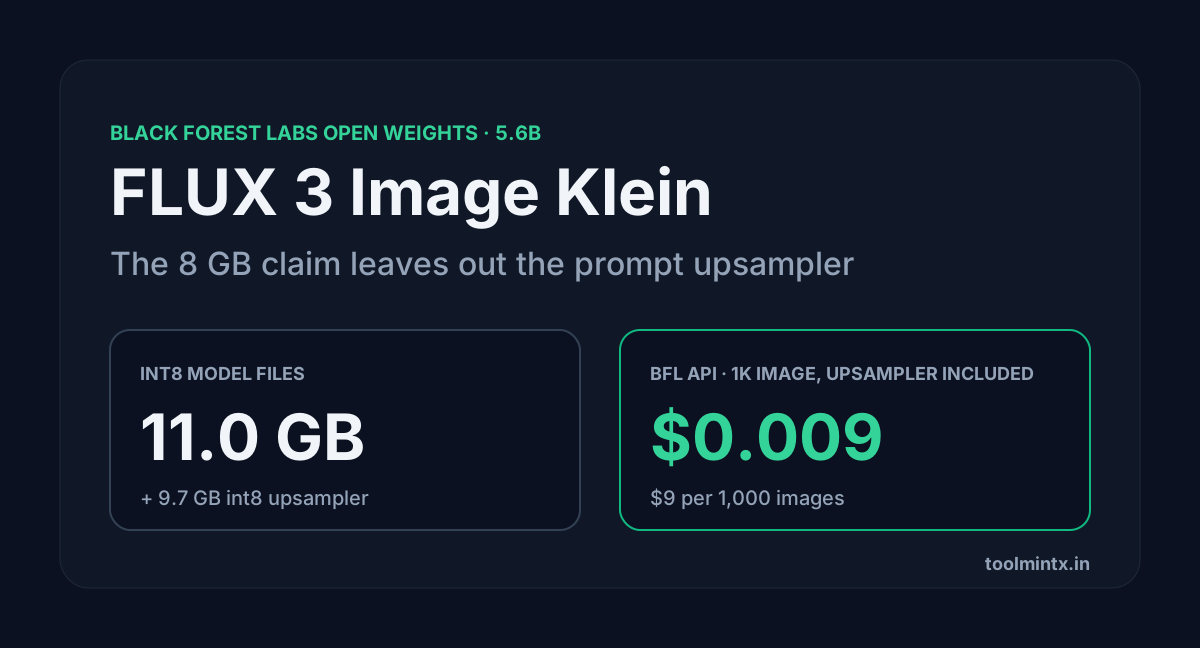
Black Forest Labs released FLUX 3 Image Klein on 15 October 2026. It's a 5.6B open-weights model for text-to-image, image editing with up to 10 reference images, and layout control with bounding boxes. The launch post says the INT8 build runs on GeForce RTX cards with as little as 8 GB of VRAM.
That number counts the image model. It leaves out the part BFL tells you never to skip. Every request is supposed to go through a prompt upsampler first, a separate 9B model whose int8 file is 9.7 GB on its own. I added up the real file sizes from Hugging Face, priced the BFL API, and worked out how to run the full pipeline on a small card without dropping the upsampler.
Table of Contents
- What FLUX 3 Image Klein is
- Four models in one request
- What fits on an 8 GB card
- Running the upsampler somewhere else
- Local or BFL API cost
- License limits
- FAQ
- Sources
What FLUX 3 Image Klein is
| FLUX 3 Image Klein | |
|---|---|
| Released | 15 October 2026 |
| Image transformer | 5.6B parameters (text encoder not counted) |
| Text encoder | Qwen3-VL-4B-Instruct |
| Checkpoints | Klein (distilled, 16 steps, no guidance) and Klein Base (50 steps, CFG 3.5) |
| Tasks | text-to-image, editing with up to 10 references, bounding-box layout |
| Resolution | up to 4K |
| Builds | BF16, FP8, INT8, NVFP4 (NVFP4 needs Blackwell) |
| Runtimes at launch | ComfyUI, Diffusers, TensorRT-LLM, SGLang Diffusion, vLLM-Omni |
| License | FLUX Kommunity License; upsampler and text encoder are Apache 2.0 |
Use the distilled checkpoint to generate images. BFL's GitHub README says it's about 6x faster than Base, and on one H200 at 1 MP it takes about 3 seconds against 12. Base is for LoRA training and research.
BFL's own chart puts Klein first among open models in its internal evaluations. Against FLUX.2 [klein] 9B it gains 91 Elo in text-to-image and 70 in editing with 38% fewer parameters. Those are BFL's numbers, and nobody outside BFL has reproduced them yet.
Four models in one request
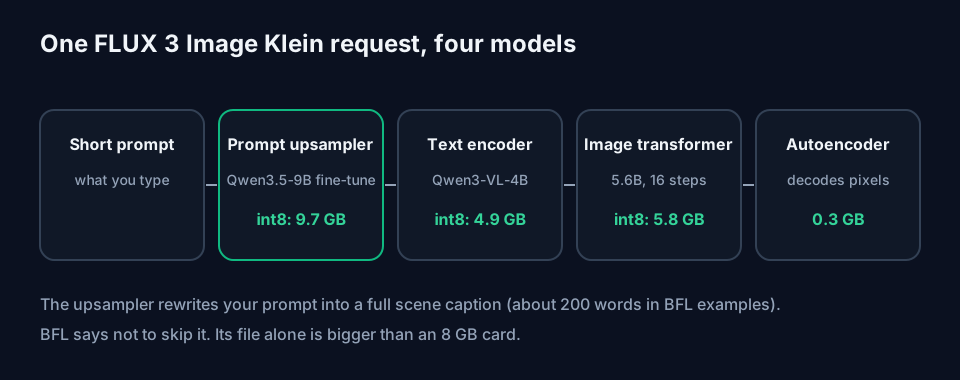
A Klein request isn't one model. It's four, run in order:
- The prompt upsampler, a Qwen3.5-9B fine-tune, turns your short prompt into a long scene caption.
- Qwen3-VL-4B encodes that caption.
- The 5.6B transformer denoises for 16 steps.
- The autoencoder decodes the result to pixels.
The model card is blunt about step 1: "Do not use the model without a prompt upsampler." Klein was trained on the captions the upsampler writes, and a short prompt sent as typed "gives generic output". In BFL's example, a 29-word request came out as a 214-word caption covering framing, lighting, film grain and the position of each element.
Diffusers doesn't run the upsampler for you either. The model card says the modular pipeline runs "neither on its own", so you load the upsampler beside it in Transformers. The reference CLI and the distilled ComfyUI text-to-image template turn it on by default. The ComfyUI editing templates have no upsampler branch at all, so for edits you run it yourself and paste the caption in.
What fits on an 8 GB card
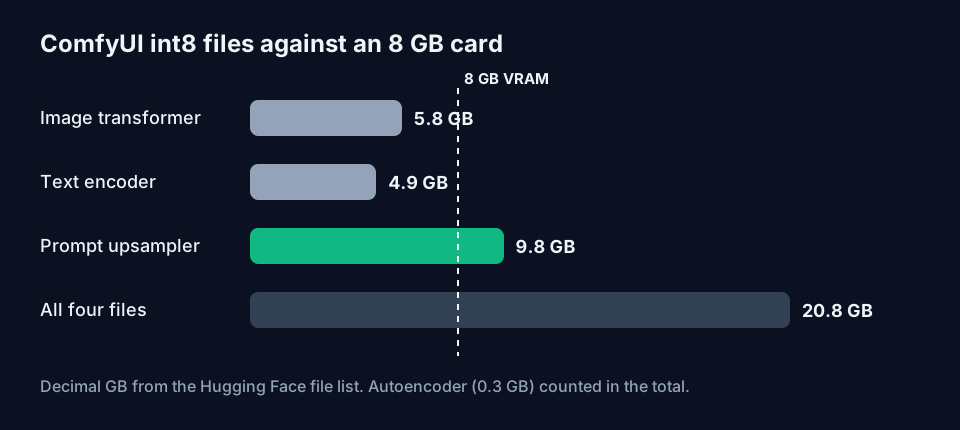
These are the ComfyUI files from black-forest-labs/flux-3-image-klein-comfy, in decimal GB as Hugging Face lists them:
| File | Precision | Size |
|---|---|---|
| Image transformer (distilled) | int8 | 5.83 GB |
| Image transformer (distilled) | NVFP4 | 5.28 GB |
| Image transformer (distilled) | BF16 | 11.10 GB |
| Qwen3-VL-4B text encoder | int8 | 4.86 GB |
| Qwen3-VL-4B text encoder | BF16 | 8.88 GB |
| Prompt upsampler | int8 | 9.75 GB |
| Prompt upsampler | w4a8 | 6.72 GB |
| Autoencoder | BF16 | 0.34 GB |
The int8 transformer, int8 text encoder and autoencoder add up to 11.02 GB. Add the int8 upsampler and the download BFL's own command fetches is 20.77 GB. None of that sits in 8 GB at once. ComfyUI has to load each model in turn and park the others in system RAM, which is why the transformer alone being 5.83 GB is the number that decides whether a 3070 can do it.
The upsampler file is bigger than the card. On 8 GB, it either swaps in and out on every prompt or runs somewhere else.
On bigger hardware the reference code tells the same story. BFL measured peak memory on a B200 at 1024x1024 with the upsampler off: 31 GB in BF16, 26 GB in FP8 and 25 GB in NVFP4. The model card says the upsampler adds about 28 GB on an 80 GB GPU. The reference code has no int8 path, so RTX 30-series owners have to use ComfyUI.
For speed, NVIDIA's numbers with the distilled int8 build in ComfyUI are about 4 seconds per 1 MP image on an RTX 5090 and under 9 seconds on an RTX 4070. Those times cover generation on the GPU only.
Running the upsampler somewhere else
The upsampler is a text job, so it doesn't have to share the GPU with the image model. Three ways to split it:
Two passes with the reference code. The README documents this for cards that can't hold both. Upsample first, then generate with --no-pup:
python -m flux3.pup --prompt "A man walking with his dog, afternoon sun" --out prompt.txt
python scripts/cli.py "$(cat prompt.txt)" --model distilled --fp8 --no-pup --out out.png
--fp8 needs an Ada, Hopper or Blackwell GPU.
Any LLM with BFL's system prompt. The model card says any LLM can stand in. Send system_prompts["t2i"] from the upsampler repo as the system prompt (or "i2i" with the reference images for edits), your request as the user message, and pass the caption back as the prompt. A small hosted model such as Claude Haiku 5.5 works, and so does a local text model on the CPU. The t2i system prompt is about 500 words, so budget roughly 1,000 input tokens per call. Expect some quality drop compared with BFL's fine-tune, which was trained for this job.
Batch the captions. If you're making 200 product shots, write all 200 captions in one sitting, save them as text, and feed them to ComfyUI afterwards. The upsampler loads once and the image model never has to share memory with it.
Whichever way you go, keep the caption. It's the real prompt, and the reference CLI saves it to a .json next to each image for that reason. If you're editing captions by hand, the Image Prompt Generator is useful for drafting the long scene descriptions Klein expects.
Local or BFL API cost
The BFL API runs the distilled checkpoint as flux-3-image-klein, with the upsampler included. Reference images and prompts cost nothing extra.
| Resolution tier | Per image | Per 1,000 images |
|---|---|---|
| 768 x 768 (0.6 MP) | $0.008 | $8 |
| 1K (1 MP) | $0.009 | $9 |
| 1.5K (2 MP) | $0.011 | $11 |
| 2K (4 MP) | $0.014 | $14 |
| 4K (16 MP) | $0.036 | $36 |
Failed generations and outputs blocked by moderation aren't charged. For comparison, FLUX 3 Image (the full model) costs $0.048 at 1K.
Locally, the image itself is free once you own the card. If you send the upsampling step to Claude Haiku 5.5 ($0.10 per 1M input tokens and $0.50 per 1M output under 100K tokens), one caption at 1,000 tokens in and 400 out costs:
1,000 x $0.10 / 1M + 400 x $0.50 / 1M = $0.0001 + $0.0002 = $0.0003
That's $0.30 per 1,000 captions against $9 for 1,000 API images at 1K. Prompt caching on the fixed system prompt would cut it further. The 400-token output is our estimate from BFL's 214-word example caption. You can rerun it with your own token counts in the API Cost Calculator.
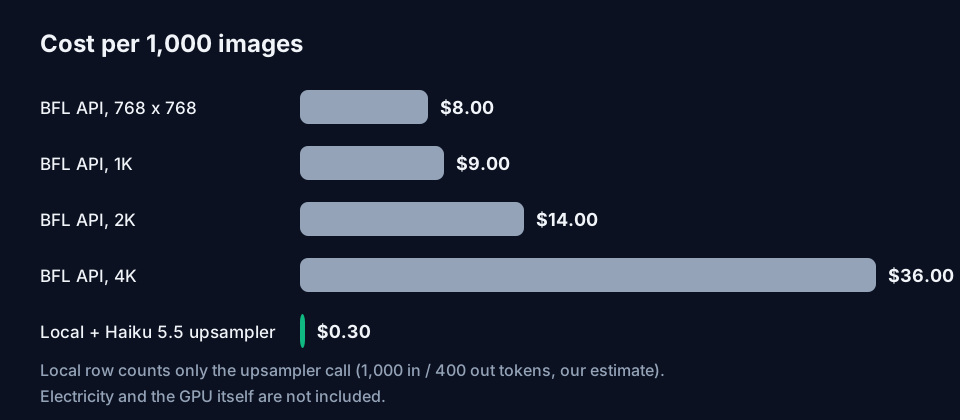
The local row leaves out electricity and the GPU. At $9 per 1,000, a few hundred images a month costs less on the API than the power bill for a card you bought for this. Go local if you already own an RTX card, you need images that never leave the machine, or you want to train LoRAs on Base.
License limits
The weights are under the FLUX Kommunity License v1.0. It allows non-commercial use, and commercial output for individuals and companies with less than US$5M in gross annualized revenue, affiliates included. Above that, you need a self-hosted license or the API. BFL's Builder plan covers 10K images a month with fine-tuning and LoRA rights.
Section 4 of the license bans, among other things, using Klein's outputs to train a competing image model. The commercial exception is not blanket permission for commercial fine-tuning or redistribution, so read it before you ship a LoRA. The upsampler and text encoder are Apache 2.0, so you can swap them or reuse them without those limits.
FAQ
Can FLUX 3 Image Klein run on 8 GB of VRAM? Yes, with the int8 files in ComfyUI on an RTX 3070-class card, per BFL. The image transformer is 5.83 GB in int8. The 9.75 GB upsampler doesn't fit alongside it, so run that step separately or with another LLM.
Can I skip the prompt upsampler?
BFL says not to. Without it a short prompt gives generic output, and one-line edit instructions like "make it blue" can reframe the whole shot. If you write long scene captions yourself, --no-pup sends them as typed.
Does it work on Apple Silicon?
The Diffusers example has an mps device switch. BFL's speed and memory numbers are all for NVIDIA GPUs, and the quantized builds were made with NVIDIA, with NVFP4 needing a Blackwell GPU. Our Ollama MLX guide covers running a local text model on a Mac, which can handle the upsampling step.
How much disk space do I need? About 20.8 GB for the int8 ComfyUI set with the upsampler. The full BF16 fast model with its upsampler is 52 GB from the reference repo, and everything including Base is 107 GB.
Sources
- Black Forest Labs, "FLUX 3 Image Klein" (bfl.ai/blog/flux-3-image-klein, 15 October 2026): parameters, builds, 8 GB claim, RTX 5090 and 4070 speeds, Elo gains over FLUX.2 [klein] 9B, runtimes, license summary.
- Black Forest Labs pricing (bfl.ai/pricing, read 17 October 2026): FLUX 3 Image Klein and FLUX 3 Image per-image rates, billing rules, Builder plan.
- Hugging Face model card,
black-forest-labs/flux-3-image-klein: upsampler requirement, steps and guidance, B200 peak memory, upsampler memory, license terms. - Hugging Face model card and file list,
black-forest-labs/flux-3-image-klein-comfy: ComfyUI file sizes, 8 GB RTX 3070 note, template behaviour. - GitHub,
black-forest-labs/flux-3-image-kleinREADME andexamples/upsampling/double_exposure_s1.json: two-pass workflow, H200 timings, download sizes, upsampler example caption, int8 path note. - Anthropic, Claude pricing (platform.claude.com/docs/en/about-claude/pricing, read 17 October 2026): Claude Haiku 5.5 rates.
- File totals, the per-caption cost and the 400-token output estimate are calculated by ToolMintX from those sources.


