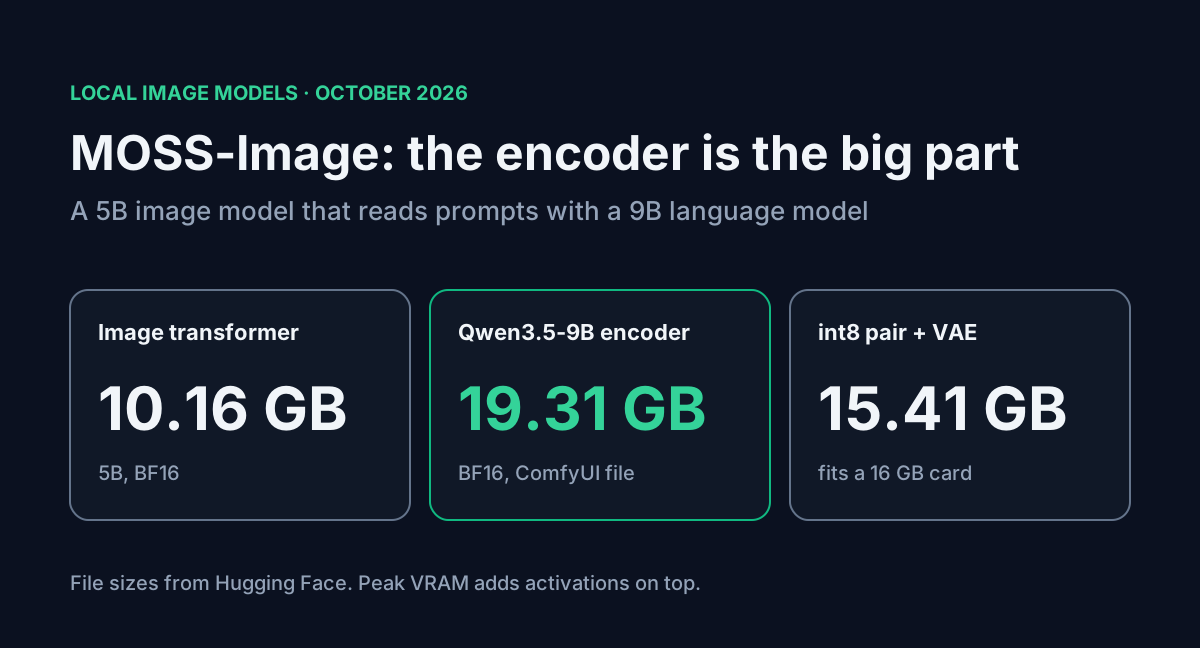
OpenMOSS released MOSS-Image on 16 October 2026: two open text-to-image models, Base and SFT, under Apache 2.0. The headline says "5B backbone", and that part is true. The image transformer is 10.16 GB in BF16.
The text encoder next to it is bigger. MOSS-Image reads prompts with a Qwen3.5-9B model, and the ComfyUI BF16 file for that encoder is 19.31 GB on its own. If you size your GPU from the 5B figure you'll come up short by about two thirds of the download. I went through every file on Hugging Face, worked out which combinations fit on 12, 16 and 24 GB cards, and wrote a small helper for the JSON layout prompts, which are the main reason to try this model.
Table of contents
- What shipped
- The text encoder is most of the download
- What fits on your card
- ComfyUI setup and the release-version trap
- Layout prompts with a coordinate helper
- Speed at the default settings
- FAQ
- Sources
What shipped
| MOSS-Image | |
|---|---|
| Announced | 16 October 2026 |
| Checkpoints | MOSS-Image-Base and MOSS-Image-SFT (fine-tuned from Base) |
| Image transformer | 42 layers, hidden size 3072, 24 heads, 10,164,617,280 bytes in BF16 (about 5.08B parameters) |
| Text encoder | Qwen3.5-9B, 8,392,695,024 parameters in the Diffusers repo |
| VAE | FLUX.2, small decoder (249.5 MB) |
| Prompt length | up to 4K tokens; ComfyUI caps text encoding at 4,096 |
| Prompt formats | natural language, tag lists, JSON layouts |
| Runtimes on day 0 | Diffusers (custom pipeline), ComfyUI, SGLang, vLLM-Omni |
| License | Apache 2.0 for weights and bundled inference code |
The SFT model is the one to generate with. The model card shows it grouping text more cleanly than Base on the same prompt, and the team describes Base as a starting point for LoRA training that still needs hand-tuned CFG. The team behind it, MOSI.AI, also put both models on its own API platform on 20 October. That console sits behind a login, so I couldn't check its prices.
The text encoder is most of the download
These are the files in Comfy-Org/MOSS-Image, in decimal GB as Hugging Face reports them:
| File | Precision | Size |
|---|---|---|
| Image transformer (SFT or Base) | BF16 | 10.16 GB |
| Image transformer (SFT or Base) | int8 | 5.41 GB |
| Qwen3.5-9B text encoder | BF16 | 19.31 GB |
| Qwen3.5-9B text encoder | int8 | 9.75 GB |
| Qwen3.5-9B text encoder | w4a8 GPTQ | 7.34 GB |
| FLUX.2 VAE, small | 0.25 GB | |
| Color and depth control LoRA | 0.31 GB |
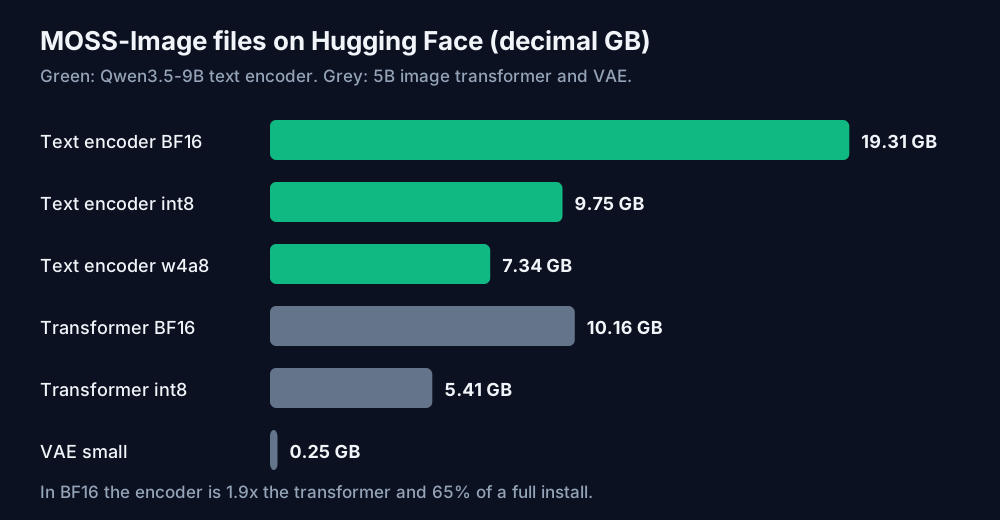
In BF16 the encoder is 1.9 times the size of the transformer and 65% of a full ComfyUI install. Quantizing to int8 keeps that ratio at 1.8. The Diffusers repo stores the encoder as 16.79 GB of shards holding 8.39B parameters, so the ComfyUI file is the bigger of the two.
This is the same trap I found in FLUX 3 Klein's 8 GB claim, where a 9.7 GB prompt upsampler sat outside the advertised number. Image models have started leaning on full language models to read prompts, and the language model is now the heavy part.
What fits on your card
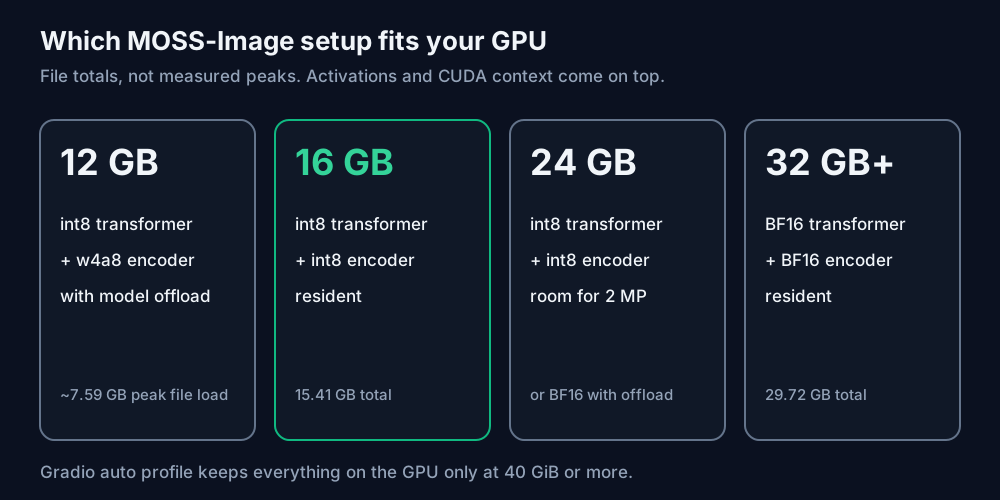
Add up the three files each setup loads:
| Setup | Files | Total on disk |
|---|---|---|
| Full BF16 in ComfyUI | 10.16 + 19.31 + 0.25 | 29.72 GB |
| Diffusers repo, BF16 | transformer + encoder + VAE shards | 27.20 GB |
| int8 transformer, int8 encoder | 5.41 + 9.75 + 0.25 | 15.41 GB |
| int8 transformer, w4a8 encoder | 5.41 + 7.34 + 0.25 | 13.01 GB |
A 16 GiB card holds 17.18 GB. The int8 pair fits with about 1.8 GB left for activations, which is thin at 2 MP but workable at the recommended 1 MP. The w4a8 encoder buys another 2.4 GB of room.
You don't have to hold everything at once, though. The encoder runs once per prompt, then the transformer does all the denoising. If the runtime swaps them, peak memory is roughly the largest single file plus the VAE. For the w4a8 setup that's 7.34 GB plus 0.25, which is why a 12 GB card is realistic with offloading. I don't have a GPU on this machine, so those are file sizes, not measured peaks. Activations and the CUDA context come on top.
The official Gradio app makes the same call. Its auto profile reads your VRAM and keeps the whole model resident only at 40 GiB or more. Below that it uses "model" offload, which moves each component to the GPU when it's needed. If you still run out, the README says to pick Sequential mode or reduce the image size. Sequential is the slowest and can't be combined with Compile DiT.
For training, the community KohakuMossTrainer says LoRA adapters train in as little as 6 GB of VRAM with CPU offload. That's the trainer author's claim and I haven't tested it. The model team adds one rule: keep the text encoder frozen when you post-train.
ComfyUI setup and the release-version trap
ComfyUI merged native MOSS-Image support on 16 October (pull request 17095). The MOSS-Image ComfyUI guide says you need master or nightly at commit e087d8f6 or later, and that the v0.41.3 release doesn't include it as of 19 October. If you installed the desktop app or pinned a release, the loader won't recognise the model and the error won't tell you why.
With a current nightly:
- Put the transformer in
models/diffusion_models/, the encoder inmodels/text_encoders/and the VAE inmodels/vae/. - Load them with Load Diffusion Model, CLIP Loader set to type
moss_image, and Load VAE. - Start from the official template
image_moss_image_t2i.json, orimage_moss_image_t2i_bboxes.jsonfor layouts.
One catch if you started with the older plugin workflow: don't move its ModelSamplingSD3 node across. The native model uses a different timestep multiplier. To change shift on the native path, the guide says to use ModelSamplingAuraFlow with multiplier 1. Importing a native template is safer than swapping loaders in an old graph.
The SFT checkpoint can show vertical color banding. There's a community DeBand LoRA from MATLOWAI for that, and its model card lists what it changes in fine detail.
Layout prompts with a coordinate helper
You can pass MOSS-Image a JSON layout instead of a sentence: a scene caption plus a list of items, each with a label, a caption, optional text to render, and a bounding box. This is how you get a headline at the top of a poster and the product in the lower third, every time.
The coordinate system is the part people get wrong. Boxes are [y_min, x_min, y_max, x_max] in absolute pixels, with the origin at the canvas center. On a 1024x1024 canvas both axes run from -512 to +512, and y grows downward.
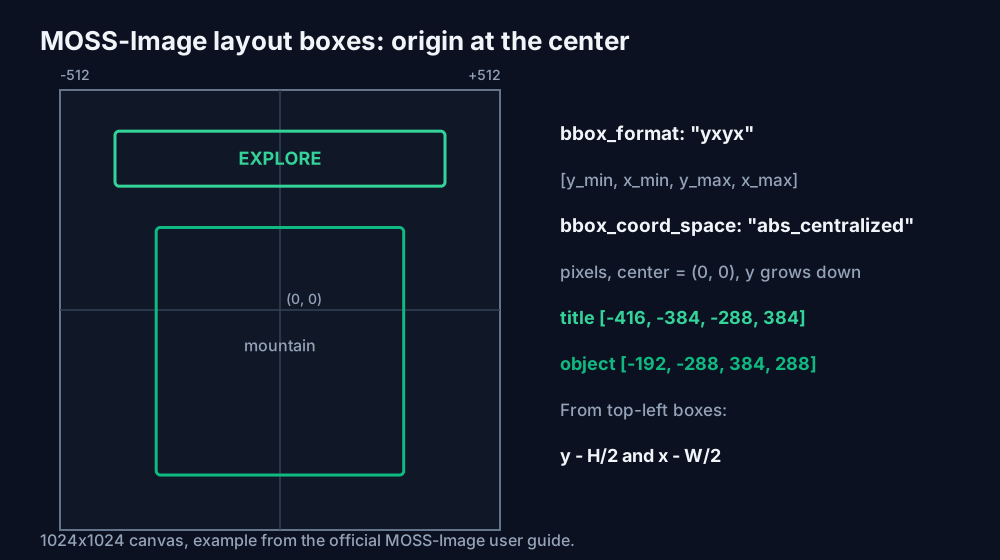
Every design tool gives you top-left boxes, so convert them. This helper takes ordinary (x0, y0, x1, y1) boxes and builds the prompt string:
import json

def moss_layout(width, height, caption, items, meta=("poster",)):
    """items: list of dicts with label, caption, box=(x0, y0, x1, y1) from the top-left,
    and optional text. Returns the prompt string MOSS-Image expects."""
    if width % 16 or height % 16:
        raise ValueError("width and height must be multiples of 16")
    out = []
    for it in items:
        x0, y0, x1, y1 = it["box"]
        entry = {
            "label": it["label"],
            "caption": it["caption"],
            "bbox": [y0 - height // 2, x0 - width // 2, y1 - height // 2, x1 - width // 2],
        }
        if "text" in it:
            entry["text"] = it["text"]
        out.append(entry)
    layout = {
        "summary": {"meta": list(meta), "canvas": "single", "caption": caption},
        "items": out,
        "bbox_coord_space": "abs_centralized",
        "bbox_format": "yxyx",
    }
    return json.dumps(layout, ensure_ascii=False)

prompt = moss_layout(
    1024, 1024,
    "A minimalist travel poster with a cream background, a blue mountain illustration, "
    "and the title EXPLORE at the top.",
    [
        {"label": "text", "caption": "Large dark-blue uppercase title centered at the top.",
         "text": "EXPLORE", "box": (128, 96, 896, 224)},
        {"label": "object", "caption": "A flat blue mountain illustration in the lower center.",
         "box": (224, 320, 800, 896)},
    ],
)
Those two boxes produce [-416, -384, -288, 384] and [-192, -288, 384, 288], which is exactly the example in the official user guide, so you can check your install against the reference poster. Generate at the same width and height you laid out for. A layout drawn for 1024x1024 and rendered at 1456x1456 puts everything in the wrong place.
If the output looks off, paste the string into a JSON formatter to check the brackets, and keep the captions as detailed as a normal prompt. For the scene description itself, the image prompt generator gives you a starting caption to edit. The MOSS team also ships a prompt-enhancer agent skill that turns pixel drafts into this JSON. It targets GPT-6-family agents with file and Python tools and doesn't call any image service.
Speed at the default settings
MOSS-Image's defaults are 50 Euler steps, CFG 3 and shift 5, with skip-layer guidance at layer 22. The model card notes that this guidance runs two transformer forwards per step, so one image is 100 forwards of a 5B model. The distilled FLUX 3 Klein uses 16 steps with no guidance, which is 6.25 times fewer passes.
Two shortcuts exist. Setting uncond_skip_layers=[] turns off the skip-layer branch, and the user guide warns that this makes images look very realistic but can collapse details. The other is a community 8-step DMD distillation by lodestones, published as LoRA adapters for ComfyUI. Both trade quality the team tuned for. Try them on your own prompts before you switch a pipeline over.
Resolution matters too. The guide recommends 1, 1.5 or 2 megapixels and allows 0.25 to 4. At 1024x1024 the transformer sees 4,096 image tokens; at 1456x1456 it's 8,281, roughly double the work per step.
FAQ
Can it run on an 8 GB card? Not from the official files without heavy offloading. The smallest encoder is 7.34 GB, and the int8 transformer is 5.41 GB, so even a swap-based setup leaves almost nothing for activations. Sequential offload might get there slowly. I'd plan on 12 GB as the floor.
Can I use MOSS-Image commercially? The weights and bundled inference code are Apache 2.0. Community LoRAs and distillations carry their own licenses, so check each model card.
Sources
- OpenMOSS, MOSS-Image-SFT and MOSS-Image-Base model cards (huggingface.co/OpenMOSS-Team, read 25 October 2026): pipeline, sampling defaults, two forwards per step, license, transformer and text encoder configs, safetensors index sizes.
- Comfy-Org, MOSS-Image repackaged files (huggingface.co/Comfy-Org/MOSS-Image, read 25 October 2026): file list and sizes, folder layout, workflow templates.
- OpenMOSS, MOSS-Image GitHub README, USERGUIDE.md, comfyui/README.md and gradio_app.py (github.com/OpenMOSS/MOSS-Image, read 25 October 2026): release dates, 4K prompt length, memory modes and auto profiles, resolution and SLG guidance, layout format, ComfyUI commit and v0.41.3 note, community projects, frozen text encoder rule.
- MOSS-Image Technical Report, arXiv 2610.23374.
- File totals, ratios, token counts and the coordinate conversion are calculated by ToolMintX from those figures.


