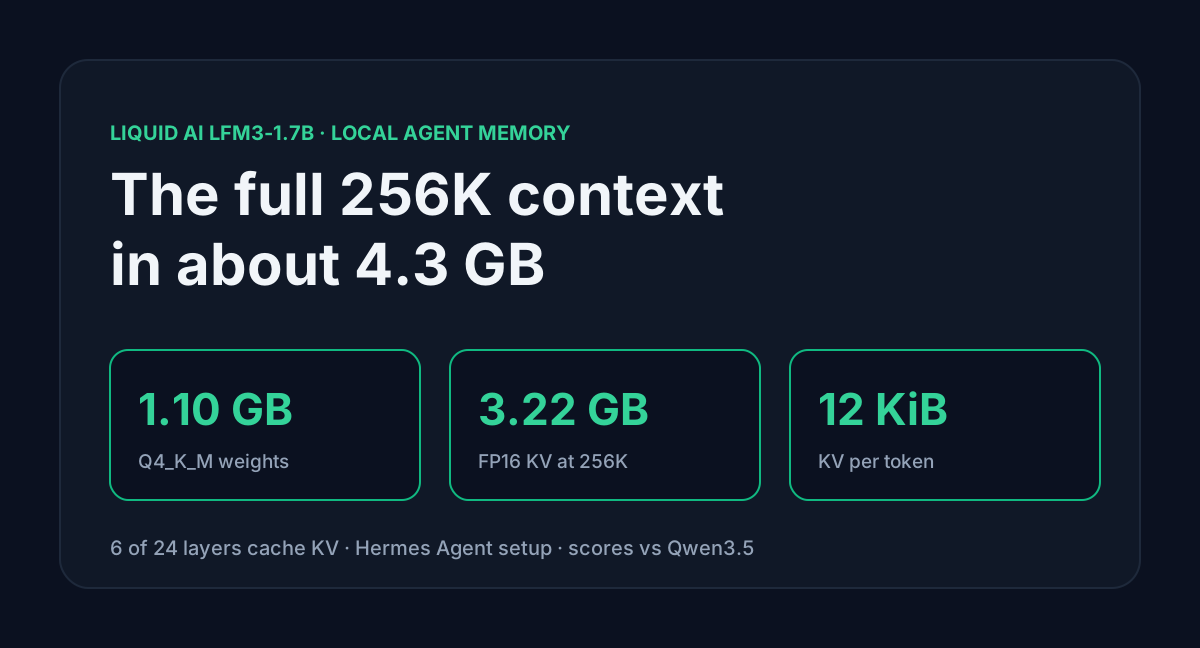
Liquid AI released LFM3 on 27 October 2026. The text model, LFM3-1.7B, is a 1.73B-parameter model that Liquid post-trained inside agent harnesses, Hermes Agent among them. Liquid's pitch is "about 1 GB at 4-bit". That figure covers the weights. An agent also needs a long context, and the context is where small models usually run out of memory.
LFM3-1.7B is unusual here. Only 6 of its 24 layers keep a cache that grows with every token, so the full 256K window costs 3.22 GB of KV cache in FP16. Add the 1.10 GB Q4_K_M file and the whole thing fits in about 4.3 GB. Below are the memory figures by context length, where the scores hold up and where they don't, and a local Hermes Agent setup you can copy.
Table of contents
- What Liquid released
- Why only 6 layers grow
- Memory by quant and context
- Scores against Qwen3.5
- Running it in Hermes Agent
- Limits before you switch
- FAQ
- Sources
What Liquid released
LFM3 is a family of six 2B-class models built on one base: text, vision, audio, omni and decision variants. This post covers the text model only.
| LFM3-1.7B | |
|---|---|
| Released | 27 October 2026 (blog post), weights on Hugging Face from 23 October |
| Parameters | 1,728,801,536 in BF16 (the card rounds to 1.73B) |
| Layers | 24: 13 gated short convolutions, 5 sliding-window attention, 6 global attention |
| Context | 262,144 tokens (256K), input plus output |
| Vocabulary | 128,000 tokens |
| Training | 22T tokens of pre-training, then SFT, mixed RL, distillation and agentic RL |
| License | LFM Open License v1.0, free for commercial use under $10M annual revenue |
| Runtimes | llama.cpp b11960 or newer, LM Studio, Ollama v0.40.12+ (macOS), MLX, vLLM, SGLang |
Liquid says it beats its older LFM2.5-2.6B with 35% fewer parameters. Reasoning is on by default. You can pass enable_thinking=False, but the card warns the switch "can be inconsistent".
Why only 6 layers grow
The KV cache is what makes long context expensive. In a plain transformer every layer stores keys and values for every token. LFM3 mixes three kinds of layer, and only one of them stores per-token state:
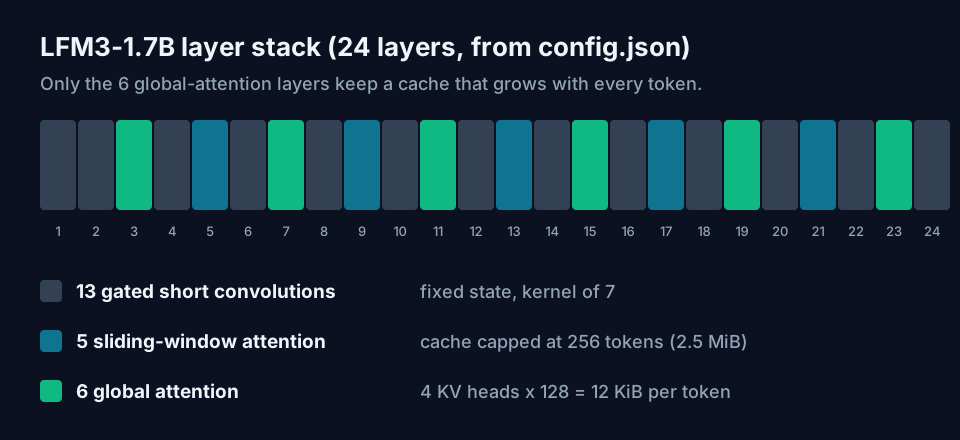
- The 13 convolution layers keep a fixed window of 7 positions. That state doesn't grow.
- The 5 sliding-window layers look back 256 tokens at most. Their cache stops growing at 256 tokens, about 2.5 MiB in FP16.
- The 6 global-attention layers see the whole context. They have 4 KV heads of 128 dimensions each.
So the per-token cost is 2 (keys and values) x 6 layers x 4 heads x 128 x 2 bytes = 12 KiB per token in FP16. Qwen3.5-4B, which also uses a hybrid stack, keeps 8 full-attention layers with a head size of 256 and pays 32 KiB per token. That's 2.67x as much.
Liquid's blog gives a figure to check this against: a 128K context needs 1.6 GB of KV for LFM3-1.7B, 4.3 GB for Qwen3.5-4B and 5.6 GB for MiniCPM5-2B. The config maths above gives 1.61 GB and 4.29 GB, so the two agree.
Memory by quant and context
GGUF file sizes, from the Hugging Face file listing:
| File | Size |
|---|---|
QAD-Q4_0 | 1.05 GB |
Q4_K_M | 1.10 GB |
Q5_K_M | 1.26 GB |
Q6_K | 1.43 GB |
Q8_0 | 1.85 GB |
BF16 | 3.47 GB |
The QAD Q4_0 file is a separate checkpoint. Liquid trained it with quantization-aware distillation to win back the accuracy that Q4_0 normally loses, and it's the smallest file in the repo.
Here's weights plus FP16 KV cache for the Q4_K_M file. Each total includes the 2.5 MiB sliding-window cache but not llama.cpp's compute buffers, so leave a few hundred MB spare:
| Context | KV cache | Q4_K_M total |
|---|---|---|
| 32K | 0.40 GB | 1.50 GB |
| 64K | 0.81 GB | 1.91 GB |
| 128K | 1.61 GB | 2.71 GB |
| 256K | 3.22 GB | 4.32 GB |
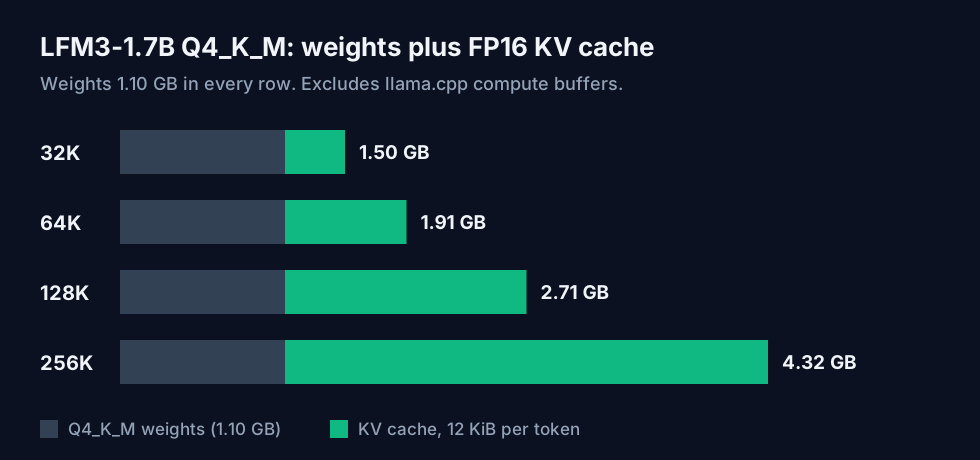
The full window fits a 6 GB card, and 128K fits in 4 GB with a little room left. On a laptop without a GPU the same totals apply to system RAM. With Q8_0 the 256K total rises to 5.07 GB. Quantizing the cache to 8-bit (-ctk q8_0 -ctv q8_0 in llama.cpp) halves the KV column, but on a model this small the FP16 cache is already cheap. I'd keep it.
The AI VRAM Calculator now has an LFM3-1.7B preset that counts only the 6 global layers. Its lowest weight setting is INT4, close to Q4_K_M. The method behind these tables is in the local LLM VRAM guide.
Scores against Qwen3.5
Liquid ran every model in BF16 on vLLM at full context. Selected rows from the model card:
| Benchmark | LFM3-1.7B | Qwen3.5-4B | Qwen3.5-9B |
|---|---|---|---|
| BFCL V4 (tool calls) | 71.39 | 55.12 | 62.83 |
| WebArena-Verified | 38.42 | 21.92 | 28.94 |
| AutomationBench | 41.29 | 8.67 | 15.10 |
| LiveClaw | 45.60 | 19.94 | 35.77 |
| MCP-Atlas | 32.57 | 41.37 | 42.67 |
| SWE-bench Verified (OpenCode) | 43.40 | 41.20 | 51.20 |
| Terminal-Bench 2.1 | 12.92 | 13.48 | 17.98 |
| GPQA Diamond | 63.37 | 75.76 | 80.40 |
| RULER 128K | 65.56 | 84.63 | 87.11 |
On single tool calls and browser or office automation it beats the 9B. It falls behind on MCP-Atlas, on knowledge (GPQA) and on long-context retrieval (RULER 128K). That last row cuts against the memory story: the 256K window is cheap to hold, but at 128K the model finds what it needs less often than Qwen3.5-4B does. Use the long window for tool traces and history the agent has to carry, not for needle-in-a-haystack lookups.
Liquid also reports a test of its own on 65 everyday agent tasks on macOS against Qwen3.5-2B: 64% success versus 48%, 58% fewer tokens per task, and stuck in under 1% of attempts versus 15%. That's a vendor test with no public task list, so treat it as a claim.
Running it in Hermes Agent
Liquid's agent-harness guide covers Hermes Agent, OpenClaw and Pi. It's written for LFM2.5-2.6B and says every command works once you swap the model id. For LFM3-1.7B on llama.cpp:
llama-server -hf LiquidAI/LFM3-1.7B-GGUF:Q4_K_M \
  --jinja \
  --port 8080 \
  -c 262144 \
  -fa on \
  -ngl 99 \
  --temp 0.1 --top-k 50 --repeat-penalty 1.1
--jinja turns on tool calling through the model's chat template. LFM3 writes its tool calls as XML, so an old build with a stale template will print the calls as text instead of running them. Use llama.cpp b11960 or newer, or pass --chat-template-file. Check the server with curl http://localhost:8080/v1/models.
Then point Hermes at it:
hermes config set model.provider custom
hermes config set model.base_url http://localhost:8080/v1
hermes config set model.default LFM3-1.7B
hermes config set model.context_length 262144
hermes config set model.api_mode chat_completions
hermes config set agent.tool_use_enforcement true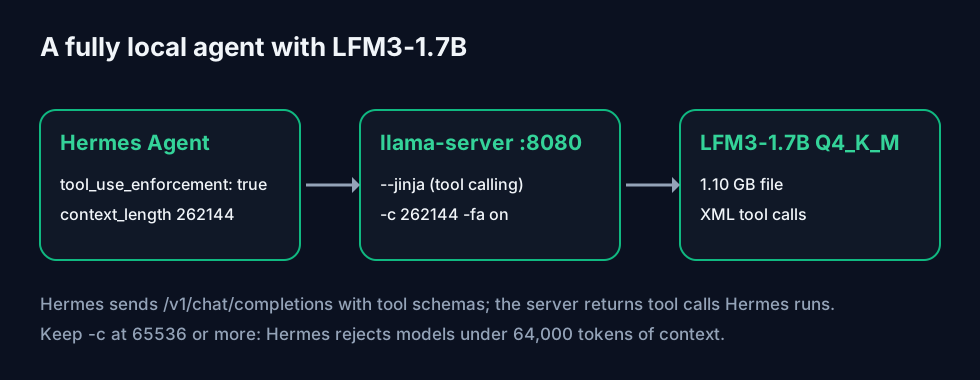
Two settings here are easy to miss:
agent.tool_use_enforcementdefaults toauto, which only applies to GPT and Codex model names. Liquid's guide sets it totruebecause without it the model "tends to describe actions instead of calling tools".- Hermes refuses models with less than 64,000 tokens of context (
MINIMUM_CONTEXT_LENGTHin its source). If you shrink-cto save memory, keep it at 65536 or more. At 64K the Q4_K_M build needs about 1.91 GB.
If you'd rather not run llama.cpp, LM Studio serves the same GGUF on port 1234 once you enable tool use in the model settings. On a Mac, ollama run lfm3 works with Ollama v0.40.12 or newer. The Ollama MLX guide for Apple Silicon covers the faster MLX backend.
Limits before you switch
- Liquid says plainly that it's "not recommended for agentic coding or complex multi-step reasoning". The SWE-bench score above was earned under a 250-turn OpenCode budget. Don't expect it to stand in for a frontier model in Claude Code or Codex.
- Knowledge is thin. Liquid's own advice is to pair it with retrieval or search. Its AA-Omniscience accuracy is 7.07, the lowest in the table. Its non-hallucination rate is 92.93, the highest, which means it tends to decline rather than invent an answer.
- The license is free for commercial use only under $10 million in annual revenue, counted across your whole corporate group. Above that you need a separate deal.
- Thinking is on by default and the off switch is unreliable. Thinking tokens count against your context, so a long session fills up faster than the visible text suggests.
FAQ
Does it work with Hindi? Hindi is one of the 16 languages on the model card. Liquid publishes no per-language scores, so test it on your own prompts first.
Can I fine-tune it on one GPU? Yes. Liquid ships TRL notebooks for SFT, DPO, GRPO and continued pre-training. Liquid calls it quick single-GPU fine-tuning. The BF16 weights are 3.46 GB.
Is there a hosted API? Liquid lists an API on its console and a playground, but I didn't find a published price for LFM3-1.7B, so this post covers only the local route.
Sources
- Hugging Face,
LiquidAI/LFM3-1.7Bmodel card andconfig.json(read 30 October 2026): layer types, KV heads, head dimension, sliding window of 256, context length, parameter count, benchmarks table, evaluation settings, training stages, chat template and tool-calling notes. - Hugging Face,
LiquidAI/LFM3-1.7B-GGUFmodel card and file listing: GGUF sizes, QAD Q4_0 checkpoint, llama.cpp b11960, LM Studio and Ollama version requirements. - Liquid AI, "Introducing LFM3: Every Modality for Specialized Intelligence" (27 October 2026): 35% fewer parameters than LFM2.5-2.6B, 1.6 GB KV at 128K, the 65-task macOS test.
- Liquid AI docs: "Run local agents with LFMs" (Hermes Agent, OpenClaw and Pi setup), the LFM3-1.7B model page, and the LFM Open License FAQ ($10M revenue threshold).
- Hugging Face,
Qwen/Qwen3.5-4Bconfig.json: 8 full-attention layers, 4 KV heads, head size 256. - Hermes Agent source:
MINIMUM_CONTEXT_LENGTH = 64_000inagent/model_metadata.pyand thetool_use_enforcementdefault. - KV cache per token, memory totals and the Qwen3.5 comparison are calculated by ToolMintX from the configs above.


