The SenseNova team put SenseNova-Loop-9B on Hugging Face on 17 November 2026, under Apache 2.0. It's a 9.66B-parameter model that takes text and images, reads up to 512K tokens, and on the team's own table ties Qwen3.8-27B on AutomationBench at a third of the size. The Q4_K_M GGUF is 5.82 GB. That puts it in reach of a 12 GB RTX 3060.
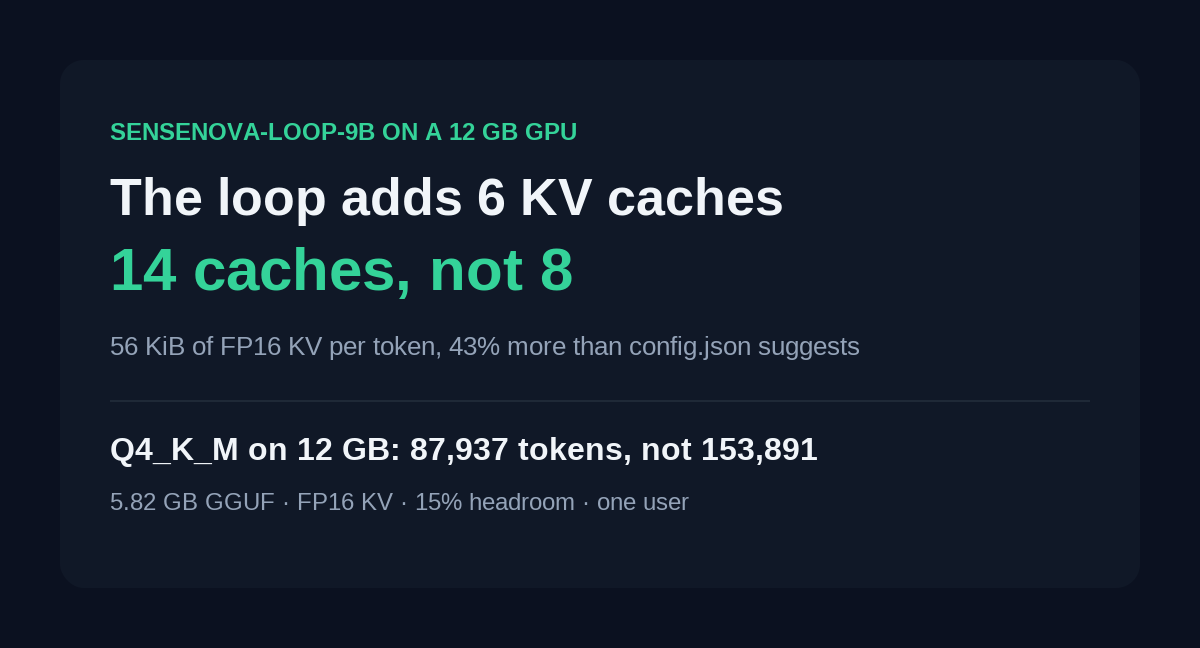
The trick is a loop. Layers 4 to 27 run twice per token, and each pass keeps its own cache. If you size the KV cache from config.json the usual way, you count 8 attention layers. The model actually keeps 14. On a 12 GB card that's the difference between a context that loads and one that runs out of memory halfway through a long prompt.
Table of contents
- How the loop works
- Counting the KV caches
- File sizes
- Context that fits on 8, 12, 16 and 24 GB
- Benchmarks and known limits
- Running it today
- FAQ
- Sources
How the loop works
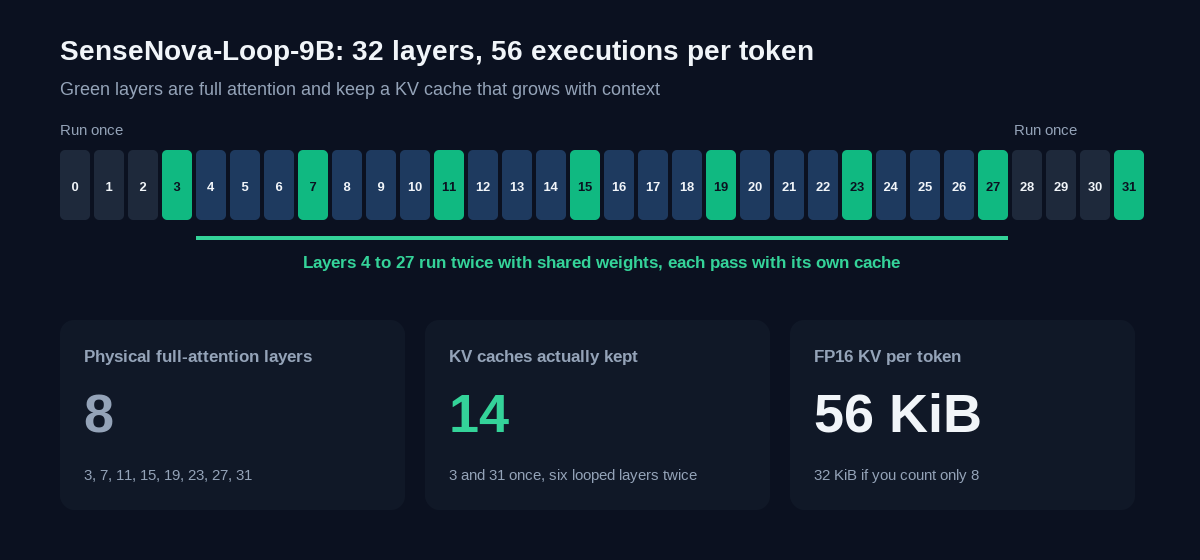
The decoder has 32 physical layers. Layers 0 to 3 run once. Layers 4 to 27, a block of 24, run twice with the same weights, and the output of the first pass is the input to the second. Layers 28 to 31 run once and feed the output head. So every token goes through 56 layer executions while the file stores only 32 layers of weights.
SenseNova calls this about 14.6B "inference-equivalent" parameters from a 9B budget. Inside the looped block, two residual streams carry the hidden state, and a learned mixer (the model card calls it mHC, manifold-constrained hyper-connections) decides how each layer reads from and writes back to them. That mixer is normalized with 20 Sinkhorn iterations. Those 20 iterations have nothing to do with the two passes, which confuses people reading the config for the first time.
Attention follows the Qwen3.8 pattern: three linear-attention layers, then one full-attention layer, repeated. The full-attention layers are 3, 7, 11, 15, 19, 23, 27 and 31. Each has 16 query heads and 4 KV heads of 256 dimensions. Hidden size is 4,096, the feed-forward width is 12,288 and the vocabulary is 248,320 tokens.
Counting the KV caches
Only full-attention layers keep a cache that grows with every token. Linear-attention layers hold a fixed-size state instead.
Six of the eight full-attention layers (7, 11, 15, 19, 23 and 27) sit inside the loop. The model's own modeling_sensenova_loop.py is explicit about what happens to them: "Repeated visits share weights, but each visit has its own cache slot." It builds a cache with one entry per execution, 56 in all. So the full-attention caches are:
- layer 3 once and layer 31 once
- layers 7, 11, 15, 19, 23 and 27 twice each
That's 14. Per cache, one token costs 2 (K and V) x 4 heads x 256 dims x 2 bytes = 4,096 bytes at FP16. Fourteen caches make 56 KiB per token. Count the eight physical layers and stop, and you get 32 KiB, which undercounts by 43%.
| Context | FP16 KV, 14 caches | FP16 KV if you count 8 |
|---|---|---|
| 32,768 | 1.75 GiB | 1 GiB |
| 131,072 | 7 GiB | 4 GiB |
| 262,144 | 14 GiB | 8 GiB |
| 524,288 | 28 GiB | 16 GiB |
SenseNova's own memory table backs up the 14. It lists the gap between an 8-bit and a 4-bit KV cache as about 1, 2 and 3 GiB at 64K, 128K and 256K. With 14 caches that gap works out to 0.88, 1.75 and 3.5 GiB. With 8 it would be 0.5, 1 and 2 GiB, which doesn't match the 256K row.
For comparison, Qwen3.8-27B keeps KV on 16 of its 64 layers with the same 4 x 256 heads, so it costs 64 KiB per token. The 9B model, loop included, is still a little lighter per token than the 27B.
The 42 linear-attention executions add a fixed state per request. From the config (32 value heads of 128 x 128, stored in FP32, plus a small conv buffer) I estimate about 87 MiB. It doesn't grow with context.
File sizes
From the Hugging Face file lists, in decimal GB:
| Build | Size | Notes |
|---|---|---|
| BF16 safetensors | 19.32 GB | 11 shards, plus a 487 MB MTP draft file |
| GGUF BF16 | 18.42 GB | |
| GGUF Q8_0 | 9.80 GB | |
| GGUF Q5_K_M | 6.67 GB | |
| GGUF Q4_K_M | 5.82 GB | |
| AWQ 4-bit | 5.59 GB | 3 shards, for vLLM and LightLLM |
| mmproj F16 | 0.92 GB | needed only for image input |
Text only, at a 32K context with an FP16 cache, the totals before runtime overhead are 7.25 GiB for Q4_K_M, 10.96 GiB for Q8_0 and 18.99 GiB for BF16. Those include the 87 MiB linear state.
Context that fits on 8, 12, 16 and 24 GB
These use the rule from the GPU panel in our AI VRAM calculator: the GGUF file, the linear state and the KV cache must fit with 15% of the card left free for CUDA buffers and the desktop. One user, text only. The 8-bit column is llama.cpp's q8_0 cache, which takes 8.5 bits per value.
| Card | Quant | FP16 KV | q8_0 KV |
|---|---|---|---|
| 8 GB | Q4_K_M | 24,274 tokens | 45,692 tokens |
| 12 GB | Q4_K_M | 87,937 tokens | 165,529 tokens |
| 12 GB | Q8_0 | 18,531 tokens | 34,883 tokens |
| 16 GB | Q4_K_M | 151,601 tokens | 285,367 tokens |
| 16 GB | Q8_0 | 82,195 tokens | 154,720 tokens |
| 24 GB | Q8_0 | 209,522 tokens | 394,395 tokens |
| 24 GB | BF16 | 59,179 tokens | 111,396 tokens |
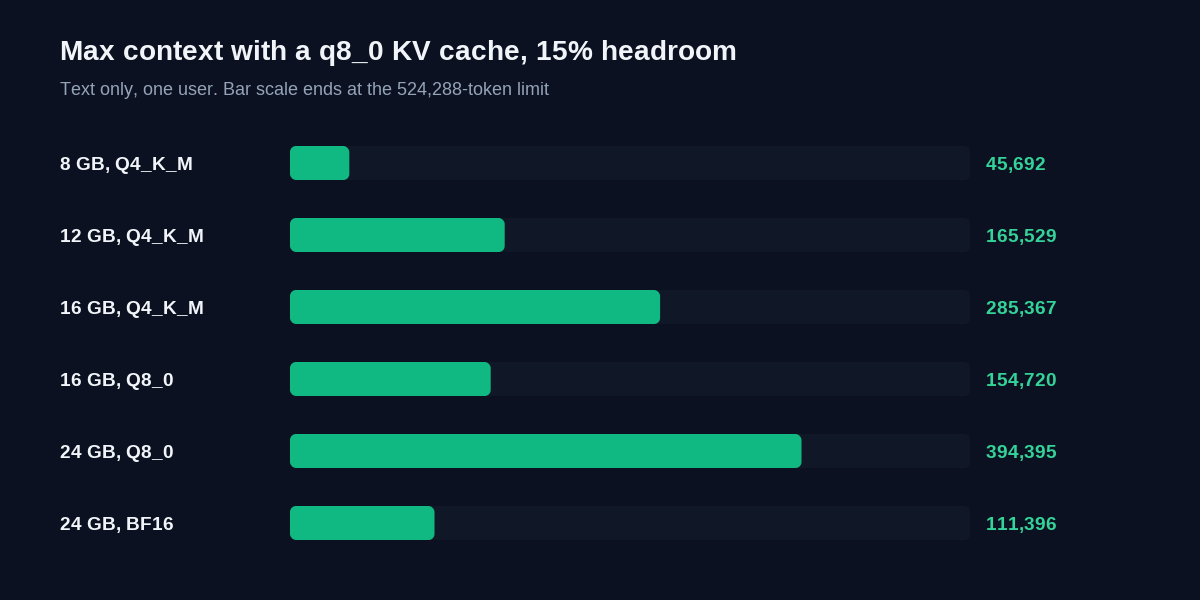
On a 12 GB card with Q4_K_M and an FP16 cache, the 8-layer count would tell you 153,891 tokens fit. The real figure is 87,937. Set --ctx-size from the wrong number and the server either refuses to start or dies once the prompt grows. Switch the cache to q8_0 and you get about 165K for real.
Image input costs the 0.92 GB projector plus the image tokens. On 12 GB with Q4_K_M and a q8_0 cache, loading the projector drops the ceiling to 135,390 tokens.
The calculator now has a SenseNova-Loop-9B preset with the 14 caches counted. Its Q4_K_M weight estimate is 5.45 GiB, close to the real 5.42 GiB file, so for this model the whole estimate is usable, not just the KV side.
Benchmarks and known limits
Every number here is from SenseNova's model card, run on its own setup. I haven't seen an outside reproduction yet.
| Benchmark | Loop-9B | Loop-9B Preview | Qwen3.8-27B |
|---|---|---|---|
| AutomationBench | 36.67 | 14.33 | 36.67 |
| AIDABench | 65.31 | 65.01 | |
| NL2Repo | 41.36 | 44.60 | |
| Terminal-Bench 2.1 | 59.55 | 40.45 | |
| GAIA | 69.90 | 37.86 | |
| BIRD | 72.34 | 71.38 |
The jump from the 31 October preview is large on the agent rows: Terminal-Bench 2.1 up 19.1 points and GAIA up 32.04. Against Qwen3.8-27B it trades blows, ahead on AIDABench by 0.3 and behind on NL2Repo by 3.24.
The card's limitations section is frank. It says the model "may misunderstand or miss requirements when given many complex tool definitions or multiple constraints", that coding and agent performance "can be inconsistent", and that long-horizon tasks still need work. If you point Hermes Agent, OpenCode or Claude Code at it through a local endpoint, keep the tool list short and leave approval prompts on.
The team also tested more passes. Going from two loops to four added 1.04 points on LiveCodeBench V6 and 1.35 on AIDABench data visualization. The release ships fixed at two, and the code rejects any other count, so you can't turn it up yourself.
Running it today
None of the main runtimes support the architecture in a release yet. Every path uses a fork or an open pull request.
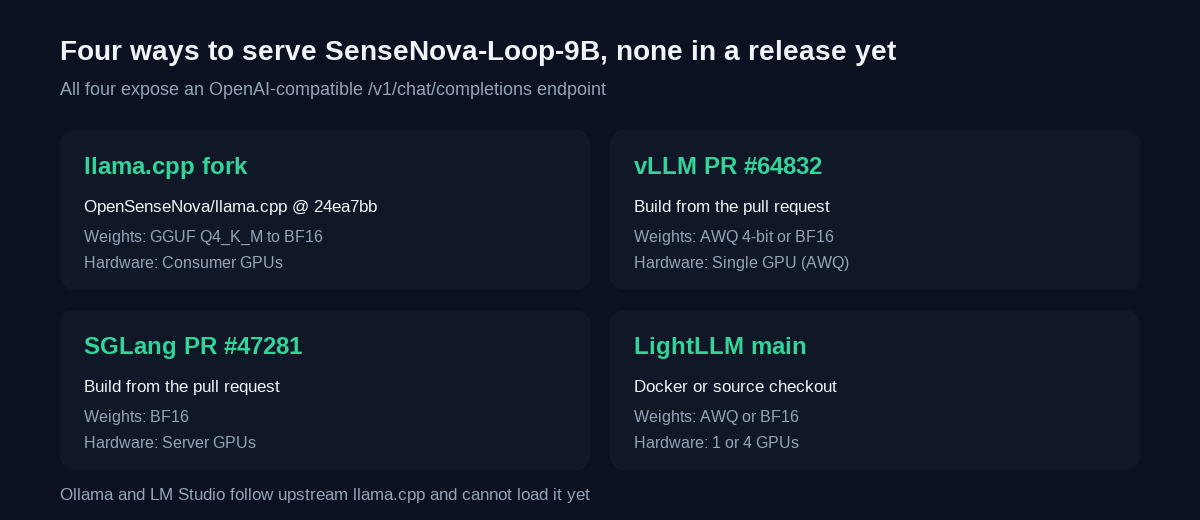
For a consumer card, build SenseNova's llama.cpp fork at commit 24ea7bb and serve the GGUF. The card's command uses a 4,096 context. On a 12 GB card, raise it and quantize the cache:
llama serve -hf sensenova/SenseNova-Loop-9B-GGUF:Q4_K_M \
  -ngl 99 -c 131072 --cache-type-k q8_0 --cache-type-v q8_0 \
  --port 8000
That's 131,072 tokens, under the 165,529 ceiling from the table. The two --cache-type flags are standard llama.cpp options and not part of SenseNova's example, so check that the fork accepts them. If it doesn't, drop them and stay under 87,937.
For the AWQ build on a single GPU, build vLLM from PR #64832, then:
vllm serve sensenova/SenseNova-Loop-9B-AWQ \
  --served-model-name sensenova_loop \
  --dtype bfloat16
SGLang needs PR #47281, and LightLLM's main branch has a single-GPU AWQ example in the AWQ repo's card. Plain Transformers works too: the card pins transformers==5.18.0 and needs trust_remote_code=True to load the loop code. Read that file before you trust it. It's 18,968 bytes and short enough to skim.
All four expose an OpenAI-compatible /v1/chat/completions endpoint, so any client that talks to LM Studio's local server can talk to this one with a base URL change.
Ollama and LM Studio can't load it yet, since both rely on upstream llama.cpp. OpenRouter doesn't list it either, so for now running it yourself is the only option.
FAQ
Does thinking mode change memory use?
Not the per-token cost. It changes how many tokens you generate. The chat template takes enable_thinking, and the card's example turns it on. Reasoning tokens fill the same KV cache as everything else, so long thinking traces eat into the context budget above.
Is the 512K context usable on a single consumer card?
Only with heavy cache quantization. At 524,288 tokens the FP16 cache alone is 28 GiB. With a 4-bit cache it's about 7 GiB, and SenseNova's own table stops at 256K, where it lists roughly 12 GiB in total with a 4-bit cache.
Can I fine-tune it?
SenseNova points to its fork of torchtitan for fine-tuning. Unsloth and the usual LoRA scripts don't list the architecture yet.
Sources
- Hugging Face,
sensenova/SenseNova-Loop-9Bmodel card,config.json,modeling_sensenova_loop.py,model.safetensors.index.jsonand file list (read 24 November 2026): release dates, license, loop range, layer types, heads, hidden and feed-forward sizes, vocabulary, mHC settings, parameter count, benchmark figures, memory table, deployment commands, limitations. - Hugging Face,
sensenova/SenseNova-Loop-9B-GGUFmodel card and file list (read 24 November 2026): GGUF and mmproj sizes, llama.cpp fork commit and serve command. - Hugging Face,
sensenova/SenseNova-Loop-9B-AWQmodel card,loop_config.jsonand file list (read 24 November 2026): AWQ shard sizes, LightLLM and vLLM commands. - Qwen3.8-27B KV layout from the ToolMintX VRAM calculator preset, taken from the Qwen repo's
config.json. - KV per token, linear-state estimate, memory totals and max-context figures are calculated by ToolMintX from the values above.