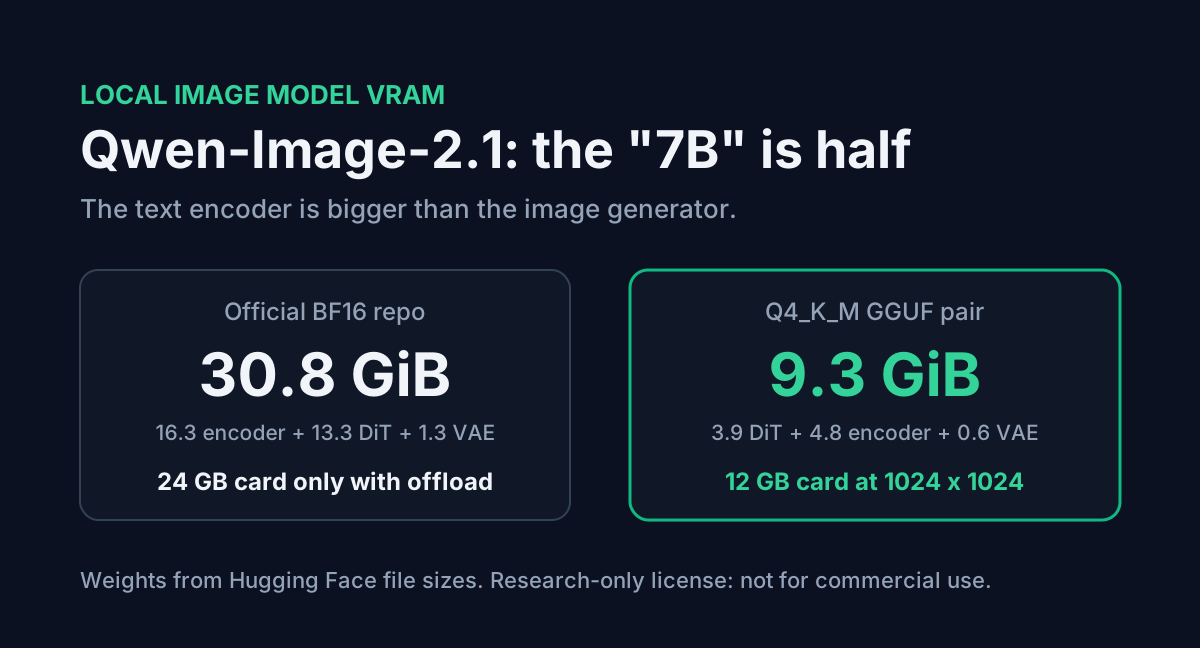
Qwen-Image-2.1 came out on 20 September 2026 as a "7B" image model that generates and edits pictures, including transparent PNGs, in one set of weights. The 7B is real, but it only counts the image generator. The prompt goes through a separate Qwen3-VL 8B text encoder first, and that encoder is bigger than the generator. Download the official repo and you get 30.8 GiB of weights.
This post adds up what each part costs in VRAM, maps the quantized files people are actually using onto 8, 12, 16 and 24 GB cards, and covers the license change that matters more than any of it if you plan to sell what you make.
Table of Contents
- What the 7B leaves out
- What the official repo weighs
- Which files fit your GPU
- Why 2048 pixels costs far more than 1024
- A local setup you can copy
- Three catches before you download
- FAQ
- Conclusion
- Sources
What the 7B leaves out
Qwen's model card describes "7B parameters in its visual generation component (32 Single-Stream DiT layers)". The pipeline in model_index.json has four pieces, and only one of them is that component:
| Part | Class | Parameters | Job |
|---|---|---|---|
| Text encoder | Qwen3VLForConditionalGeneration | 8.77B | Reads the prompt and any reference images |
| Transformer (DiT) | QwenImage21Transformer2DModel | about 7.12B | Denoises the image latent, 40 steps by default |
| VAE | AutoencoderKLQwenImage21 | 0.34B | Turns the latent into pixels, 16x upscale |
| Scheduler | FlowMatchEulerDiscreteScheduler | none | Step timing |
The encoder count comes from its safetensors index (total_parameters: 8,767,123,696). The DiT figure is its 14.23 GB of BF16 weights divided by 2 bytes. So a "7B model" needs about 16.2B parameters on hand to make one image.
What the official repo weighs
The Qwen/Qwen-Image-2.1 repo stores the encoder and DiT in BF16 and the VAE in FP32:
| Part | Stored as | Size |
|---|---|---|
| Text encoder (4 shards) | BF16 | 16.33 GiB |
| DiT (2 shards) | BF16 | 13.25 GiB |
| VAE | FP32 | 1.26 GiB |
| Total | 30.84 GiB |
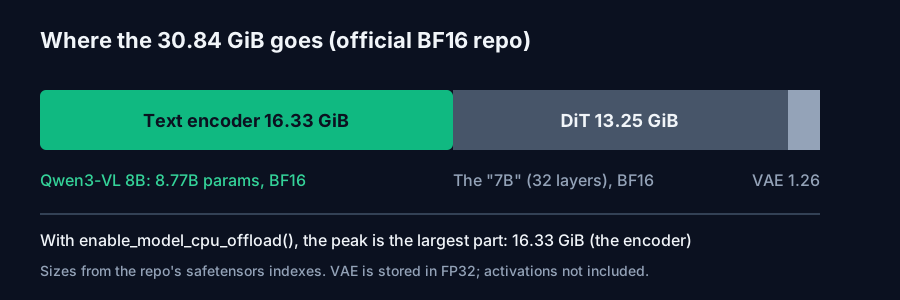
The model card's quick start loads everything with .to("cuda"). That needs a 40 GB-class card before a single activation is allocated. Its "memory optimization" line, pipe.enable_model_cpu_offload(), moves each part onto the GPU only while it runs. The encoder finishes before denoising starts, so with offloading the peak is the largest single part.
That peak is the encoder at 16.33 GiB, not the DiT. A 16 GB card has about 14.9 GiB in the units these files use, so BF16 with offloading still doesn't fit there. On a 24 GB card it does.
Which files fit your GPU
Most people are not running the official BF16 files. In the two weeks since launch, ComfyUI's repack (Comfy-Org/Qwen-Image-2.1) and Unsloth's GGUF upload each have several times the downloads of the base repo. Here are the common combinations, using the file sizes listed on Hugging Face:
| Setup | DiT | Text encoder | VAE (BF16) | Weights total |
|---|---|---|---|---|
| Official BF16 | 13.25 | 16.33 | 1.26 (FP32) | 30.84 GiB |
| ComfyUI INT8 + INT8 encoder | 6.76 | 8.71 | 0.63 | 16.10 GiB |
| GGUF Q8_0 + Q8_0 encoder | 7.12 | 8.11 | 0.63 | 15.86 GiB |
| ComfyUI INT8 + W4A8 encoder | 6.76 | 5.88 | 0.63 | 13.27 GiB |
| GGUF Q4_K_M + UD-Q4_K_XL encoder | 3.91 | 4.80 | 0.63 | 9.34 GiB |
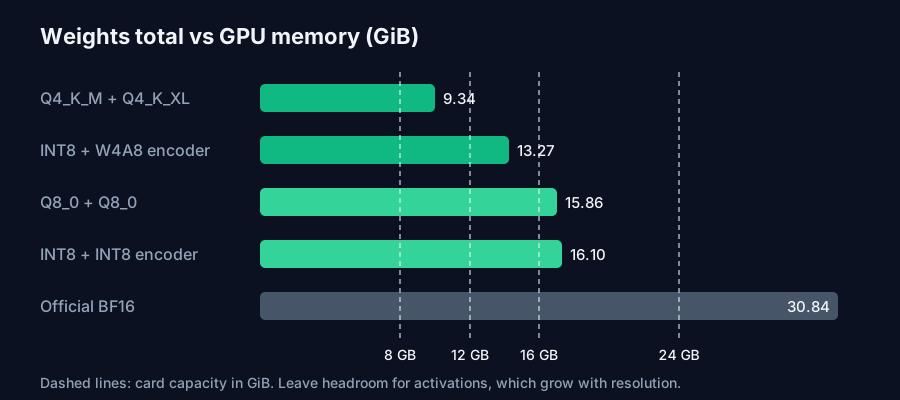
These are weights only. Activations come on top and grow with resolution, so leave a few GiB free. Unsloth's guide gives these starting points and says they are estimates, not tested minimums:
- 12 to 16 GB VRAM: GGUF Q4_K_M at 1024 x 1024, batch 1
- 24 GB VRAM: INT8 or FP8 at 512 x 512, or GGUF Q4_K_M at 1024 x 1024
- 6 GB VRAM: FP8 with offloading, which Unsloth says runs under 2x slower
- Mac or CPU only: GGUF Q4_K_M with the Q4_K_XL encoder in 12 to 16 GB of RAM
For an 8 GB card, the Q4 pair is 9.34 GiB, so you will be offloading the encoder whatever you do. For 12 GB, the Q4 GGUF pair is the one to try first. On 24 GB, I would start with the INT8 DiT, since Unsloth's own quant test gave INT8 a mean LPIPS of 0.064 against 0.112 for FP8 at almost the same file size.
The same arithmetic works for any model: parameters times bytes per parameter. Our AI VRAM Calculator does it for LLMs, with KV cache on top, and our local LLM VRAM guide explains each term if you are sizing a card for both chat and images.
Why 2048 pixels costs far more than 1024
The VAE config sets scale_factor_spatial: 16, and the DiT uses patch_size: 1. Each image token covers a 16 x 16 pixel block:
| Resolution | Image tokens | Relative attention work |
|---|---|---|
| 1024 x 1024 | 4,096 | 1x |
| 2048 x 2048 (native 1:1) | 16,384 | about 16x |
| 2752 x 1536 (native 16:9) | 16,512 | about 16x |
Doubling the side quadruples the tokens, and self-attention cost grows with the square of the token count. Every native preset in the model card sits around 16,400 tokens. That is why both Unsloth and the ComfyUI community start people at 1024 x 1024 even though the model is sold on 2K output. Generate at 1024, keep the seeds you like, and rerun only those at full size.
For editing, Qwen's blog says reference images and instructions are encoded once in the first step and reused through a prefix KV cache. Up to 10 reference images are supported, and each one adds tokens to that cache, so a 10-image try-on uses more memory than a plain prompt at the same output size.
A local setup you can copy
With 12 to 16 GB of VRAM, stable-diffusion.cpp plus Unsloth's GGUFs is the lightest path. You need three files: the DiT GGUF, the BF16 VAE, and the Qwen3-VL encoder GGUF.
# Files (Hugging Face):
#   unsloth/Qwen-Image-2.1-GGUF        -> qwen-image-2.1-Q4_K_M.gguf          (3.91 GiB)
#   unsloth/Qwen-Image-2.1-FP8         -> vae/qwen_image_2.1_vae_bf16.safetensors (0.63 GiB)
#   unsloth/Qwen3-VL-8B-Instruct-GGUF  -> Qwen3-VL-8B-Instruct-UD-Q4_K_XL.gguf (4.80 GiB)

sd-cli --diffusion-model qwen-image-2.1-Q4_K_M.gguf \
  --vae qwen_image_2.1_vae_bf16.safetensors \
  --llm Qwen3-VL-8B-Instruct-UD-Q4_K_XL.gguf \
  -p "a cartoon sloth mascot waving, flat vector illustration" \
  --steps 20 --cfg-scale 6.0 --sampling-method euler \
  -W 1024 -H 1024 --diffusion-fa -o out.png
On 24 GB with diffusers, use the official pipeline with offloading and keep guidance at 1.0:
import torch
from diffusers import QwenImage21Pipeline

pipe = QwenImage21Pipeline.from_pretrained(
    "Qwen/Qwen-Image-2.1", torch_dtype=torch.bfloat16
)
pipe.enable_model_cpu_offload()  # peak = largest part (the 16.3 GiB encoder)

image = pipe(
    prompt="This is an RGBA image with transparency. A paper lantern sticker. "
           "The image has alpha channel and the background is transparent.",
    width=1024, height=1024,
    num_inference_steps=40,
    generator=torch.Generator("cuda").manual_seed(42),
).images[0]
image.save("lantern.png")
The two recipes don't share settings. Unsloth's guide lists 40 steps with CFG disabled (guidance 1.0) for diffusers, and 20 steps at CFG 6.0 for stable-diffusion.cpp. If you copy a CFG of 6 into diffusers, or 1.0 into sd.cpp, your outputs won't match anyone else's.
The transparent prompt is the format Qwen's card recommends. The model decides from the prompt text whether to return RGB or RGBA, so if you want transparency, ask for it in words. Our Image Prompt Generator can draft the descriptive part, and you add the RGBA sentences around it.
Three catches before you download
The license changed. The first Qwen-Image (August 2025) and Qwen-Image-2512 are Apache 2.0. Qwen-Image-2.1 ships under the Qwen Research License, which grants use "FOR NON-COMMERCIAL PURPOSES ONLY" and defines non-commercial as "research or evaluation purposes only". Commercial use needs a separate licence from model-business@notice.qwencloud.com. If you make thumbnails for a monetised channel, product shots for a shop or client work, this model isn't cleared for that out of the box. Every quantized repo above inherits the same licence.
The encoder is the part to quantize first. Most guides focus on the DiT quant, but the encoder is 53% of the BF16 download. Going from the BF16 encoder (16.33 GiB) to UD-Q4_K_XL (4.80 GiB) saves more memory than taking the DiT from BF16 all the way to Q4.
The Unsloth app only does text-to-image for now. Unsloth's guide says this release supports text-to-image only in the desktop app, although the same page also shows an edit tab. For multi-image editing and masks, diffusers or ComfyUI are the safer routes today.
FAQ
How much VRAM does Qwen-Image-2.1 need? The full BF16 weights are 30.84 GiB. With CPU offload the peak is about 16.3 GiB (the text encoder). Q4 GGUF files total 9.34 GiB and Unsloth suggests 12 to 16 GB of VRAM for 1024 x 1024.
Can Qwen-Image-2.1 run on an 8 GB GPU? Yes, with offloading. The Q4 weights are 9.34 GiB, a bit more than 8 GB holds, so part of the model has to sit in system RAM. Expect it to be slower than on a 12 GB card.
Is Qwen-Image-2.1 free for commercial use? No. It uses the Qwen Research License, which allows research and evaluation only. Earlier Qwen-Image releases were Apache 2.0.
Why is the text encoder bigger than the image model? The encoder is Qwen3-VL 8B with 8.77B parameters. It reads the prompt and up to 10 reference images, so it is a full vision-language model. The DiT that draws the image has about 7.12B.
What resolution should I start at? 1024 x 1024. It uses 4,096 image tokens, against about 16,400 for the native 2K presets, so it fits smaller cards and runs much faster.
Conclusion
Qwen-Image-2.1 is a 16B-parameter pipeline sold as a 7B model. In practice that means 30.84 GiB at full precision, 16.3 GiB at the peak with offloading, about 16 GiB for the INT8 or Q8 pair, and 9.34 GiB for the Q4 GGUF pair. A 12 GB card runs it at 1024 x 1024 with Q4 files, a 24 GB card gets you INT8, and 2K output costs about 16 times the attention work of 1024. Check the licence before any of that. Unlike earlier Qwen-Image releases, this one is research-only, so use it for experiments and keep commercial work on an Apache 2.0 model until Qwen grants you a licence.
Sources
- Hugging Face,
Qwen/Qwen-Image-2.1model card,model_index.json, transformer, VAE and text-encoderconfig.json, safetensors indexes and file listing: parameter counts, layer counts, 16x VAE scale, file sizes, aspect-ratio presets, quick-start code. - Qwen blog, "Qwen-Image-2.1: Compact, Efficient, and Unified Image Creation" (20 September 2026): 7B visual component, 32 DiT layers, prefix KV cache reuse, 10 reference images, transparency.
- Qwen Research License Agreement, release date 20 September 2026 (LICENSE file in the model repo): non-commercial grant and commercial licence contact.
- Unsloth Docs, "Qwen-Image-2.1: How to Run Locally": memory starting points, INT8 vs FP8 LPIPS table, recommended settings per backend, text-to-image-only note.
- Hugging Face file listings for
unsloth/Qwen-Image-2.1-GGUF,unsloth/Qwen-Image-2.1-FP8,unsloth/Qwen3-VL-8B-Instruct-GGUFandComfy-Org/Qwen-Image-2.1: quantized file sizes and the stable-diffusion.cpp command. - Hugging Face model pages for
Qwen/Qwen-ImageandQwen/Qwen-Image-2512: Apache 2.0 licence. - Combined totals, offload peaks and token counts are calculated by ToolMintX from the figures above.


