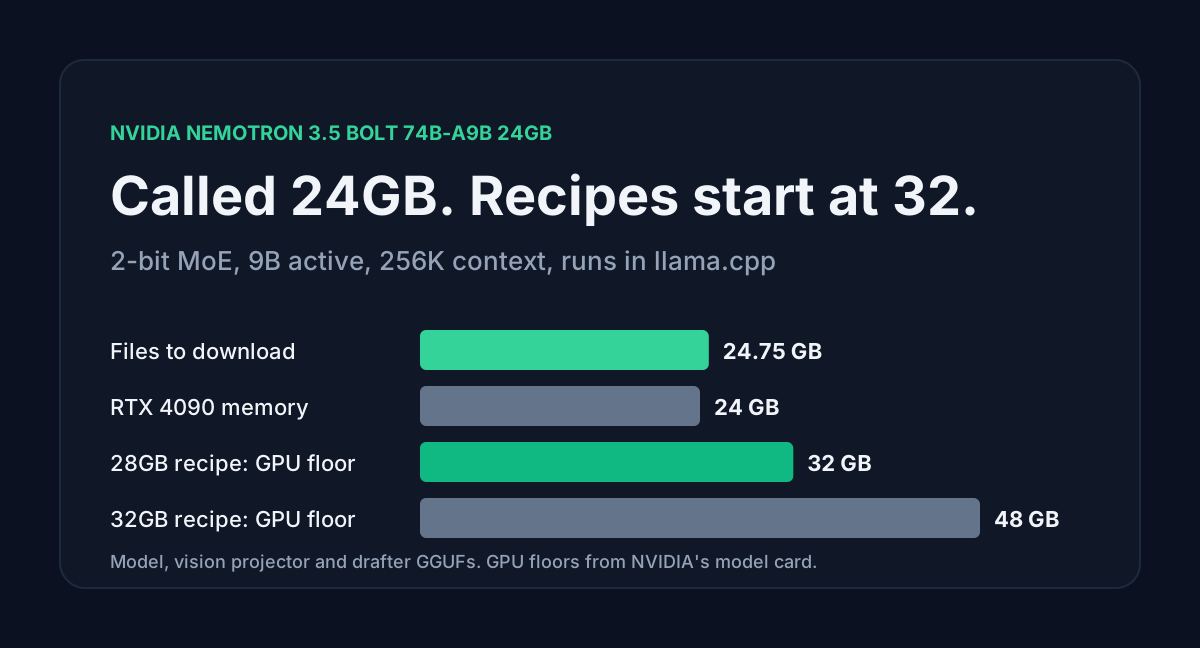
NVIDIA put Nemotron 3.5 on Hugging Face on 15 October in two sizes that matter for agents. Super VL is a 120B mixture-of-experts model with 12B active parameters, image and video input and a context window of up to 1M tokens. Bolt is a compressed 74B child with 9B active parameters, and its full name ends in "24GB".
That suffix reads like "runs on an RTX 4090". It doesn't mean that. The three files you download add up to 24.75 GB, and the smallest recipe NVIDIA publishes asks for a 32 GB GPU. This post works out where the gigabytes go, gives the llama.cpp command for a 32 GB card, and prices the bigger Super VL when you rent it instead: $0.23 for our standard 60-turn agent session.
Table of contents
- Bolt and Super VL at a glance
- Where the 24GB name comes from
- Memory on a 24 GB and a 32 GB card
- Running Bolt with llama.cpp
- Super VL rented for one agent session
- Benchmarks against GLM-5.3-Flash
- FAQ
- Sources
Bolt and Super VL at a glance
| Super VL 120B-A12B | Bolt 74B-A9B 24GB | |
|---|---|---|
| Parameters (BF16 safetensors) | 124.45B, 12B active | 74.89B, 9B active |
| Blocks | 88: 40 Mamba-2, 40 MoE, 8 attention | 88: 40 Mamba-2, 40 MoE, 8 attention |
| Experts per token | 22 of 512 | 9 |
| Context | up to 1M tokens | up to 256K tokens |
| Input | text, images, video | text, images, video |
| Smallest official build | NVFP4, 69.86 GiB | IQ2 GGUF, 20.51 GiB |
| License | OpenMDW-1.1 | OpenMDW-1.1 |
Both use the same hybrid layout. Only 8 of the 88 blocks are attention layers, and each keeps 2 KV heads of 128 dimensions. That makes the KV cache tiny: 8 KiB per token at BF16, so a full 1M-token Super VL context needs 8 GiB of cache. The 40 Mamba-2 blocks hold a fixed state instead, about 160 MiB per sequence in fp32 whatever the length.
NVIDIA lists Super VL for 1x DGX Spark, 1x H200, 2x H100 or 1x GB200 at NVFP4, and 4x H100 at BF16. It's not a desktop GPU model. Bolt is the one aimed at your own machine.
Where the 24GB name comes from
NVIDIA built Bolt by compressing Super VL with a router-guided architecture search. The search had a target: a deployment footprint below 24 GB at batch size 1 and 128K context. To hit it, every expert (routed and shared) is quantized to IQ2-XXS at 2.0625 bits per weight, the Mamba layers sit at NVFP4, and the embedding and output layers stay at Q8_0. NVIDIA then used quantization-aware distillation to win back accuracy.
So "24GB" is the size of the model, and NVIDIA wrote it for the RTX Spark, which shares 64 GB or 128 GB of memory between CPU and GPU. The card says the aim is to fit in 24GB "and run alongside other applications". On a discrete GPU there is nothing alongside: the card's own memory has to hold everything.
Memory on a 24 GB and a 32 GB card
The Quick Start downloads three GGUF files:
| File | Size |
|---|---|
| NVIDIA-Nemotron-3.5-Bolt-74B-A9B-24GB.gguf | 20.51 GiB |
| mmproj (vision projector) | 1.61 GiB |
| LiLiCorr DFlash drafter | 0.93 GiB |
| Total | 23.05 GiB (24.75 GB) |
Then add the cache. With the q8_0 KV cache the 28GB recipe uses, 65,536 tokens of context costs 272 MiB of KV, and the Mamba state adds about 160 MiB. That brings the total to 23.47 GiB before llama.cpp allocates its compute buffers.
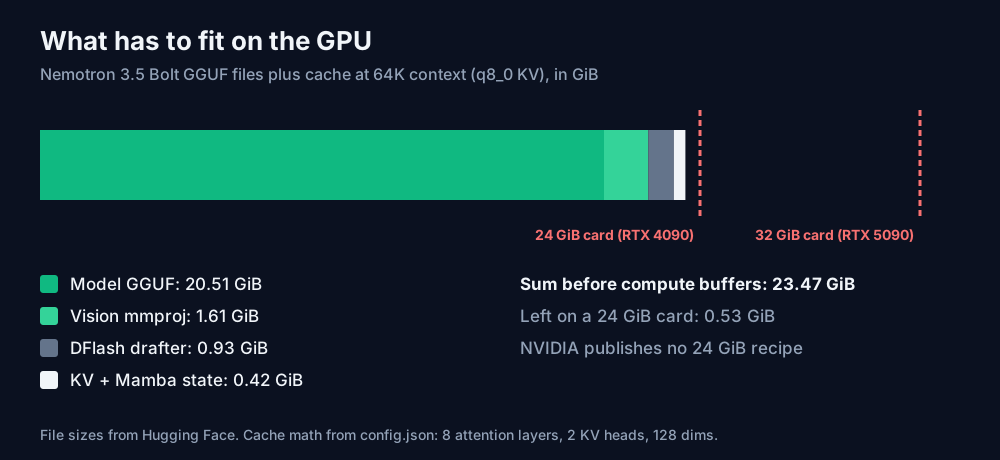
A 24 GiB card has 0.53 GiB left after that, and your desktop and CUDA context take part of it. NVIDIA doesn't publish a 24 GB recipe. We haven't tested one either, so treat it as unknown. If you try, drop the drafter and the mmproj first: that frees 2.54 GiB and costs you speculative decoding and image input.
The two official recipes:
| Recipe | Hardware NVIDIA names | Context | KV cache | Draft tokens |
|---|---|---|---|---|
| 28GB | RTX Spark 64GB or RTX GPU 32GB+ | 65,536 | q8_0 | up to 6 |
| 32GB | RTX Spark 128GB or RTX GPU 48GB+ | 262,144 | default | up to 7 |
An RTX 5090 with 32 GB fits the 28GB recipe. The full 256K context needs a card with 48 GB or more. To try other context sizes, the AI VRAM Calculator now has Bolt and Super VL presets that count only the 8 attention layers. Its lowest weight setting is 4-bit, so for Bolt's weights use the 20.51 GiB file size and take only the KV figure from the tool.
Running Bolt with llama.cpp
Build current llama.cpp from source with CUDA (cmake -B build -DGGML_CUDA=ON -DGGML_NATIVE=ON), download the three files with hf download, then start the 28GB recipe. This is NVIDIA's Linux command:
llama-server \
  --model "$MODEL" \
  --mmproj "$MMPROJ" \
  --batch-size 2048 \
  --ubatch-size 512 \
  --ctx-size 65536 \
  --parallel 1 \
  -ngl 999 \
  --spec-type draft-dflash \
  --spec-draft-n-max 6 \
  --spec-draft-model "$SPEC_DRAFT" \
  --spec-draft-ngl 999 \
  --cache-type-k q8_0 \
  --cache-type-v q8_0 \
  --temp 1.0 \
  --top-p 0.95 \
  --flash-attn on \
  --jinja
--jinja loads the model's own chat template. Leave it in: reasoning is switched on and off through that template (enable_thinking), and tool calls go through it too. --parallel 1 means one conversation at a time, which suits a single coding agent and nothing more.
To point Hermes Agent at it, set a custom OpenAI-compatible provider. The model ID is whatever GET /v1/models returns on your server:
hermes config set model.provider custom
hermes config set model.base_url http://localhost:8080/v1
hermes config set model.default YOUR_MODEL_ID
Port 8080 is llama-server's default. Change it if you started the server with --port.
Super VL rented for one agent session
If you don't have 32 GB of VRAM, the parent model is cheap to rent. Together AI and DeepInfra both list Super VL at $0.15 per million input tokens, $0.02 cached and $0.50 output.
The session is the one we use for every model: 60 turns, a 120,000-token prefix sent fresh once and read from cache on the other 59 turns, then 3,000 new input tokens and 1,500 output tokens per turn.
| Model on Together AI | Prefix, first send | Cache reads | New input | Output | Session |
|---|---|---|---|---|---|
| Nemotron 3.5 Super VL | $0.018 | $0.142 | $0.027 | $0.045 | $0.23 |
| DeepSeek V4.1 Flash 1017 | $0.036 | $0.042 | $0.054 | $0.108 | $0.24 |
| GLM-5.3-Flash | $0.018 | $0.212 | $0.027 | $0.045 | $0.30 |
| Reflection Beam 1.0 | $0.048 | $0.283 | $0.072 | $0.108 | $0.51 |
| Claude Sonnet 5.5 | $2.27 |
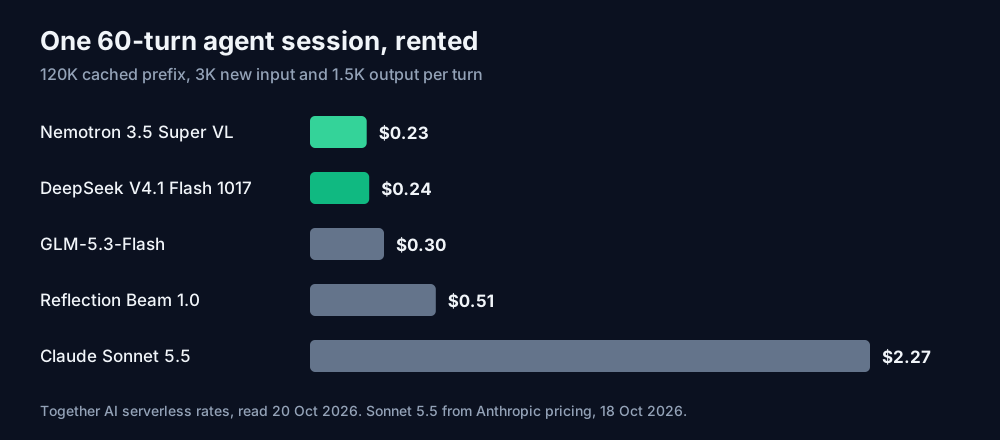
The Sonnet 5.5 figure is from our DeepSeek Flash post, priced from Anthropic's page on 18 October. Four Super VL sessions a workday for 20 days is $18.53 a month.
Cache reads are 61% of the Super VL bill. If every turn misses the cache, the same session costs $1.15, five times as much, so check cached_tokens in the usage block. Reasoning is on by default and bills as output. If thinking triples output to 4,500 tokens a turn, the session goes to $0.32. Plug your own turn counts into the API Cost Calculator, which now lists Super VL on Together.
Benchmarks against GLM-5.3-Flash
DeepSeek V4.1 Flash and GLM-5.3-Flash cost about the same per session, and on NVIDIA's own model card both beat Super VL on the coding rows. All numbers below are NVIDIA's, run through its NeMo Gym recipes:
| Benchmark | Super VL | GLM-5.3-Flash | DeepSeek V4 Flash 0731 |
|---|---|---|---|
| SWE-bench Verified | 71.10 | 79.10 | 75.4 |
| Terminal-Bench 2.1 | 60.67 | 82.70 | 76.80 |
| tau2-bench telecom | 73.19 | 98.5 | 98.2 |
| BrowseComp | 78 | 86.6 | 84.2 |
| AA-Omniscience hallucination rate (lower is better) | 30.0 | 30.3 | 95.9 |
| OSWorld-Verified | 51.14 | 14.78 | N/A |
The DeepSeek column is the July Flash build, since that's what NVIDIA tested. Super VL wins where its vision input counts: on OSWorld-Verified, a computer-use test that drives a desktop from screenshots, it scores 51.14 against 14.78. For a text-only coding agent, GLM-5.3-Flash scores 8 points higher on SWE-bench Verified for 7 cents more per session. Pick Super VL when the agent has to read screenshots, PDFs as page images or video.
Bolt's own table compares it with local models of similar size: Terminal-Bench 2.1 at 50.98 against 44.38 for Qwen3.6-35B-A3B, and BrowseComp at 66.75 against 48.74. On PinchBench it's level (87.82 against 88.07).
FAQ
Does Bolt run in Ollama or LM Studio? NVIDIA's card gives llama.cpp and vLLM instructions only. The recipe depends on llama.cpp's DFlash drafter flags and a build from source, so check each app's release notes before you expect it to load.
Can I run Super VL locally? Not on one consumer GPU. The ggml-org Q4_0 GGUF alone is 66.99 GiB. NVIDIA names DGX Spark, RTX Spark and RTX Pro 6000 for local use, with llama.cpp and Unsloth builds.
Is OpenMDW-1.1 a commercial license? NVIDIA's cards say the models are ready for commercial and non-commercial use under OpenMDW-1.1. Read the license text at openmdw.ai before you ship anything on it.
Sources
- Hugging Face,
nvidia/NVIDIA-Nemotron-3.5-Super-VL-120B-A12B-BF16model card, config.json and repository metadata (read 20 October 2026): architecture, parameter count, layer types, KV heads, head dim, context, deployment hardware, benchmark table, license. - Hugging Face,
nvidia/NVIDIA-Nemotron-3.5-Super-VL-120B-A12B-NVFP4model card and metadata (read 20 October 2026): NVFP4 size, release date 15 October 2026, deployment table. - Hugging Face,
nvidia/NVIDIA-Nemotron-3.5-Bolt-74B-A9B-24GBand-24GB-GGUFmodel cards, config.json and file listings (read 20 October 2026): compression method, 24 GB target, IQ2-XXS quantization, 28GB and 32GB recipes, llama.cpp commands, benchmark table, file sizes. - Hugging Face,
nvidia/NVIDIA-Nemotron-3.5-Bolt-74B-A9B-24GB-LiLiCorr-GGUFandnvidia/NVIDIA-Nemotron-3.5-Bolt-74B-A9B-BF16metadata (read 20 October 2026): drafter size, BF16 parameter count. - Together AI pricing (together.ai/pricing, read 20 October 2026): Nemotron 3.5 Super VL, DeepSeek V4.1 Flash 1017, GLM-5.3-Flash and Reflection Beam rates.
- Hugging Face,
ggml-org/NVIDIA-Nemotron-3.5-Super-VL-120B-A12B-GGUFfile listing (read 20 October 2026): Q4_0 size. - DeepInfra pricing (deepinfra.com/pricing, read 20 October 2026): Nemotron 3.5 Super VL rates.
- Session costs, monthly totals, KV cache and Mamba state sizes and memory sums are calculated by ToolMintX from those sources.


