Nanbeige4.3-33B went up on Hugging Face on 24 October 2026 under Apache 2.0. It's a 33B dense model from the Nanbeige team at BOSS Zhipin, pitched as an agent model for coding and office work, and its card puts it ahead of Qwen3.8-27B on most agent benchmarks.
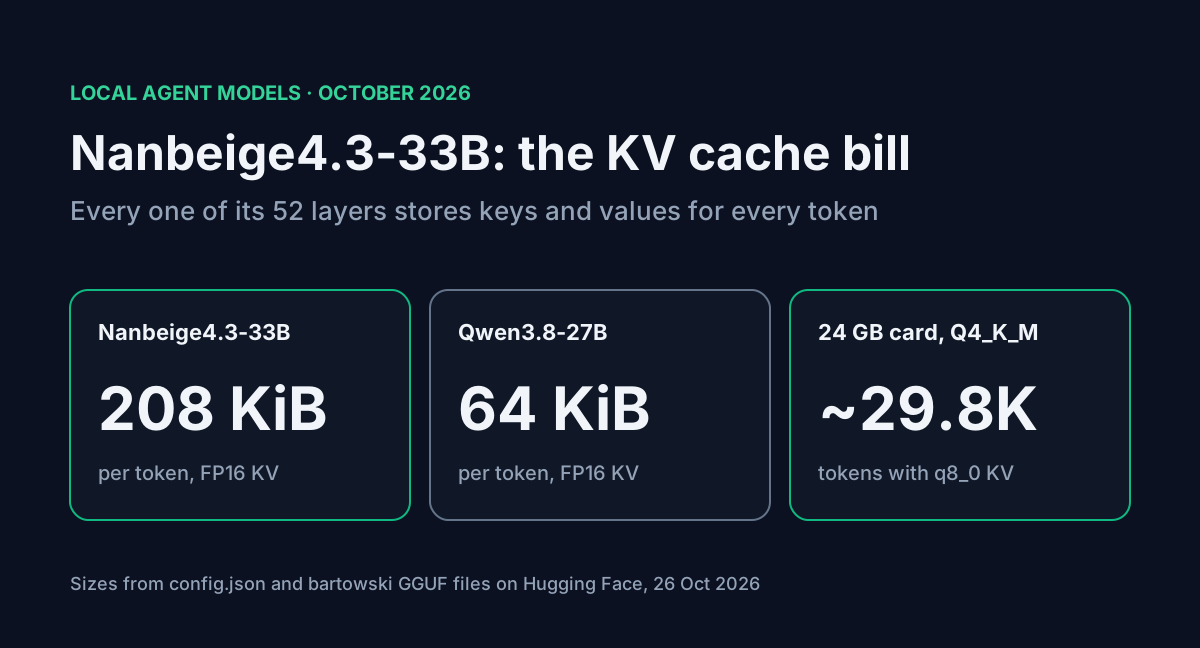
The part the card skips is memory. Qwen3.8-27B keeps a KV cache on only 16 of its 64 layers. Nanbeige is a plain Llama-style stack, so all 52 layers cache keys and values for every token. That's 208 KiB per token in FP16, 3.25 times what Qwen3.8-27B needs. The weights fit a 24 GB card at 4-bit, but the context you'd want for an agent doesn't. I worked through the config and the GGUF file sizes to find what actually fits on 24, 32 and 48 GB.
Table of contents
- What shipped
- Where the memory goes
- How much context fits on your card
- The agent settings make it worse
- Running it with llama.cpp
- Benchmarks against Qwen3.8-27B
- FAQ
- Sources
What shipped
| Nanbeige4.3-33B | |
|---|---|
| Released | 24 October 2026 (Hugging Face) |
| Maker | Nanbeige team, BOSS Zhipin |
| Parameters | 33,118,977,024 (BF16) |
| Architecture | LlamaForCausalLM, dense |
| Layers | 52, all full attention |
| Attention | 56 query heads, 8 KV heads, head dim 128 |
| Hidden / FFN size | 7,168 / 22,016 |
| Vocabulary | 166,912 tokens |
| Context | 524,288 tokens (512K) |
| BF16 weights | 66.24 GB across 14 safetensors shards |
| License | Apache 2.0 |
A Base checkpoint shipped alongside it. The card calls the 33B a "teacher" model and says a distilled Nanbeige4.3-3B is coming next. No hosted API showed up on OpenRouter when I checked on 26 October, so for now this is a local or self-hosted model.
Where the memory goes
KV cache per token is 2 × layers × KV heads × head dim × bytes. Plugging in each config:
| Model | Layers caching KV | KV heads × head dim | FP16 KV per token |
|---|---|---|---|
| Nanbeige4.3-33B | 52 | 8 × 128 | 208 KiB |
| Qwen3.8-27B | 16 of 64 | 4 × 256 | 64 KiB |
Qwen3.8 gets its small number from the hybrid stack: three linear-attention layers for every full-attention layer, and only the full-attention ones grow with context. Nanbeige has nothing like that. At the same context it needs 3.25 times the cache.
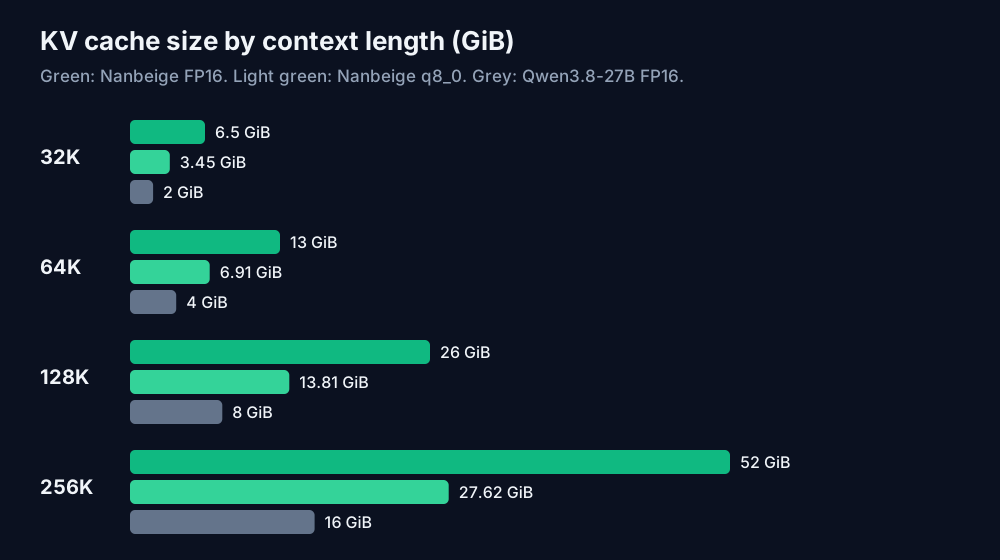
| Context | Nanbeige FP16 | Nanbeige q8_0 | Qwen3.8-27B FP16 |
|---|---|---|---|
| 32K | 6.5 GiB | 3.45 GiB | 2.0 GiB |
| 64K | 13.0 GiB | 6.91 GiB | 4.0 GiB |
| 128K | 26.0 GiB | 13.81 GiB | 8.0 GiB |
| 256K | 52.0 GiB | 27.62 GiB | 16.0 GiB |
The full 512K window costs 104 GiB of FP16 cache per user. Add the 66.24 GB of BF16 weights and you're at about 166 GiB before any runtime overhead. That's why the official vLLM and SGLang commands start at four GPUs.
How much context fits on your card
bartowski posted GGUF quants on 25 October. These are the sizes that matter for a single card:
| Quant | File size | Bits per weight |
|---|---|---|
| IQ4_XS | 18.64 GB | 4.5 |
| Q4_K_M | 20.79 GB | 5.02 |
| Q5_K_M | 25.07 GB | 6.06 |
| Q6_K | 29.02 GB | 7.01 |
| Q8_0 | 35.20 GB | 8.5 |
For each card I took the GiB left after the weights, held back 1.5 GiB for compute buffers, and divided the rest by the per-token cache. With q8_0 KV cache:
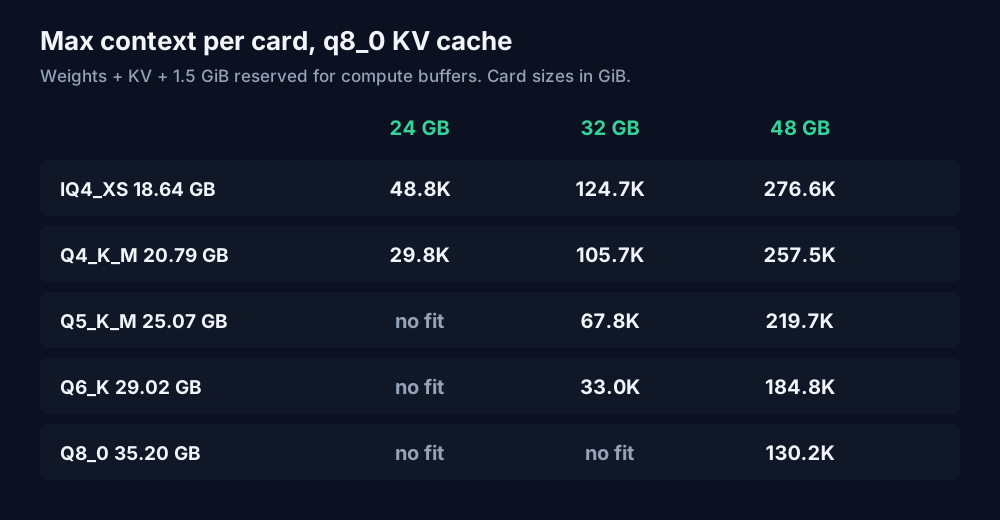
| Quant | 24 GB | 32 GB | 48 GB |
|---|---|---|---|
| IQ4_XS | 48.8K | 124.7K | 276.6K |
| Q4_K_M | 29.8K | 105.7K | 257.5K |
| Q5_K_M | no fit | 67.8K | 219.7K |
| Q6_K | no fit | 33.0K | 184.8K |
| Q8_0 | no fit | no fit | 130.2K |
Leave the cache at FP16 and those numbers roughly halve. Q4_K_M on a 24 GB card drops to about 15.8K tokens.
For comparison, unsloth's Qwen3.8-27B UD-Q4_K_M file is 16.46 GB, and on the same 24 GB card with q8_0 cache it leaves room for about 221K tokens. That's the trade you're making if you swap Qwen3.8-27B out for Nanbeige: better agent scores on paper, and roughly a seventh of the context on a 24 GB GPU.
These are estimates. Real llama.cpp buffers grow a little with batch size and context, so leave a few hundred MiB of slack. The AI VRAM calculator now has a Nanbeige4.3-33B preset with these config values if you want to try other mixes.
The agent settings make it worse
The card's recommended settings for agent and tool-use work are temperature 1.0, top_p 0.95 and up to 65,536 new tokens. That output budget alone is 13 GiB of FP16 cache, or 6.91 GiB at q8_0, before a single token of prompt.
It also tells you to set preserve_thinking=True for multi-turn tool use and code-agent workflows. With that on, the template keeps each earlier turn's reasoning in the prompt instead of blanking it, so context fills faster on long sessions. Every benchmark on the card was run that way.
On a 24 GB card, a coding agent like Claude Code or Hermes Agent will hit the ~30K ceiling within a few file reads. A realistic minimum for agent use is a 32 GB card at Q4_K_M, which gives around 105K tokens. A 48 GB card at Q4_K_M or Q5_K_M is where it gets comfortable.
Running it with llama.cpp
The architecture is stock Llama, so llama.cpp loads it without a patch. On a 32 GB card:
llama-server \
  -m Nanbeige_Nanbeige4.3-33B-Q4_K_M.gguf \
  -ngl 99 \
  -c 98304 \
  -fa on \
  --cache-type-k q8_0 \
  --cache-type-v q8_0 \
  --jinja \
  --temp 1.0 --top-p 0.95 \
  --port 8080
-c 98304 (96K) leaves headroom under the 105.7K estimate. On a 24 GB card, drop it to -c 28672. The quantized V cache needs flash attention on, which is what -fa on does.
--jinja makes llama-server use the chat template in the GGUF. Nanbeige's template defaults to an XML tool-call format, the same <tool_call><function=...> shape as Qwen3-Coder, and the official vLLM and SGLang commands use the qwen3_coder tool parser for it. I didn't test whether your llama.cpp build parses those calls into OpenAI-style tool_calls. Send one tool request and check the raw response before you point an agent at it.
If you're serving it with vLLM instead, the card's command is the place to start:
vllm serve /path/to/Nanbeige4.3-33B \
  --tensor-parallel-size 4 \
  --gpu-memory-utilization 0.8 \
  --enable-auto-tool-choice \
  --reasoning-parser qwen3 \
  --tool-call-parser qwen3_coder
Benchmarks against Qwen3.8-27B
All figures are from the Nanbeige model card, with every model at its highest thinking effort under the same harness:
| Benchmark | Nanbeige4.3-33B | Qwen3.8-27B |
|---|---|---|
| Terminal-Bench 2.1 | 80.9 | 73.0 |
| DeepSWE | 65.5 | 42.5 |
| SWE-Bench Pro | 60.3 | 61.7 |
| SkillsBench | 61.1 | 56.4 |
| Toolathlon-Verified | 70.4 | 68.5 |
| GDPval | 84.8 | 86.4 |
| GPQA Diamond | 89.5 | 89.2 |
Nanbeige leads on most of the agent rows, and the DeepSWE gap is large. Qwen3.8-27B still wins SWE-Bench Pro and GDPval. These are the maker's own numbers, published on launch day, and nobody has reproduced them yet.
If you'd rather fine-tune a smaller model for one narrow job than run a 33B agent, the Unsloth vs Ollama guide covers that route.
FAQ
Will the 3B model fix the memory problem? The card only says a Nanbeige4.3-3B distilled from this model is coming. Its config isn't public yet, so its KV cost is unknown.
Can I run it on a 16 GB card? Only at 2 to 3 bits. The IQ3_M file is 17.80 GB and Q3_K_M is 15.92 GB, so even those leave little or no room for cache. The IQ2 files (10.07 to 12.19 GB) fit, at a quality cost I haven't measured.
Can I use it commercially? The weights are Apache 2.0. Community quants and fine-tunes carry their own licenses, so check each card.
Sources
- Nanbeige, Nanbeige4.3-33B model card, config.json, generation_config.json and model.safetensors.index.json (huggingface.co/Nanbeige/Nanbeige4.3-33B, read 26 October 2026): release date, architecture, parameter count, context, benchmarks, recommended settings, chat template options, vLLM and SGLang commands, license.
- bartowski, Nanbeige_Nanbeige4.3-33B-GGUF file list (huggingface.co/bartowski/Nanbeige_Nanbeige4.3-33B-GGUF, read 26 October 2026): quant file sizes.
- Qwen, Qwen3.8-27B config.json (huggingface.co/Qwen/Qwen3.8-27B, read 26 October 2026): layer types, KV heads, head dim.
- unsloth, Qwen3.8-27B-GGUF file list (huggingface.co/unsloth/Qwen3.8-27B-GGUF, read 26 October 2026): UD-Q4_K_M file size.
- KV cache sizes, bits per weight and context limits are calculated by ToolMintX from those figures.


