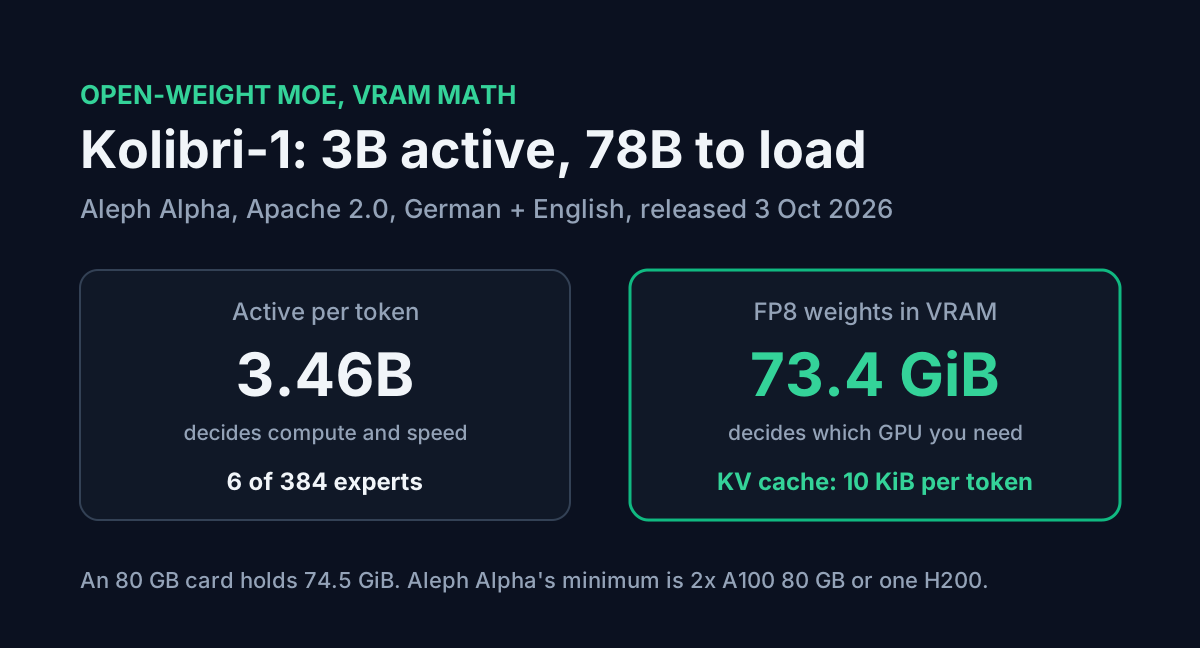
Aleph Alpha released Kolibri-1 on 3 October 2026, the Day of German Unity. It is an open-weight mixture-of-experts model under Apache 2.0, built for German and English, with 3.46 billion active parameters per token out of 78.1 billion total.
The "3B active" number is the one that travels, and it makes Kolibri-1 sound like something you can run on a gaming GPU. You can't, at least not from Aleph Alpha's own files. Active parameters decide how much compute each token costs. They don't decide how much memory the model needs, because every expert has to sit in VRAM whether a given token uses it or not. This post works out what Kolibri-1 actually needs, why its KV cache is unusually small, and which community quants bring it within reach of a Mac or a two-GPU desktop.
Table of Contents
- What Aleph Alpha shipped
- Active parameters are not a memory number
- Why one 80 GB card is not enough
- The KV cache is where Kolibri-1 is cheap
- Running it below datacenter hardware
- Serving it with vLLM
- Kolibri-1 or Qwen3.8 27B?
- FAQ
- Conclusion
- Sources
What Aleph Alpha shipped
Two repositories went up on Hugging Face:
| Repo | Weights | Size on disk | Aleph Alpha's minimum hardware |
|---|---|---|---|
Aleph-Alpha/Kolibri-1 | FP8 (e4m3, 128x128 blocks) | 78.9 GB | 2x A100 80 GB, 1x H200, 1x B200 or B300 |
Aleph-Alpha/Kolibri-1-BF16 | BF16 | 156.2 GB | 4x A100 80 GB, 2x H200, 1x B200 or B300 |
The architecture, read from the model's config.json:
- 50 layers, hidden size 2,560
- 384 routed experts per MoE layer, 6 selected per token, plus 1 shared expert, each with a 512-wide FFN
- 48 attention heads, 4 KV heads, head dimension 128
- a 4:1 mix of sliding-window and full attention: 40 layers see only the previous 512 tokens, 10 layers see everything
- 262,144 tokens of native context, validated up to 1,048,576 with a config override
It supports a reasoning mode with low, medium and high effort (or none), and tool calling through vLLM's parser. The knowledge cutoff is 18 June 2026. Aleph Alpha trained it on 20T tokens, with German making up 21.3% of pre-training tokens, and describes it as a model for regulated, on-premise work in sectors like public administration and aerospace.
Active parameters are not a memory number
A mixture-of-experts model routes each token through a few experts. Kolibri-1 picks 6 of 384 per layer, so a token touches about 4.4% of the weights. That is what makes it fast and cheap per token.
It does nothing for memory. The router decides per token, so the next token might need any of the 384 experts. All of them stay loaded.
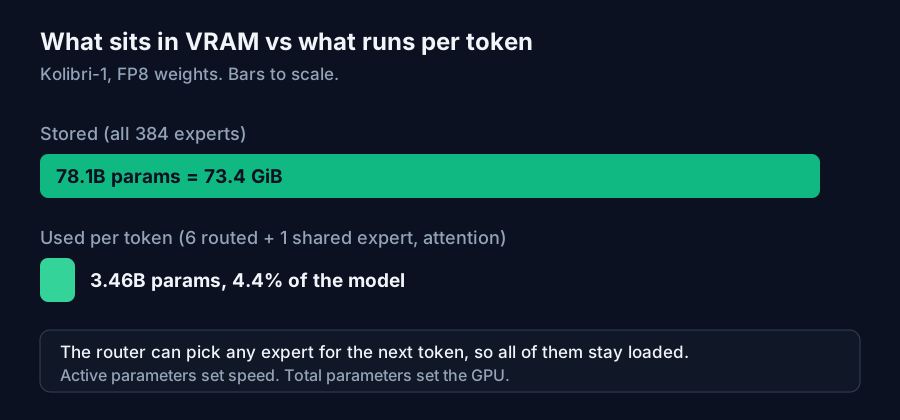
So the number to size hardware against is 78.1B parameters, the same rule our local LLM VRAM guide uses for dense models. At FP8 (one byte per weight) that is the 78.9 GB checkpoint. In the GiB that GPU tools report, it comes to 73.4 GiB before any KV cache or runtime overhead.
Why one 80 GB card is not enough
An "80 GB" A100 or H100 holds 80 billion bytes, which is 74.5 GiB. Kolibri-1's FP8 weights take 73.4 GiB of that. You are left with about 1 GiB for the CUDA context, activations and the KV cache, and vLLM reserves more than that before it serves a single request.
That is why Aleph Alpha's minimum is two A100 80 GB cards or one H200 (141 GB, about 131 GiB), rather than one 80 GB card. The model fits on paper and fails in practice.
With an H200 you have roughly 58 GiB left after the weights, which is plenty, for a reason covered next.
The KV cache is where Kolibri-1 is cheap
The KV cache stores a key and a value for every token in every layer that attends to it. Kolibri-1's sliding-window layers only keep the last 513 tokens, so they hold a fixed 20 MiB regardless of context length (at FP8). Only the 10 full-attention layers grow with the context.
Per token, at the FP8 KV cache Aleph Alpha uses in its own serving command:
2 (key + value) x 10 layers x 4 KV heads x 128 head dim x 1 byte = 10 KiB per token
Compare Qwen3.8 27B, which has 16 full-attention layers with 4 KV heads and a 256-wide head: 32 KiB per token at FP8, and 64 KiB at BF16.
| Context, one user | Kolibri-1 (FP8 KV) | Qwen3.8 27B (FP8 KV) | Kolibri-1 if all 50 layers were full attention |
|---|---|---|---|
| 32K | 0.33 GiB | 1 GiB | 1.56 GiB |
| 128K | 1.27 GiB | 4 GiB | 6.25 GiB |
| 262K | 2.52 GiB | 8 GiB | 12.5 GiB |
| 1M | 10.02 GiB | 32 GiB | 50 GiB |
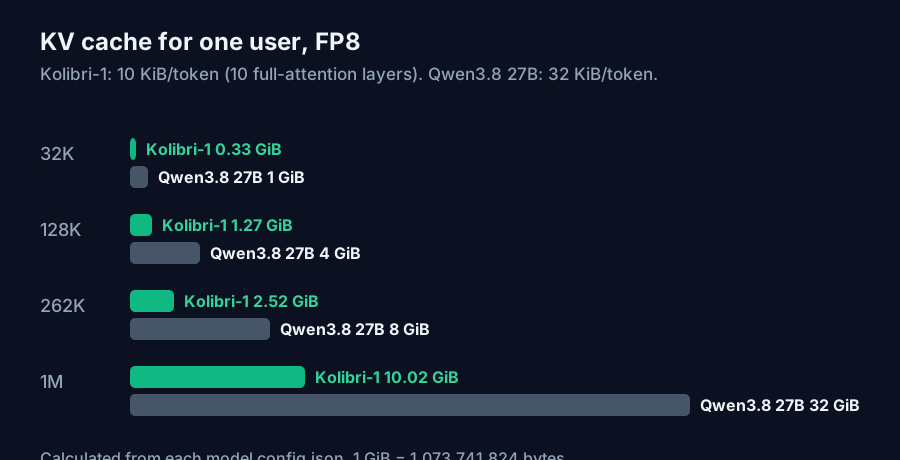
Two practical numbers come out of this. On one H200, a single 1M-token request needs 73.4 GiB of weights plus 10 GiB of cache, about 83.5 GiB total. Eight users at 128K each need about 10.2 GiB of cache, so 83.6 GiB total. Both leave room on a 131 GiB card.
The model's weights are heavy and its context is light. Most models are the other way around once you go past 100K tokens.
You can enter these numbers in the AI VRAM Calculator, which now has a Kolibri-1 preset. Like the Qwen3.8 presets, it counts only the 10 full-attention layers, so the KV figure matches the arithmetic above instead of overstating it fivefold.
Running it below datacenter hardware
Within a day of release, the community had posted lower-bit conversions. None are from Aleph Alpha, and none carry its benchmark results.
| Build | Size | What it needs |
|---|---|---|
| MLX 4-bit (4.54 bits/weight) | 41 GiB | 64 GB+ Mac |
| MLX 3-bit (3.57 bits/weight) | 33 GiB | 48 GB+ Mac |
| MLX 2-bit (2.61 bits/weight) | 24 GiB | 36 GB+ Mac |
| GGUF Q3_K_S (about 3.47 bits/weight) | 31.54 GiB | a patched llama.cpp build |
The MLX uploader reports about 52 to 56 tokens per second on an M1 Max and peak memory of 30 GB for the 2-bit build at a 4K-token prompt. A small MoE generates quickly on Apple silicon because each token reads only the active weights from memory.
The GGUF needs care. Stock llama.cpp doesn't know the kolibri1 architecture, so the file ships with a source patch, and its author says compatibility with Ollama and LM Studio hasn't been checked. It was tested at a 4,096-token context split across an RTX 3060 12 GB and an Intel Arc Pro B60 24 GB. Reasoning mode, tool calling and long context weren't validated. Treat it as an experiment until a mainline llama.cpp release adds the architecture.
The 2-bit and 3-bit builds also lose quality. The MLX uploader's own perplexity check on a short German sample goes from 12.77 at 4-bit to 14.01 at 2-bit. For anything you plan to rely on, 4-bit is the lowest I would go.
Serving it with vLLM
The official path is vLLM with Aleph Alpha's plugin, since mainline vLLM doesn't include the architecture either:
pip install 'aleph-alpha-inference>=1'

vllm serve Aleph-Alpha/Kolibri-1 --kv-cache-dtype fp8 \
  --reasoning-parser kolibri1 \
  --tool-call-parser kolibri1 \
  --enable-auto-tool-choice
For contexts past 262K, add --max-model-len 1048576 --hf-overrides '{"max_position_embeddings": 1048576}'. Aleph Alpha recommends staying at or under 262K for latency and for complex tasks, and its own RULER results drop from 69.8 at 256K to 63.2 at 1M.
The server is OpenAI-compatible. Reasoning effort goes through the chat template rather than a top-level field:
from openai import OpenAI

client = OpenAI(base_url="http://localhost:8000/v1", api_key="EMPTY")

response = client.chat.completions.create(
    model="Aleph-Alpha/Kolibri-1",
    messages=[{"role": "user", "content": "Summarise this contract clause in German."}],
    temperature=1.0,
    top_p=0.97,
    extra_body={
        "top_k": 128,
        "chat_template_kwargs": {"reasoning_effort": "medium", "enable_thinking": True},
    },
)
print(response.choices[0].message.content)
The sampling values (temperature 1.0, top_p 0.97, top_k 128) are the ones the model card recommends. Tool definitions go in the standard tools field and work alongside reasoning mode. If you are debugging the JSON your tools return, the JSON Formatter makes the tool-call arguments easier to read.
Kolibri-1 or Qwen3.8 27B?
These are the two open models most people will weigh for a single big GPU. Aleph Alpha's model card benchmarks both with the same framework, with Kolibri-1 at high reasoning effort:
| Benchmark | Kolibri-1 | Qwen3.8 27B |
|---|---|---|
| Overall (EN) | 75.5 | 80.2 |
| Overall (DE) | 70.8 | 79.9 |
| SWE-Bench Verified | 66.4 | 72.6 |
| LiveCodeBench v6 | 85.9 | 93.8 |
| AIME 2026 (EN) | 96.0 | 97.7 |
| Tau2-Bench (Telecom) | 94.7 | 82.5 |
| Tau3-Bench (Banking) | 38.1 | 50.0 |
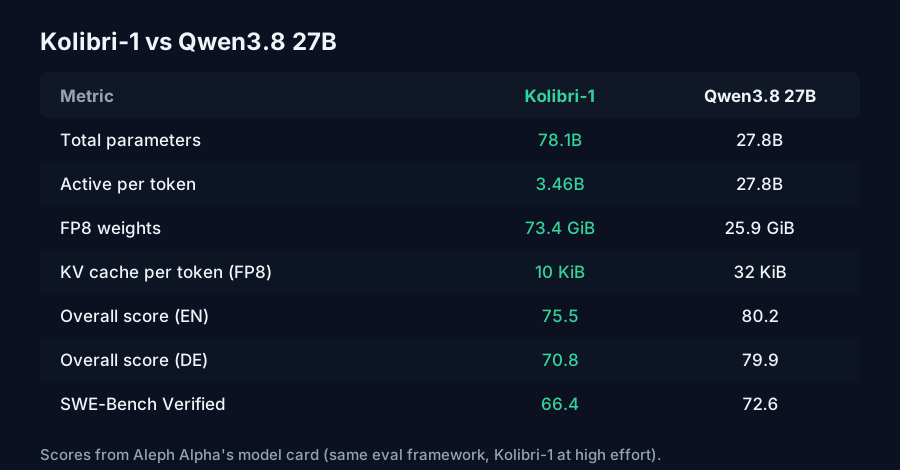
Qwen3.8 27B scores higher on nearly every row, including German, which is Kolibri-1's specialty. Kolibri-1's clear win is Tau2-Bench Telecom (94.7 against 82.5). That gap is smaller than it looks, though, because Qwen3.8 27B activates about 8 times as many parameters per token (27.8B against 3.46B). Aleph Alpha's table greys out the dense models for exactly that reason.
On memory the picture flips. Qwen3.8 27B's weights are 25.9 GiB at FP8, so it fits on a 32 GB or 48 GB card where Kolibri-1 can't. Kolibri-1's cache is a third the size per token, so on a large card it holds far more concurrent long-context users.
- One 24 to 48 GB GPU: Qwen3.8 27B. Kolibri-1 only fits as an unofficial 2-bit or 3-bit build.
- One H200 or B200 serving many users: Kolibri-1. Weights are a fixed cost, the cache stays small, and per-token compute is about an eighth.
- A Mac with 64 GB or more: Kolibri-1 at MLX 4-bit is worth trying for speed. Check output quality yourself, since no one has benchmarked that build.
- Work that has to stay on EU-controlled infrastructure under Apache 2.0: that is the case Aleph Alpha built Kolibri-1 for. The benchmarks above are its own runs, so test on your own documents.
FAQ
How much VRAM does Kolibri-1 need? The official FP8 weights take 73.4 GiB (78.9 GB). Add the KV cache and runtime overhead, and Aleph Alpha's minimum is two A100 80 GB cards or one H200. The BF16 version needs twice that.
Why can't Kolibri-1 run on one 80 GB GPU if only 3B parameters are active? All 384 experts per layer must stay in memory because any token can be routed to any of them. An 80 GB card holds 74.5 GiB, and the FP8 weights alone use 73.4 GiB.
How big is the Kolibri-1 KV cache? About 10 KiB per token at FP8, because only 10 of its 50 layers use full attention. That is 2.52 GiB at 262K tokens and about 10 GiB at 1M.
Can I run Kolibri-1 in Ollama or LM Studio? Not officially. The only GGUF so far needs a patched llama.cpp, and its author hasn't tested Ollama or LM Studio. On a Mac, the community MLX builds are the simpler route.
Is Kolibri-1 better than Qwen3.8 27B? Not on scores. In Aleph Alpha's own table, Qwen3.8 27B scores higher overall in English and German, on coding and on math. Kolibri-1 leads on Tau2-Bench Telecom and uses about an eighth of the compute per token.
Conclusion
Kolibri-1's "3B active" figure is real, but it describes compute, not memory. Plan for 73.4 GiB of FP8 weights, which rules out a single 80 GB card. In exchange the model has one of the smallest KV caches for its context length: 10 KiB per token, so a 1M-token request adds only about 10 GiB. On an H200 that makes it a cheap model to serve at scale. On a desktop, it is only practical as a community 2-bit to 4-bit build. Run your own card and context through the AI VRAM Calculator before you download 79 GB, and if you are weighing a hosted model instead, the API Cost Calculator prices the same workload.
Sources
- Aleph Alpha, "Kolibri Has Landed: A Sovereign Open-Weight Model" (3 October 2026): release, 78B total and 3B active, Apache 2.0, German share of pre-training data.
- Hugging Face,
Aleph-Alpha/Kolibri-1model card: parameter counts, FP8 precision, hardware requirements, context lengths, serving command, sampling settings, reasoning effort, post-training benchmarks and RULER results. - Hugging Face,
Aleph-Alpha/Kolibri-1config.json: layers, heads, KV heads, head dimension, experts, sliding window and layer types. - Hugging Face,
Aleph-Alpha/Kolibri-1-BF16: BF16 checkpoint size and hardware requirements. - Hugging Face,
velaia/Kolibri-1-MLX-2bitmodel card: MLX 2/3/4-bit sizes, peak memory, perplexity and M1 Max speed (community build). - Hugging Face,
Eliasfpv28/Kolibri-1-Q3_K_S-GGUFmodel card: GGUF size, llama.cpp patch requirement and test setup (community build). - Hugging Face,
Qwen/Qwen3.8-27Bconfig, as used in the ToolMintX AI VRAM Calculator preset. - KV cache and memory figures are calculated by ToolMintX from those configs (1 GiB = 1,073,741,824 bytes).


