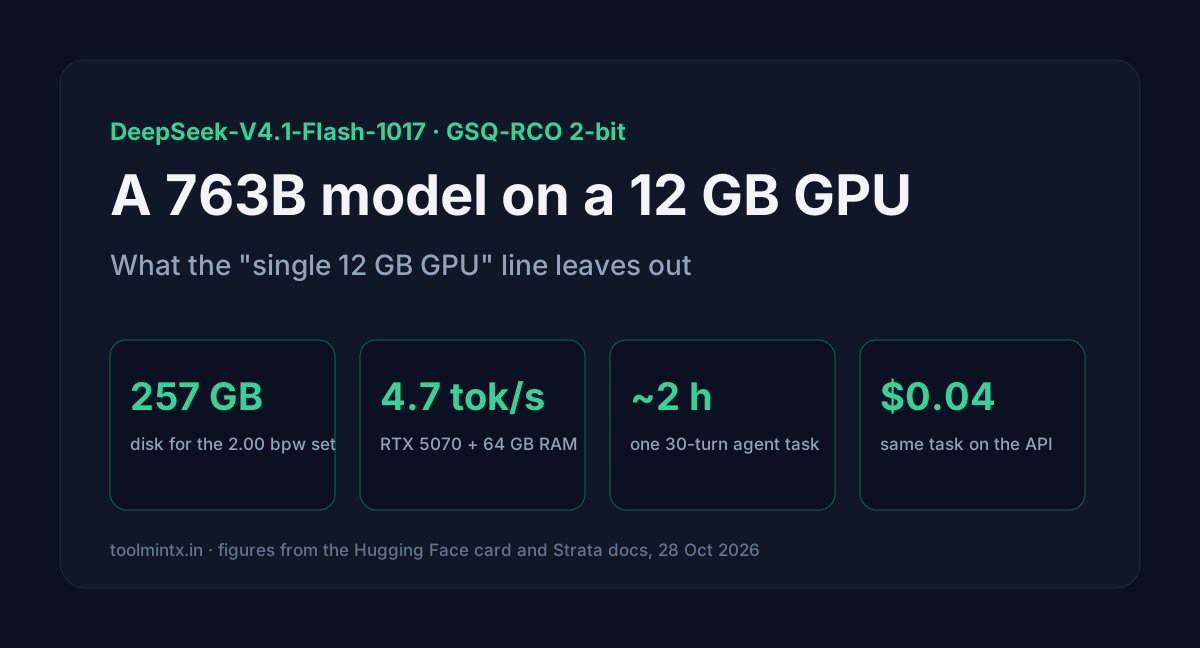
IST Austria's DASLab put three 2-bit builds of DeepSeek-V4.1-Flash-1017 on Hugging Face, and the model card says every one of them "runs on a single GPU with 12 GB of VRAM". The repo passed 1.1 million downloads in five days. That line is true. It also leaves out the parts that decide whether you'd want to: about 257 GB of disk, a lot of system RAM, and an answer speed of 4.7 tokens a second on an RTX 5070.
I took the file sizes from the repository, the speeds from the Strata engine's own measurements, and costed one agent task both locally and on DeepSeek's API.
Table of contents
- The three builds
- Where 257 GB goes
- How a 763B model runs on 12 GB
- Speed on real hardware
- One agent task, local against the API
- Setup with llama.cpp or Strata
- FAQ
- Sources
The three builds
DeepSeek-V4.1-Flash-1017 is a 763.2B mixture-of-experts model: 40 layers, 384 routed experts per layer with 6 active per token, and a 1M-token context. The released weights are FP8, with the routed experts in FP4.
DASLab's quants are non-uniform. A gradient search (RCO) picks a quantization type for each tensor under a size budget, and GSQ does the low-bit rounding. The dense tensors get Q5_K, Q6_K or Q8_0. The routed experts get types from IQ1_S to IQ3_S.
| Build | bpw | Backbone | Engram | Total | Benchmark recovery |
|---|---|---|---|---|---|
| IQ1_M | 1.75 | 120.72 GB | 110.60 GB | 231.32 GB | 98.7% |
| IQ2_XXS (recommended) | 2.00 | 138.24 GB | 110.60 GB | 248.84 GB | 100.0% |
| IQ2_XS | 2.25 | 155.23 GB | 110.60 GB | 265.83 GB | 99.8% |
Recovery is the average of AIME25, GPQA-Diamond and LiveCodeBench v6 against the base model, all at reasoning effort 50. The base averages 93.54, and IQ2_XXS matches it on all three.
Strata's docs measured something the card doesn't show. On 4,995 positions, the 2.00 set has KL divergence 0.170 and 15.5% higher perplexity than the original (8.6% on code, 5.3% on agent work). The 2.25 set is at 7.3%. IQ1_M is 21% worse overall and 53% worse on plain English prose. The card's three benchmarks are math, science questions and code, so they never touch the prose weakness.
The tensor allocation files in the repo show how "2 bits" is reached. In the IQ2_XXS build, 60 of the 120 routed-expert matrices are IQ1_M, 42 are IQ2_XXS and 18 are IQ2_XS. Half the experts sit below 2 bits, and the dense path at Q5_K and Q8_0 pulls the average up to 2.0038.
Where 257 GB goes
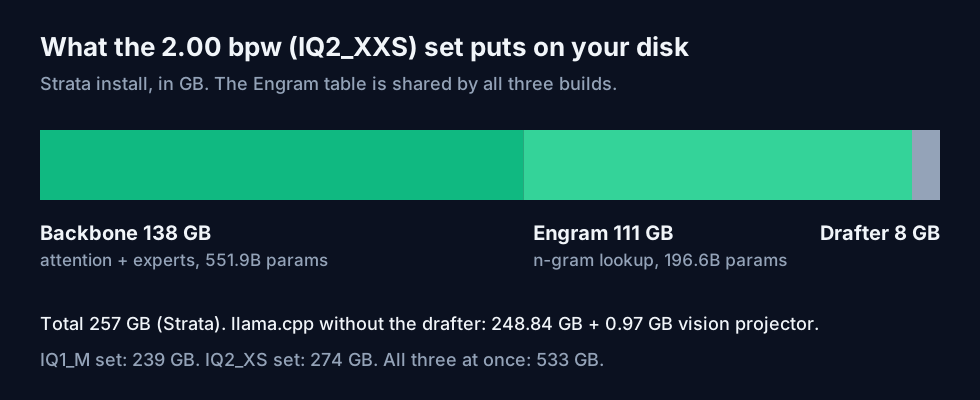
The backbone holds 551.9B parameters: attention, shared experts and the 15,360 routed experts. The Engram file holds the model's two n-gram lookup tables, 196.6B parameters at IQ4_NL. It's the same file for every build, so trying a second build costs only its backbone.
Strata adds an 8 GB DSpark draft model for speculative decoding. Its totals are 239 GB for 1.75 bpw, 257 GB for 2.00 and 274 GB for 2.25. Setup asks for about 265 GB free for the 2.00 set. With llama.cpp you skip the drafter and add the 0.97 GB vision projector if you want images.
How a 763B model runs on 12 GB
None of these builds fits in 12 GB. The trick is placement:
- The dense weights (attention, shared experts, embeddings) go to the GPU. In Unsloth's full 508 GB set they're 16.8 GB in BF16; the 2-bit builds store them at Q5_K to Q8_0. A card that can't hold its share can stop the engine with an out-of-memory error at start, and Strata says so before downloading.
- As many routed experts as fit go to the GPU too. The rest run on the CPU, read in place from the model files, and need free RAM to stay cached.
- The Engram tables stay memory-mapped on the SSD. The model reads a few rows per token, so they use neither VRAM nor RAM, but a slow drive slows every token.
So the real requirement is a 12 GB card plus enough RAM to cache the CPU's experts plus an NVMe drive. Strata's docs say that under about 40 GB of RAM it's untested and slow. The model card's own memory section still has a "TBD" comment where the RAM figure should be.
Context costs VRAM as well. The KV cache lives in graphics memory, so each extra position pushes experts off the card. Strata's default context is 8,192 tokens, the size it was checked at.
Speed on real hardware
Strata's numbers for the 2.00 bpw set:
| Hardware | Answer speed | Prompt reading |
|---|---|---|
| RTX 5070 12 GB, 64 GB RAM | 4 to 6 tokens/s (4.7 measured) | about 110 to 121 tokens/s at 4K |
| RTX 3060 12 GB, 46 GB RAM | 9 to 11 tokens/s (agent work 7.8) | about 155 tokens/s at 4K |
| Ryzen AI Max+ 395, 128 GB unified | 19 to 21 tokens/s on code, about 18 on agent work | 87 tokens/s at 4K |
| 1x Radeon AI PRO R9700, 251 GB RAM | 21 to 25 tokens/s | 320 to 360 tokens/s at 8K |
| RTX 4090 48 GB, 128 GB RAM (one user report) | 40.2 tokens/s | 615 tokens/s at 4.6K |
The RTX 3060 beating the RTX 5070 is in Strata's table as measured, and the doc doesn't explain it. Expect your own number to depend on RAM size and drive speed as much as on the card.
One agent task, local against the API
A realistic coding-agent task:
- 30 turns
- a 24,000-token starting prefix (system prompt, tool definitions, files read)
- 2,000 new input tokens and 1,000 output tokens per turn
- the context ends at 114,000 tokens, so set
--context 128k; the default 8K won't hold it
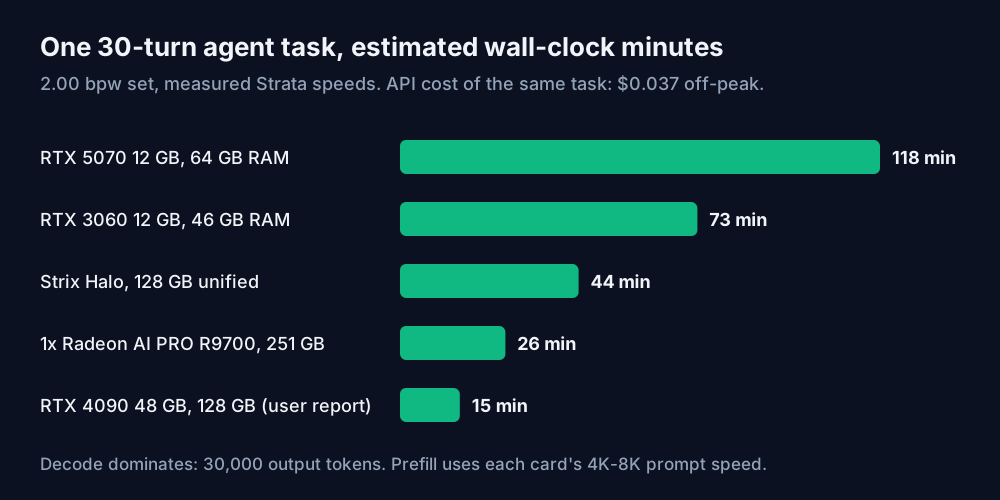
Strata keeps each conversation's KV cache between turns, so locally the model reads 84,000 prompt tokens once and writes 30,000. Time is prompt tokens over prompt speed plus output tokens over answer speed. I used the agent-work speed where Strata gives one.
| Hardware | Prompt reading | Answering | Total |
|---|---|---|---|
| RTX 5070 12 GB, 64 GB RAM | 11.6 min | 106.4 min | 118.0 min |
| RTX 3060 12 GB, 46 GB RAM | 9.0 min | 64.1 min | 73.1 min |
| Ryzen AI Max+ 395, 128 GB | 16.1 min | 27.8 min | 43.9 min |
| 1x Radeon AI PRO R9700 | 4.1 min | 21.7 min | 25.9 min |
| RTX 4090 48 GB (user report) | 2.3 min | 12.4 min | 14.7 min |
These are estimates from the measured speeds, and they lean optimistic. Speeds were measured at 4K to 8K, and a context near 114K means fewer experts on the card.
The same task on DeepSeek's API, which serves this exact model as deepseek-flash, is 2,001,000 cache-hit input tokens, 84,000 cache misses and 30,000 output. At off-peak rates ($0.003 hit, $0.15 miss, $0.60 output per million) that's $0.037. At weekday peak it's $0.073. Twenty such tasks a day for a month is about $22 off-peak.
So the 12 GB route doesn't save money. A 257 GB download, an evening of setup and two hours a task on an RTX 5070 replace a few cents. Local is worth it for other reasons: code that can't leave the machine, offline work, or no per-token bill at all when the hardware is already paid for. Strix Halo and the R9700 box are where it starts to feel usable. On a 12 GB card, use it for overnight batch jobs, not interactive coding.
To try other turn counts, the API cost calculator has DeepSeek Flash with its cache rates. For a smaller model that fits fully on your card, the AI VRAM calculator does the sizing. The peak-hour windows and the Claude Code setup are in our DeepSeek Flash in Claude Code post.
Setup with llama.cpp or Strata
llama.cpp added DeepSeek-V4.1 in release b11870 on 25 October 2026. The repo's files switched to that layout on 27 October. Files downloaded before then don't load in llama.cpp. You don't need to download them again: convert_ds41_upstream.py rewrites them locally and fetches 80 KB.
hf download ISTA-DASLab/DeepSeek-V4.1-Flash-1017-GSQ-RCO-GGUF \
  --include "*IQ2_XXS*" "*Engram*" --local-dir .

# the Engram file is shard 6 of every build
ln -s DeepSeek-V4.1-Flash-Engram-IQ4_NL.gguf \
  DeepSeek-V4.1-Flash-1017-GSQ-RCO-IQ2_XXS-00006-of-00006.gguf

llama-server -m DeepSeek-V4.1-Flash-1017-GSQ-RCO-IQ2_XXS-00001-of-00006.gguf \
  -ngl 99 --reasoning on --reasoning-effort 50
Forget the symlink and llama.cpp won't find shard 6. Reasoning effort takes 1 to 100 or low, high, max. The default is 75, and the card's benchmarks were run at 50.
Strata wraps the same files with its own engine and an OpenAI- and Anthropic-compatible server on localhost:
strata launch --family deepseek41 --model ist-das-2.00bpw --plan--plan prints where the model would go on your machine before anything downloads. Strata turns the model's DSML tool calls into OpenAI tool_calls and Anthropic tool_use, so agent harnesses work. It handles one request at a time, and on cards with 16 GiB or less it defaults to Faster mode, which uses 5 of the 6 experts per token.
FAQ
Which build should I download? IQ2_XXS (2.00 bpw) for most machines. Strata's setup suggests IQ1_M where 2.00 is tight on memory or disk, but avoid it if you want the model to write prose.
Does it work on an 8 GB card?
Neither source tests one. Both name 12 GB as the floor, and strata launch --plan will tell you before the download if your card can't hold the dense weights.
Can I use images?
Yes. Download the 0.97 GB mmproj file and pass it with --mmproj in llama.cpp. Strata reads images with its own vision tower, which takes 319 MiB of VRAM.
Sources
- Hugging Face,
ISTA-DASLab/DeepSeek-V4.1-Flash-1017-GSQ-RCO-GGUFmodel card, file listing andtensor-allocation/*.rco-allocation.txt(read 28 October 2026): build sizes, bpw, benchmark recovery, parameter counts, llama.cpp commands, update of 27 October, per-tensor quant types. - Hugging Face,
deepseek-ai/DeepSeek-V4.1-Flash-1017config.json: 40 layers, 384 routed experts, 6 active, 1,048,576 max positions, FP8 with FP4 experts. - GitHub, ggml-org/llama.cpp release b11870 (published 25 October 2026): DeepSeek-V4.1-Flash support.
- GitHub, Niko1221/Strata README and docs/DEEPSEEK41.md (read 28 October 2026): disk totals, placement, measured speeds, perplexity and KL figures, default context, Faster mode, API behaviour.
- ToolMintX API Cost Calculator data, from DeepSeek's pricing page: deepseek-flash off-peak and peak rates. Task times and costs are calculated by ToolMintX from the figures above.


