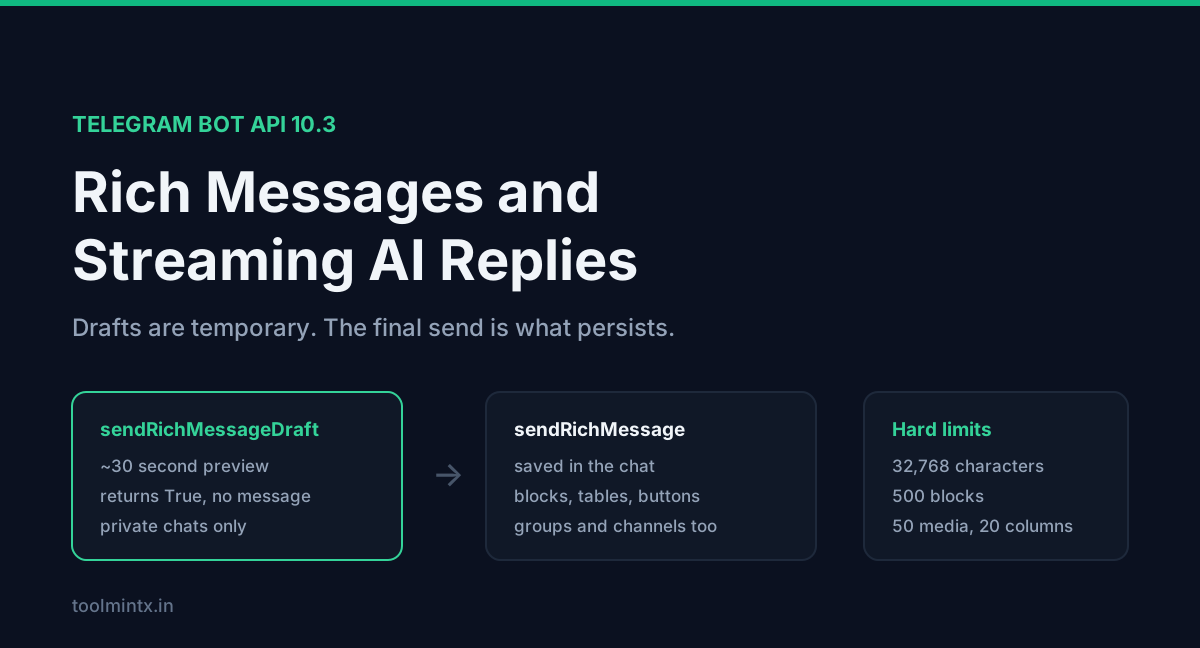
If your Telegram bot wraps an LLM, you have probably written the same hack twice. Send a placeholder message, call editMessageText every few hundred milliseconds as tokens arrive, hit a flood wait, then slow the loop until the typing feels wrong. Telegram now has a real method for this, sendRichMessageDraft, and it behaves differently from the edit loop.
The draft is temporary. It expires in about 30 seconds and doesn't persist in the chat, so when generation finishes you call sendRichMessage separately to save the output. Two calls, two objects, one of them disposable. Miss that and your bot streams a nice answer that vanishes.
Rich messages arrived in Bot API 10.1 on 11 June 2026, gained media handling in 10.2 on 14 July, and picked up buttons plus expandable quotes in 10.3 on 24 August. That is three releases in ten weeks, so much of the advice floating around is already stale.
Table of contents
- What a rich message is
- The streaming flow
- Draft IDs and animation
- Markdown, HTML or blocks
- The thinking block
- Buttons in 10.3
- Limits
- Stopping a generation
- Cost, rate limits and chat IDs
- FAQ
- Sources
What a rich message is
A normal Telegram message is one text blob plus an array of entities with byte offsets. Anything structural, like a table or a heading, you faked with monospace and newlines.
A rich message is a document. You send an array of blocks, each with a type: paragraph, heading, pre, list, table, blockquote, footer, divider, map, collage, slideshow, details, plus media blocks and a mathematical-expression block. Clients render them natively, so a code block looks like a code block and a table scrolls like a table.
Two objects are easy to mix up. RichMessage is what you receive, on the rich_message field of Message. InputRichMessage is what you send. Every block type exists in both forms, RichBlockParagraph for receiving and InputRichBlockParagraph for sending, so check the direction in the class name before you copy a field list from the docs.
The streaming flow
The disposable middle step is where people go wrong, so here is the whole lifecycle.
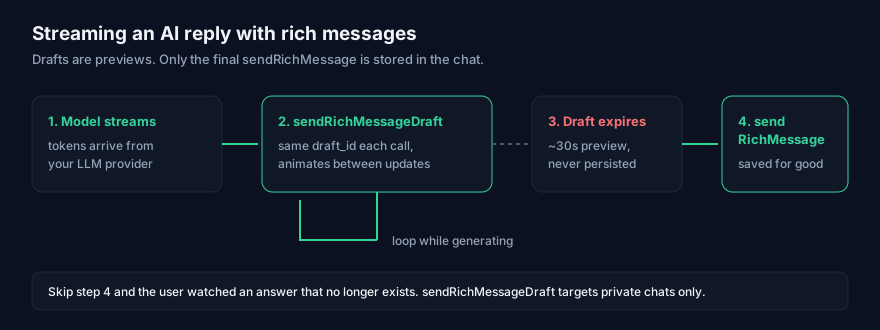
sendRichMessageDraft returns True, not a Message. There is no message ID to hold on to, because nothing was created. It takes an integer chat_id for a private chat, a non-zero draft_id and an InputRichMessage. You can't upload new files inside a draft or reference a file by URL, so any media has to wait for the final send.
Draft IDs and animation
draft_id decides whether the user sees smooth growth or a hard cut. Reuse the same non-zero value across calls and the client animates the diff between updates. Change it and the old draft is replaced with no animation.
Use one draft_id per generation. If a parallel tool call needs its own progress display, give it a second draft_id instead of a second message.
Markdown, HTML or blocks
InputRichMessage accepts exactly one of blocks, markdown or html. Pass two and the call fails.
| Field | Best for | Trade-off |
|---|---|---|
markdown | piping LLM output through nearly untouched | GFM-compatible where possible, so most model output survives |
html | when you need tags Markdown has no syntax for | verbose, but <sub>, <aside>, <tg-map> and buttons live here |
blocks | programmatic output you assemble yourself | explicit and typed, no parser surprises |
The Markdown flavour is deliberately close to GitHub Flavored Markdown, and models already emit GFM. **bold**, # Heading, fenced code blocks with a language tag, | tables |, - [ ] task items, > quotes, footnotes with [^id] and $x^2 + y^2$ for inline maths all parse.
Two additions beyond GFM are easy to miss: ==marked text== and ||spoiler||. You can mix HTML into the Markdown for the gaps, though Markdown is not parsed inside block-level HTML tags except <details>, <tg-collage> and <tg-slideshow>.
Media is where the two text modes get fiddly. Inside markdown or html you reference an upload with a tg://photo?id=, tg://video?id=, tg://document?id= or tg://audio?id= link, then declare that ID in the media array with the actual InputMedia* object. The document variant is new in 10.3. IDs are 1-64 characters, A-Z a-z 0-9 _ - only. Media must be its own block, never inline with a paragraph, and media blocks accept only HTTP and HTTPS URLs.
Telegram otherwise detects URLs, emails, @usernames, hashtags, cashtags, bot commands, phone numbers and bank card numbers on its own. To turn that off, pass skip_entity_detection: true. For a bot that outputs code or data, autodetection is usually noise.
The thinking block
InputRichBlockThinking renders a "Thinking…" placeholder, and it works only in sendRichMessageDraft. You can't receive one in a message because it never persists. Its HTML form is <tg-thinking>, its block type is "thinking", and Telegram ships a custom emoji pack at t.me/addemoji/AIActions intended for use inside it.
This is the slot for a reasoning trace. If your model has a thinking phase before the answer, put the status line here and the answer in normal paragraph blocks. The whole draft disappears when the final sendRichMessage lands.
Buttons in 10.3
Rich messages couldn't carry inline buttons until 24 August 2026. Now they can, through RichMessageButton and RichTextButton, plus RichBlockButtons and its input twin.
Buttons take a style: danger, success, primary, or link, which renders as a plain borderless link and is allowed only on callback buttons. Clients pick theme-appropriate colours per style. Exactly one type field must be set among url, callback_data, web_app, login_url, the three switch_inline_query variants, copy_text and disabled.
In HTML mode you write them as <tg-button type="callback_data" style="link" data="callback"> and group them with <tg-button-row align="center">. The disabled field points at a new DisabledButton class. The button renders but does nothing, which is the honest way to show a step the user hasn't unlocked yet, instead of removing it and reflowing the layout.
10.3 also added force_reply to InlineKeyboardMarkup and ReplyKeyboardMarkup, and is_compact to tables.
Limits
These are hard caps from the rich message limits section, and a generated document can hit several without anyone planning it.
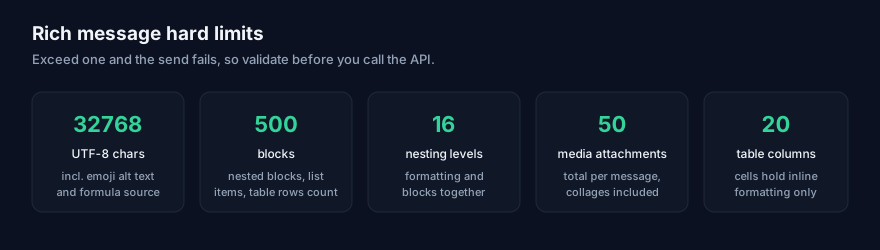
The 500-block cap counts nested blocks, list items, ordered list items, table rows, quotation blocks and details blocks. A model asked for "a detailed breakdown" will produce a 40-row table with a nested list per row and cross it without warning. Count blocks before you send, not after the API returns a 400.
Table cells accept inline formatting only, so no lists or media inside a cell. Formula source is raw LaTeX, passed through as-is.
That 400 tells you almost nothing about which nested field Telegram disliked, and these payloads go deep. Paste the body into the JSON Formatter to confirm the structure is valid and that blocks is an array of objects with type set on each one. That is faster than re-reading the docs. Half the failures I have seen were a single block missing its type.
Stopping a generation
10.3 added can_stop and keep_on_stop to both draft methods. Pass can_stop: true and the client shows a stop button. When the user presses it, your bot receives a stopped_message_generation update carrying a MessageGenerationStopped object with chat, an optional message_thread_id and the draft_id that was stopped.
Match on draft_id to find which generation to cancel, then cancel the upstream request. The button stops the user seeing more tokens. It doesn't stop your provider billing you for them.
keep_on_stop: true keeps the partial draft visible after the press, but it is still a draft: it disappears after a short time or as soon as your bot sends anything. To preserve what was generated before the stop, call sendRichMessage with the partial content, as you would on a normal completion.
Cost, rate limits and chat IDs
Every draft frame is a Telegram API call, but the expensive half is upstream. You pay for output tokens the user may never keep, and the draft that showed them is thrown away by design. With reasoning models the bill grows faster, because thinking tokens usually bill as output.
Run the numbers before you ship. The API Cost Calculator takes your model, average output length and request volume, so you can see what a streaming bot costs per thousand conversations instead of finding out on the invoice.
Message rate limits are unchanged: 30 messages per second by default, or up to 1000 with Paid Broadcasts enabled through @BotFather at 0.1 Telegram Stars per message beyond the free allowance, set via allow_paid_broadcast. Only successful sends are charged.
sendRichMessage takes a chat_id as an integer or an @username. For a group or channel that ID is negative with a -100 prefix, which breaks naive integer parsing. getUpdates also returns nothing while a webhook is set, the usual reason a chat ID lookup comes back empty. Our Telegram Chat ID Finder takes a bot token, validates it, names the bot back so you know you pasted the right one, and lists the chat, group and channel IDs it can see, with the -100 form handled. It runs in your browser.
sendRichMessageDraft accepts only a private-chat integer chat_id, so group streaming isn't available. A group bot streams nothing and posts the finished rich message once.
If you are still on the edit loop, swap to sendRichMessageDraft this week. The two-call shape (drafts for the stream, sendRichMessage for the result) is the one thing to get right on day one. Buttons, thinking blocks and the stop update can wait until the stream works.
FAQ
What is the difference between sendRichMessage and sendRichMessageDraft?
sendRichMessage creates a real message and returns it. sendRichMessageDraft streams a temporary preview, returns True, expires in about 30 seconds and never persists. You need both for a streaming reply.
Do I still need editMessageText for streaming?
No. editMessageText gained a rich_message parameter in 10.1 for editing rich messages, but drafts are the intended path for streaming partial output.
Can I stream to a group?
No. sendRichMessageDraft takes a private-chat chat_id only. In a group, send the completed rich message.
Which Bot API version do I need?
10.1 for rich messages and both send methods, 10.2 for the media array and block classes, 10.3 for buttons, expandable quotations, documents in rich messages and the stop-generation update.
Sources
- Telegram Bot API reference:
sendRichMessage,sendRichMessageDraft,InputRichMessage, block classes, rich message limits and formatting options, read 8 September 2026 - Bot API changelog: Bot API 10.1 (11 June 2026), 10.2 (14 July 2026) and 10.3 (24 August 2026) entries, read 8 September 2026


