You added the bot to your channel, posted "test", ran getUpdates, and got back {"ok":true,"result":[]}. No error. The same bot answers instantly in a private chat and in a group, so the token is fine. The channel is the problem, and it is usually one of four things, none of which Telegram reports as an error.
Channels differ from groups in how updates reach a bot. Posts arrive under a different key, the bot needs a role it does not need anywhere else, and one setting you may have changed months ago can silently filter channel posts out. Here is each cause, checked against the Bot API spec (version 10.3, 24 August 2026), plus three ways to get a channel ID without waiting for a post at all.
Table of contents
- Why a channel lookup returns nothing
- Cause 1: you are reading message, not channel_post
- Cause 2: the bot is a member, not an admin
- Cause 3: a saved allowed_updates filter
- Cause 4: a webhook is still registered
- Three ways to get the ID without posting
- Which method to use
- FAQ
- Conclusion
- Sources
Why a channel lookup returns nothing
A group message and a channel post are both Message objects, but Telegram wraps them in different fields of the Update. The spec is also explicit that "at most one of the optional fields can be present in any given update", so a channel post never shows up as message as a courtesy.
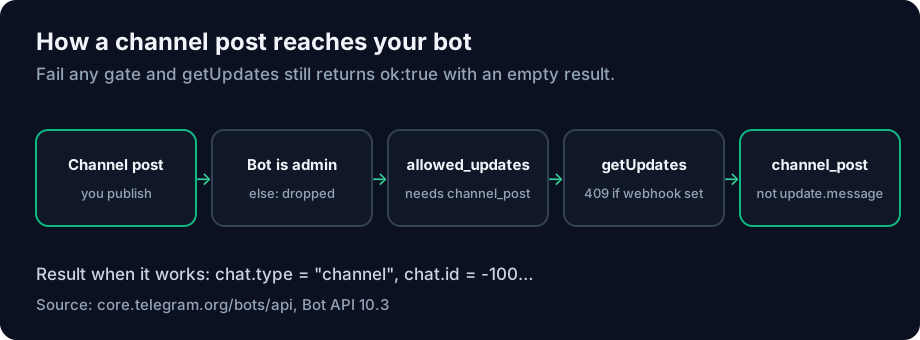
That gives you four gates. A post has to come from a channel where the bot is an admin, pass the bot's saved update filter, reach getUpdates rather than a webhook, and then be read from the right key. Fail any one and the result is the same empty array.
Cause 1: you are reading message, not channel_post
This is the most common one, because nearly every "get your chat ID" snippet online was written for private chats and groups. The Bot API lists channel_post as its own update type: "New incoming channel post of any kind - text, photo, sticker, etc." Edits come in as edited_channel_post.
A script that does update["message"]["chat"]["id"] raises a KeyError on a channel post, or skips it quietly if it used .get(). Read both keys:
m = u.get("message") or u.get("channel_post") or {}
chat = m.get("chat", {})
print(chat.get("type"), chat.get("id"), chat.get("title"))
When it works, chat.type reads channel and the ID starts with -100. That prefix is part of the number. Our explainer on what the -100 prefix means covers why, and why trimming it gives you chat not found.
Cause 2: the bot is a member, not an admin
In a group a bot can sit as a regular member and still see commands. A channel has no regular members who can post, and bots only receive channel posts once they are an administrator. Add it from the channel's Administrators screen, not as a subscriber.
Keep the rights minimal. In the Bot API, can_post_messages is the channel right that lets an admin "post messages in the channel, approve suggested posts, or access channel statistics", and a lookup bot does not need to publish. Grant it later if the bot is going to post.
Cause 3: a saved allowed_updates filter
This one is hard to spot, because it is caused by something you set months ago, possibly on another machine. getUpdates and setWebhook both accept allowed_updates, a list of the update types you want. The spec's description ends with this sentence: "If not specified, the previous setting will be used."
So the filter persists on Telegram's side. If a framework or an old script ever registered the bot with allowed_updates=["message","callback_query"], then every later getUpdates call that omits the parameter keeps that filter. Channel posts are dropped before they reach you, and nothing tells you why.
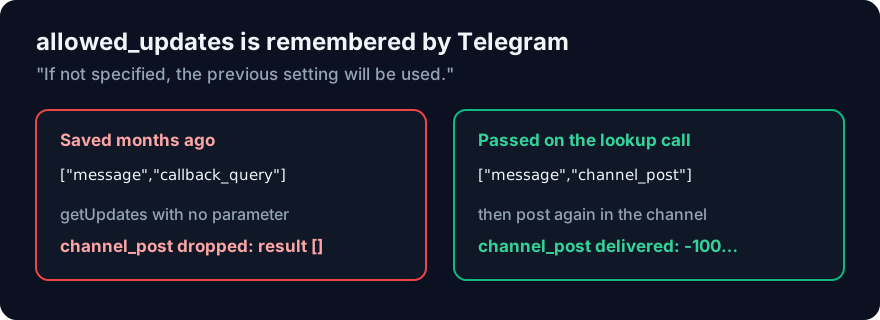
The fix is to name the types on the lookup call:
curl -s "https://api.telegram.org/bot<YOUR_BOT_TOKEN>/getUpdates" \
  --data-urlencode 'allowed_updates=["message","channel_post","my_chat_member"]'
Be aware that this call also updates the saved setting. If the bot runs in production, re-register its webhook with the list it actually needs once you have your ID. The spec adds one more caveat: the parameter "doesn't affect updates created before the call", so post again after changing it.
An empty list is not a reset to "everything" either. The default, as the spec puts it, is "all update types except chat_member, message_reaction, and message_reaction_count". channel_post and my_chat_member are both included in that default.
Cause 4: a webhook is still registered
If you get 409 Conflict instead of an empty array, the bot has a webhook set. getUpdates "will not work if an outgoing webhook is set up", and Telegram allows one delivery method at a time. deleteWebhook switches the bot back to polling. Leave drop_pending_updates off, or you throw away the queue you are trying to read.
Undelivered updates only wait 24 hours, so a post from last week is gone whichever method you use. Post a fresh one.
Three ways to get the ID without posting
You do not have to publish a test post to your subscribers. Each of these returns the same -100… number.
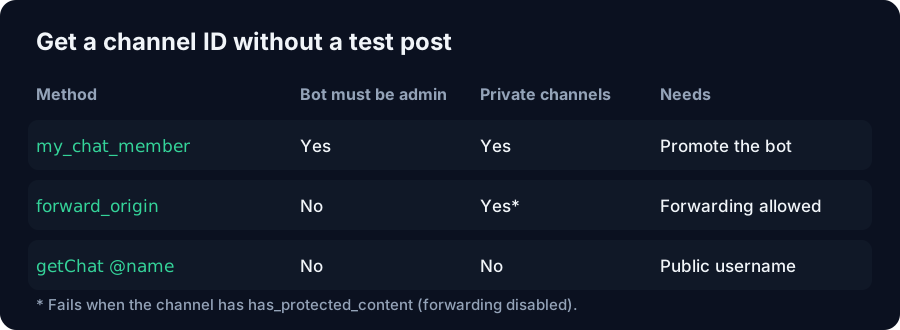
Read my_chat_member when you add the bot. Promoting the bot to admin fires a my_chat_member update, described in the spec as "the bot's chat member status was updated in a chat". Its chat field is the channel. Add the bot, then poll: the ID is in the queue before anyone posts anything. The Telegram Chat ID Finder reads this update, so starting it and then promoting the bot is enough.
Forward a channel post to the bot. A forwarded message carries forward_origin. When the original was posted in a channel, its type is channel and its chat field is the "channel chat to which the message was originally sent". The ID sits at message.forward_origin.chat.id. This works for a channel the bot has not joined, as long as you can forward from it. Channels with has_protected_content block forwarding, so this route fails there.
Call getChat with the public username. For a public channel, getChat accepts @channelusername as chat_id and returns a ChatFullInfo whose id is the numeric ID. It is one request and no updates are involved. Private channels have no username, so this only covers public ones.
Which method to use
If the bot is going to post in the channel anyway, add it as admin and read my_chat_member. It needs nothing extra and gives you the ID the moment you save the admin change.
If you only need the ID for a public channel, getChat with the username is the fastest and touches nothing. Store the number it returns rather than the username. Owners can change or release usernames, but a channel's numeric ID stays fixed.
If the channel is private and you do not want the bot in it, forward one post to the bot in a private chat and read forward_origin.chat.id, unless forwarding is disabled.
FAQ
Why does getUpdates return an empty result for my Telegram channel?
Either the bot is not a channel admin, a saved allowed_updates filter excludes channel_post, or the post came before the filter changed. An empty result with "ok":true means nothing reached the queue, not that the token is wrong.
Does my bot need admin rights to see channel posts?
Yes, it has to be an administrator of the channel. A bot added as a plain subscriber gets nothing. Grant can_post_messages only if it will publish.
Why do channel posts not appear under message?
Telegram delivers them as channel_post, a separate field of Update, and only one field is present per update. Read message or channel_post.
How do I get a private Telegram channel's ID?
Add the bot as admin and read the chat.id from the my_chat_member update, or forward a post from the channel to the bot and read forward_origin.chat.id. getChat with a username only works for public channels.
What does allowed_updates do if I leave it out? Telegram reuses the previous setting. A filter set once by an old script or framework keeps applying to every later call until you pass a new list.
Is a Telegram channel ID the same as a supergroup ID?
They share one ID range and both start with -100, so the number alone cannot tell you which you have. Check chat.type, which is channel or supergroup.
Can I use @channelname instead of the numeric ID?
For public channels, yes, in sendMessage and getChat. Usernames can be changed or released by the owner, so store the numeric ID for anything long-lived.
Conclusion
An empty getUpdates on a channel is almost never a broken bot. Most of the time the script is reading message instead of channel_post, the bot is a subscriber instead of an admin, or a saved allowed_updates list is dropping the post.
Skip the test post if you can. Read my_chat_member when you promote the bot, call getChat for a public channel, or forward a post and read forward_origin.chat.id.
The Telegram Chat ID Finder runs the my_chat_member route in the browser and handles the webhook conflict for you. For picking apart a raw getUpdates payload, paste it into the JSON Formatter.
Sources
- Telegram Bot API, core.telegram.org —
Updatefields (channel_post,my_chat_member, one field per update),getUpdatesandallowed_updatespersistence and default,MessageOriginChannel,getChat,has_protected_content,can_post_messages, Bot API 10.3 of 24 August 2026, read 29 September 2026 - Bot API dialog IDs, core.telegram.org — shared ID range for supergroups and channels, read 11 September 2026


