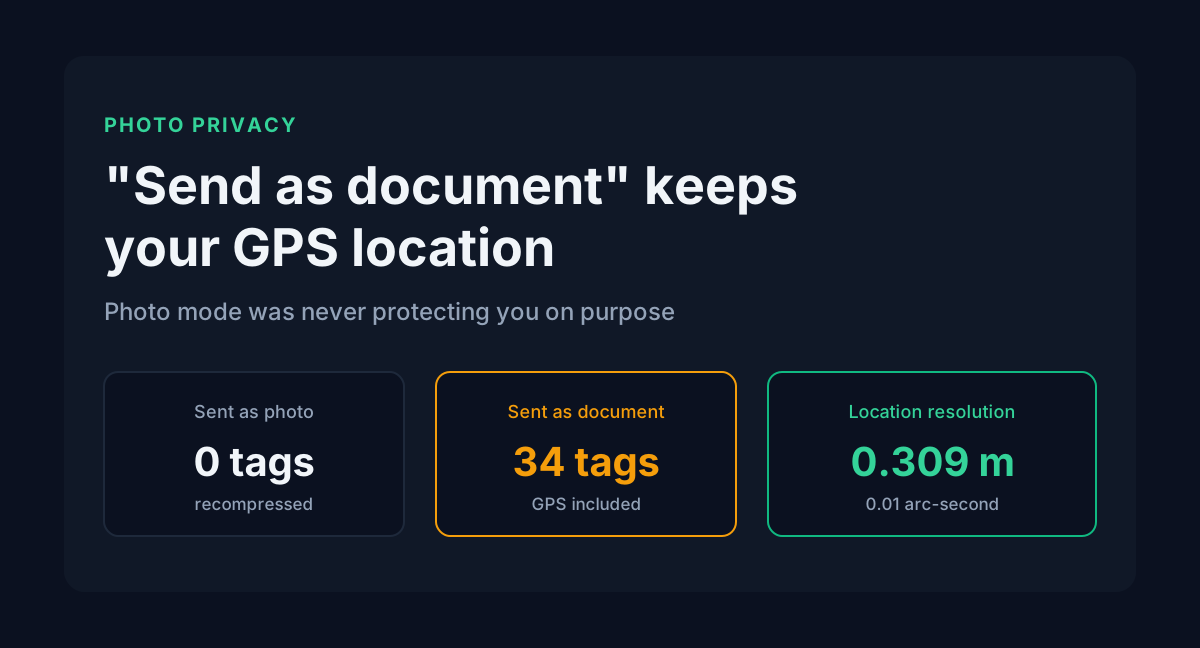
Someone asks you for a photo and adds "please send it as a document, not as an image, quality kharab ho jaati hai." Reasonable request. WhatsApp compresses photos badly, and sending as a file fixes that.
It also ships your GPS coordinates to them, accurate to about a third of a metre.
The compression you were avoiding was doing something else on the side. It rebuilt the image from pixels and dropped every hidden block in the process. Turn the compression off and the accidental privacy goes with it.
Table of contents
- What is inside the file
- Why photo mode stripped it
- How precise the GPS location is
- Stripping metadata does not shrink the file
- PDFs store metadata twice
- What a half cleanup leaves behind
- Before you send a file
- FAQ
- Sources
What is inside the file
I built a 4032x3024 JPEG with the metadata a modern phone typically writes, then walked its markers byte by byte. The camera data sits in three separate directories inside a single 778-byte APP1 segment.
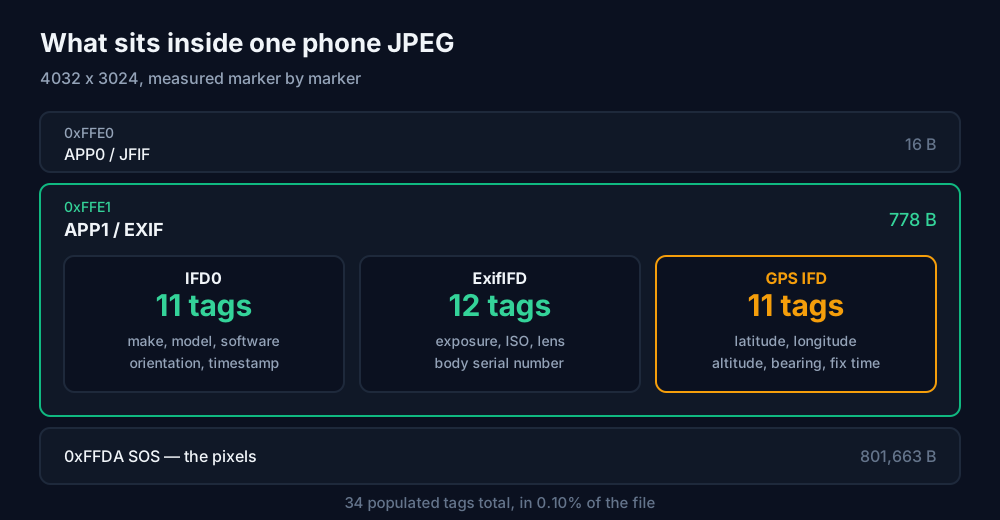
Thirty-four populated tags across the three. IFD0 carried the make, model, software version and orientation. ExifIFD carried exposure, aperture, ISO, focal length, both timestamps, the lens description and the camera body serial number. The GPS directory had eleven tags of its own: latitude, longitude, altitude, the satellite fix timestamp, compass bearing and the date of the fix.
People tend to underestimate the serial number. It is a fixed identifier that links every photo from that handset to every other photo from it, including ones you posted publicly years ago.
Why photo mode stripped it
When you send that file through WhatsApp's gallery picker, the app recompresses it. Recompression decodes the JPEG to a pixel grid and writes a new file from that grid, and a file written from pixels has nowhere to put an APP1 segment.
I reproduced the operation: decode, copy the pixels into a fresh image, re-encode. It is the same browser canvas trick our bulk image metadata remover uses, and the result came out clean.
| Property | Original JPEG | After pixel-only re-encode |
|---|---|---|
| APP1 segment | 778 B | absent |
| Populated EXIF tags | 34 | 0 |
| GPS directory | present | absent |
| Pixel dimensions | 4032 x 3024 | 4032 x 3024 |
Nothing here was designed to protect you. Privacy was a side effect of a bandwidth decision, and "send as document" skips the recompression, hands over the original bytes and loses the side effect. This is why "share as a file to keep quality" and "share as a file to keep metadata" amount to the same advice. Photography forums give it for the first reason, and people documenting evidence give it for the second.
How precise the GPS location is
EXIF does not store a decimal latitude. It stores degrees, minutes and seconds, each as a fraction with its own denominator, and the seconds field decides the resolution.
A phone typically writes seconds with a denominator of 100, so the smallest step is one hundredth of an arc-second. One degree of latitude spans about 111,320 metres, so one arc-second is 111320 / 3600 = 30.92 metres. One hundredth of that is 0.309 metres.
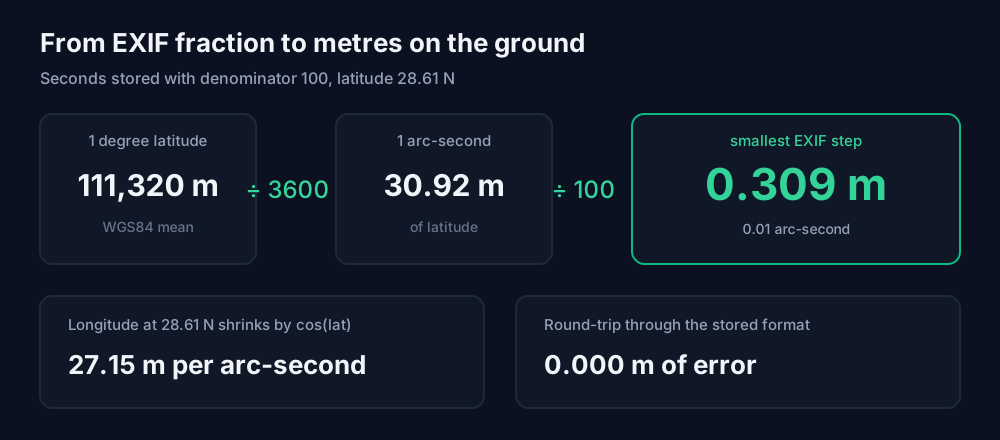
That is 31 centimetres, enough to tell which room of the house you were standing in. Longitude is slightly tighter in absolute terms because meridians converge. At Delhi's latitude of 28.61 degrees, one arc-second of longitude covers 27.15 metres rather than 30.92.
I round-tripped the encoding to check that the storage format wasn't losing precision. Input 28.613900 degrees, decoded back to 28.613900 degrees, error 0.000 metres. The format keeps everything the GPS chip claims.
Whether your phone's fix is genuinely accurate to 31 cm is a separate question, and usually it isn't. The file has room to record it at that resolution anyway, and the recipient can't tell a precise reading from a lucky one.
Stripping metadata does not shrink the file
Many guides on this subject promise smaller files after cleaning. I measured the pair above and the result went the other way.
| File | Bytes |
|---|---|
| With full EXIF and GPS | 803,052 |
| After stripping, pixel-identical | 803,161 |
The cleaned file is 109 bytes larger. Removing 778 bytes of metadata grew the file, because re-encoding the pixel grid produced slightly different entropy coding than the original pass, and that difference outweighed the segment I deleted. Strip metadata for privacy. On a real photo the storage saving is a rounding error, and on this one it didn't exist.
PDFs store metadata twice
Images have one hiding place. PDFs have two.
The older location is the document information dictionary, which holds Title, Author, Subject, Keywords, Creator and Producer. It is what File, then Properties shows in any viewer. The newer location is an XMP packet, an XML block embedded in the file and written by most modern editors in addition to the old dictionary.
I assembled a PDF by hand with both copies populated, the way a Word export arrives, and counted the bytes.
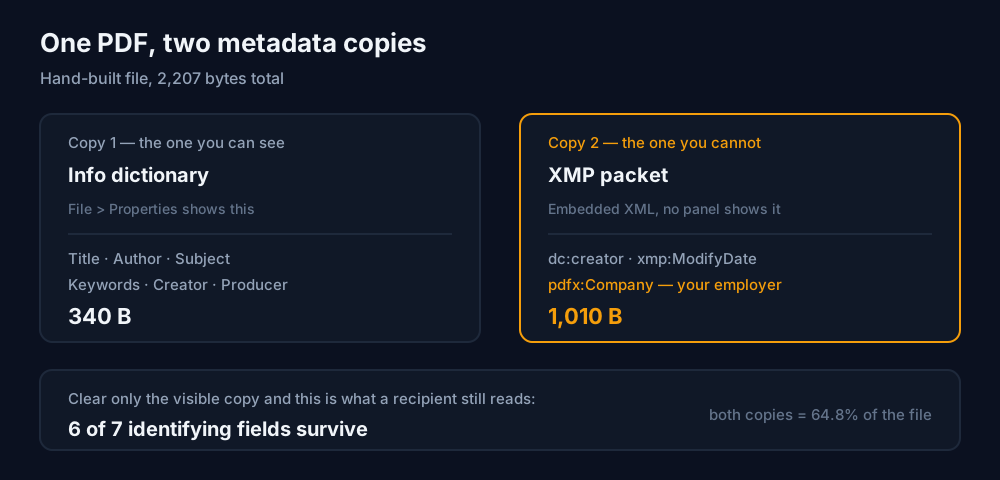
The XMP packet alone was 1,010 bytes. On a short document the two copies together came to 64.8% of the entire file, so on a small PDF more of the bytes can be identifying information than content.
The XMP block also carried a field the Properties panel never shows: pdfx:Company. Word writes your organisation name there from your Office installation. Nobody types it and nobody sees it, but it travels with every PDF you export.
What a half cleanup leaves behind
The common mistake is clearing only the fields you can see. I ran a byte-level grep on all three versions, looking for each identifying string the way a recipient with a text editor would.
| Field | Original | Info dict cleared only | Both cleared |
|---|---|---|---|
| Author name | leaks | still leaks | gone |
| Company name | leaks | still leaks | gone |
| Producing software | leaks | still leaks | gone |
| Internal draft filename | leaks | still leaks | gone |
| Edit timestamp | leaks | still leaks | gone |
| Internal subject line | leaks | gone | gone |
| Document ID | leaks | still leaks | still leaks |
Clearing the visible fields removed one of seven. Six identifying fields survived in the XMP copy, including the author name and the company, because the two copies are independent storage and emptying one does nothing to the other.
Viewers add to the confusion. Several PDF readers prefer XMP when both exist, so you can clear the Author box, save, reopen the file and watch the old name come back. It looks like the edit failed. The edit worked, and the reader is showing the copy you didn't touch.
The last row matters too. The document ID, a fixed identifier in the trailer, survived clearing both metadata copies. Removing it takes a tool that targets it explicitly, which is why our PDF metadata editor drops the XMP stream and the document ID together instead of blanking only the six fields you can see.
Before you send a file
If you are sending a file rather than a photo, clean it first. Nothing in the transfer will do it for you.
For images, decide what you want. Send as document for quality, which keeps everything. Let the app compress for privacy, which keeps nothing. If you want both, strip the metadata yourself and send the stripped file as a document. The batch tool exists for the case where you have thirty photos rather than one.
For PDFs, verify instead of trusting the editor. Clear the fields, save, reopen the saved file and check the Properties panel again. If a value you cleared has come back, you edited one copy and the reader is showing you the other. You can't tell from looking at a file which version you have, so the check belongs before you hit send.
Two things no metadata tool can do. It can't remove what is visible in the pixels, so a street sign, a licence plate or a name on an envelope stays where it is. And it can't help with a platform that keeps its own copy of the original upload, which several do regardless of what the file you handed over contained.
FAQ
Does sending a photo as a document on WhatsApp keep the GPS location?
Yes. Document mode transfers the original file without recompressing it, so the EXIF block, including the GPS directory, arrives intact and the recipient can read your coordinates. Photo mode recompresses the image, which rebuilds it from pixels and drops the metadata as a side effect.
How accurate is the GPS in a photo's EXIF data?
The format can record your position to roughly a third of a metre. EXIF stores seconds typically at a denominator of 100, a smallest step of 0.01 arc-seconds, and one arc-second of latitude is 30.92 metres, so the step is 0.309 metres.
Why does the author name come back after I clear it in a PDF?
The PDF stored it twice. You cleared the document information dictionary, but the XMP packet still holds the old value, and many viewers prefer XMP when both exist. Use a tool that removes the XMP stream as well as the visible fields.
Can metadata removal hide a face or a licence plate?
No. Metadata lives outside the pixel data, so stripping it changes nothing you can see. Anything visible in the image needs the pixels edited.
Sources
- All byte counts, tag counts, precision arithmetic and leak comparisons in this post were measured locally: a 4032x3024 JPEG constructed with a full EXIF, ExifIFD and GPS directory then marker-walked segment by segment, and a PDF assembled by hand with both an Info dictionary and an XMP packet, then grepped at the byte level after each cleanup stage.
- EXIF 2.32, published 2019 by the Japan Electronics and Information Technology Industries Association, defines the APP1 segment layout, the GPS IFD tag set and the rational storage format for coordinates.
- Apple Support, "Manage location metadata in Photos" (Personal Safety User Guide), documents removing location from a photo via Adjust Info, Adjust Location, No Location.
- Google Photos Help, "Understand, find and edit your photos' locations", states that a location written automatically by the camera cannot be edited or removed in Google Photos, only estimated or manually added locations can.
- WGS84 mean value of 111,320 metres per degree of latitude, used for the arc-second conversion; the longitude figure at 28.61 degrees N applies the cosine of the latitude.


