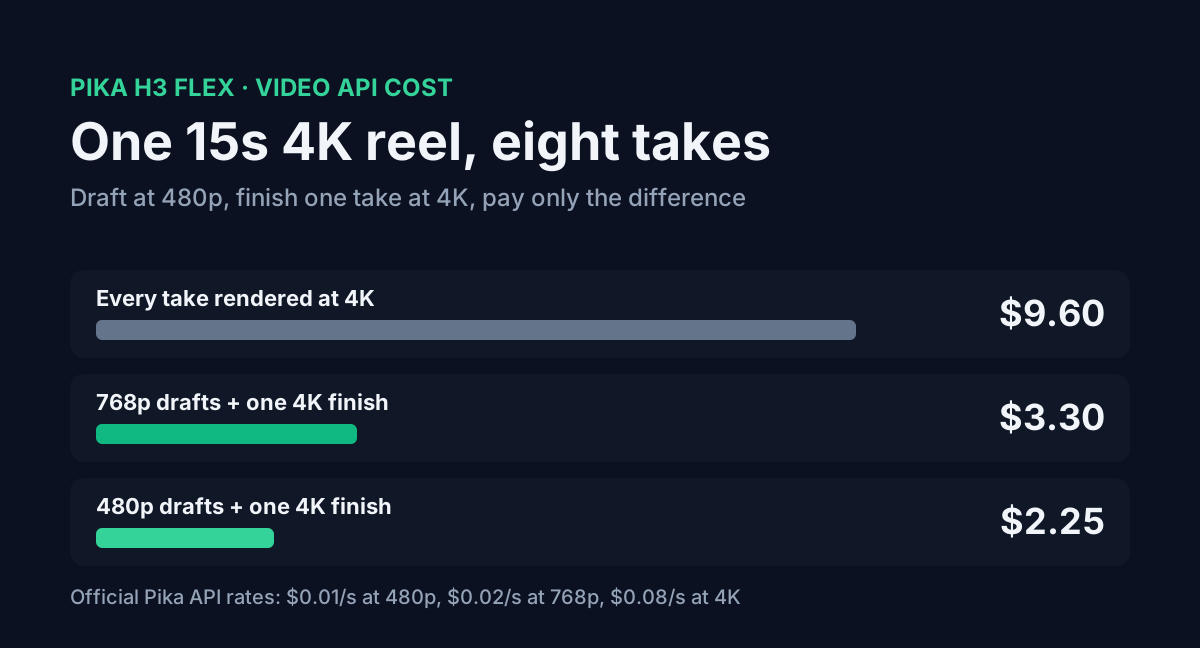
Pika put Pika H3 Flex on Hugging Face on 29 October 2026. It's a pair of LoRA adapters on top of MiniMax H3 that make video with synced stereo audio in six sampling steps, and it supports up to 12 reference files per clip. The weights are open. The same model is also sold through Pika's API, and that's where the interesting part is.
The API lets you render a cheap 480p draft, throw away the takes you don't like, and finish the one you keep at 1080p, 2K or 4K. Finishing costs the 4K price minus what the draft already cost. So a bad take costs $0.15 instead of $1.20.
Below are the official per-second rates, one short-form reel costed with eight takes, what the local route actually needs in GPU memory and disk, and the request flow for the API.
Table of contents
- What Pika released
- Price per second by mode
- One reel with eight takes
- How the finish is billed
- Running it on your own GPU
- ComfyUI files and sizes
- Request flow for the API
- FAQ
- Sources
What Pika released
| Pika H3 Flex | |
|---|---|
| Published | 29 October 2026 (Hugging Face) |
| Base model | MiniMax H3 |
| Weights | Two FP32 LoRA adapters, rank and alpha 128: FL2VA (text and first/last frame) and Ref2VA (references) |
| Sampling | Six steps, with Pika's own schedule |
| Native output | 480p or 768p, 24 fps, 32 kHz stereo audio, MP4 |
| Length | 5 to 15 seconds per request |
| Aspect ratios | 11, from 21:9 to 9:21, including 9:16 |
| References | Up to 9 images, 3 videos and 3 audio clips, 12 files total |
| Prompt | 1 to 8,000 characters |
| Licence | MiniMax H3 Community License Agreement |
Local inference stops at 768p. The 1080p, 2K and 4K outputs, separate audio stems and the prompt rewriter exist only on the hosted API.
Length rounds up to the model's frame grid. A 5-second request gives 124 frames, about 5.17 seconds. A 15-second request gives 362 frames, about 15.08 seconds.
Price per second by mode
Pika bills per second of output, and only successful jobs are charged. These are the catalog rates, per second:
| Resolution | Text or image to video | Reference to video |
|---|---|---|
| 480p | $0.01 | $0.03 |
| 768p | $0.02 | $0.06 |
| 1080p | $0.035 | $0.075 |
| 2K | $0.04 | $0.08 |
| 4K | $0.08 | $0.10 |
Two lines in that table catch people out. Reference-to-video costs 3x the text rate at 480p. It also bills each second of reference video you upload at the same rate as the output. A 15-second 480p clip driven by a 15-second motion reference costs $0.90, not $0.45.
The extras are cheap. The prompt rewriter is a flat $0.02 per request. Audio stems (dialogue, score, SFX, foley and ambience as WAV files) cost $0.001 per output stem second, so all five stems of a 15-second clip come to $0.075.
You can price these in the API cost calculator, which now lists Pika H3 Flex under video.
One reel with eight takes
Take a creator making one 15-second vertical reel. Prompt-driven video misses often, so assume eight takes before one is worth keeping. The final ships in 4K.
| Workflow | Cost per reel |
|---|---|
| Eight takes rendered straight at 4K | $9.60 |
| Eight 768p drafts, finish one at 4K | $3.30 |
| Eight 480p drafts, finish one at 4K | $2.25 |
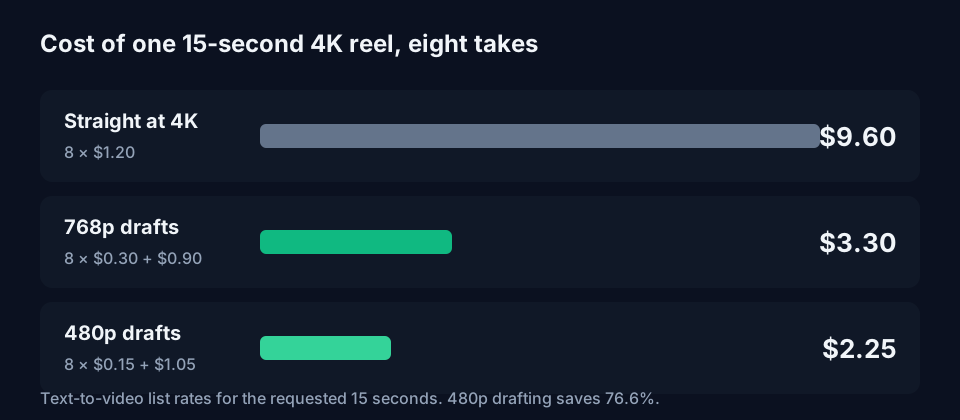
The 480p route saves 76.6%. Each draft is $0.15, and the finish adds $1.05. At 30 reels a month that's $67.50 against $288.00 for rendering every take at 4K, and $99.00 if you draft at 768p.
If the final only needs 1080p, eight 480p drafts plus one finish come to $1.57 against $4.20 for eight 1080p renders, which saves 62.5%.
These are list prices for the requested 15 seconds. The draft-to-video spec bills per actual output second, and the frame grid makes a 15-second clip about 15.08 seconds long, so expect a cent or so more per clip. For prompt help on the first draft, the image prompt generator gives you a scene description to start from.
How the finish is billed
The catalog calls the mode flex_draft_difference. The finish price is the direct price at the target resolution minus what you paid for the draft. For a 15-second clip:
| Draft | Draft cost | Finish to 1080p | Finish to 4K |
|---|---|---|---|
| 480p | $0.15 | $0.375 | $1.05 |
| 768p | $0.30 | $0.225 | $0.90 |
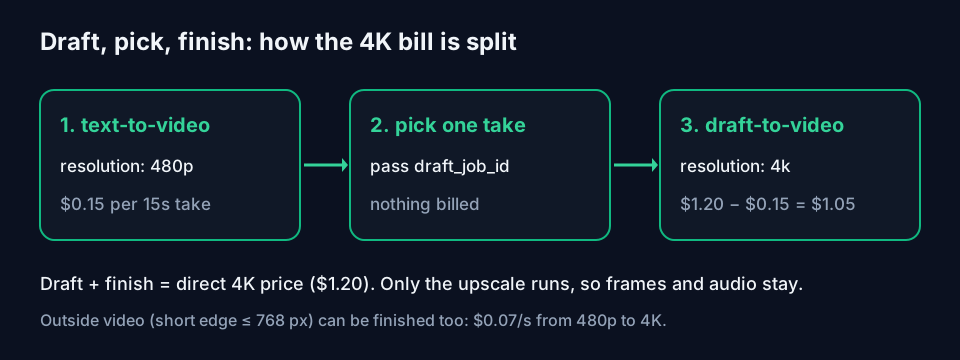
Draft plus finish always equals the direct price of the final, $1.20 for 15 seconds at 4K. Drafting first never costs more than going straight to 4K. The upscale is the only stage that runs, and it keeps the original frames, frame rate and audio, so the 4K file is the take you approved.
The text-to-video schema explains why that works. A request for 1080p, 2K or 4K generates at 768p and then upscales once. Asking for 4K directly runs the same pipeline as a 768p draft plus a finish.
The finish endpoint also takes outside video. Pass a URL instead of a draft id and Pika upscales any clip whose short edge is 768 pixels or less, up to 512 MiB and 1,441 frames. Billing is the target rate minus the matching native rate per second: $0.07 a second to take a 480p clip to 4K.
Running it on your own GPU
The open weights skip the per-second bill, but the hardware notes are blunt. Pika qualified the package on an H100 80GB only. H200 and B300 haven't been qualified, and no consumer card is listed.
| Request | GPU memory during sampling | Notes |
|---|---|---|
| 480p, 5 seconds, default | About 66 to 69 GiB | Fits on H100 80GB |
| 768p, 15 seconds, default | Over 80 GiB | Exceeds H100 |
768p, 15 seconds, --cpu-offload | About 29 to 32 GiB | Host memory near 94 GiB |
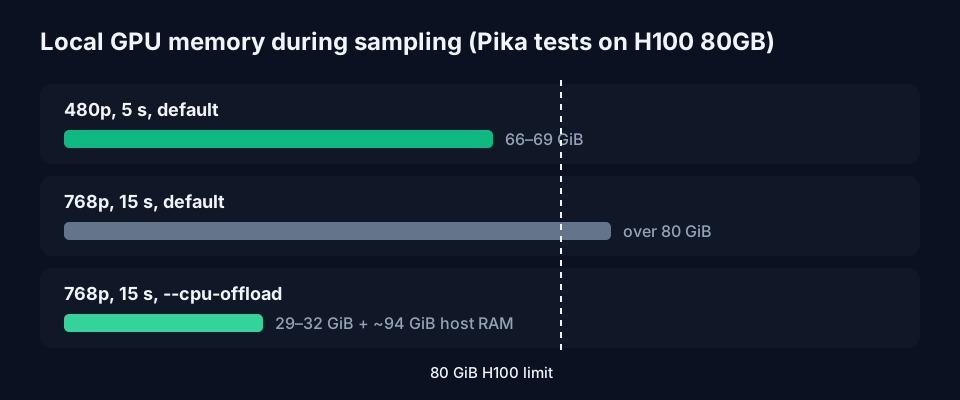
Those figures cover sampling only. The text encoder and the two VAEs need memory on top. Disk is the other wall: 211 GB for the base components plus about 5.5 GB for both adapters. The package needs Python 3.12 and runs one request per GPU. A second GPU runs a second request, it doesn't split one.
Local output tops out at 768p. To get 4K from a local render you'd still send it to the paid finish endpoint as an external video, at $0.07 a second from 480p.
ComfyUI files and sizes
Comfy published three templates (text to video, reference to video, first and last frame) under Template Library > Video. They load a quantized H3 base plus one Pika adapter. The text-to-video template uses these files:
| File | Folder | Size |
|---|---|---|
minimax_h3_fl2va_pruned_int8_convrot | models/diffusion_models/ | 20.97 GB |
qwen3vl_32b_minimax_h3_nvfp4_awq | models/text_encoders/ | 15.69 GB |
minimax_h3_video_vae_int8_convrot | models/vae/ | 2.81 GB |
minimax_h3_audio_vae_fp32 | models/vae/ | 0.61 GB |
pika_h3_flex_fl2va_v1_bf16 | models/loras/ | 1.96 GB |
That's 42.04 GB to download, against 211 GB for the full package. Text to video needs ComfyUI 0.43.2 or newer. The other two templates need 0.30.0.
Comfy says a 5-second 1344x768 clip finishes in about a minute on a single card but doesn't name the card. Pika's adapter README says the Comfy conversion was checked tensor by tensor, but an end-to-end ComfyUI render wasn't verified as part of the upload.
Keep the adapter strength at 1.0 and leave the template's sigma list alone. Don't stack a 4-step or 8-step turbo LoRA on top. The adapter is already distilled to six steps, and a second speed-up LoRA breaks the output.
If you want to estimate memory for the Qwen3-VL 32B text encoder on its own, the AI VRAM calculator handles that part. It doesn't model video diffusion.
Request flow for the API
Every generation runs against production, and there's no free tier. Pika's docs suggest reading the balance first, which is a free call:
curl https://api.dev.pika.art/billing/balance \
  -H "X-API-Key: YOUR_API_KEY"
balance_micro_usd is dollars times 1,000,000. Then submit the draft at 480p:
curl -X POST https://api.dev.pika.art/v1/media/pika/pika-h3-flex/text-to-video \
  -H "X-API-Key: YOUR_API_KEY" \
  -H "Content-Type: application/json" \
  -d '{
  "prompt": "YOUR_PROMPT",
  "duration": 15,
  "aspect_ratio": "9:16",
  "resolution": "480p"
}'
The default resolution is 768p, so set 480p explicitly or every draft costs double. rewrite defaults to true and rewrites your prompt before generation. Set it to false if you've tuned the prompt yourself.
The submit returns a job id with status queued. Poll GET /v1/media/jobs/{request_id} until it reads completed or failed. When you've picked a take, send its id to the finish endpoint:
curl -X POST https://api.dev.pika.art/v1/media/pika/pika-h3-flex/draft-to-video \
  -H "X-API-Key: YOUR_API_KEY" \
  -H "Content-Type: application/json" \
  -d '{
  "draft_job_id": "YOUR_DRAFT_JOB_ID",
  "resolution": "4k"
}'
The finish endpoint defaults to 2K, not 4K. Each completed job carries billing.charge_micro_usd, so log that per job id rather than trusting your own sum. Retry a failed submit with a fresh Idempotency-Key, because the same key replays the failed job.
FAQ
Is Pika H3 Flex free for commercial use?
It depends on the MiniMax H3 Community License Agreement, which covers the adapters. Comfy's tutorial points to its territorial and commercial-use conditions. Read it before you sell output.
Can the finish step change the take?
No. Only the upscale stage runs. The draft's frames, frame rate and audio are kept.
Does a failed generation cost money?
No. Pika charges only successful generations. A failed job reports a settled charge of 0.
Can I draft locally and finish on the API?
Yes, through the external video option. A 480p clip to 4K costs $0.07 a second, $1.05 for 15 seconds, the same as finishing an API draft.
Sources
- Pika H3 Flex model card, Hugging Face (read 1 November 2026)
- Pika H3 Flex hardware and tested configurations, GitHub
- Pika H3 Flex ComfyUI adapters README
- Pika API text-to-video specification and pricing
- Pika API reference-to-video specification and pricing
- Pika API draft-to-video specification
- Pika API index (llms.txt)
- Pika H3 Flex ComfyUI workflows, Comfy docs
- Comfy-Org/MiniMax-H3 file sizes, Hugging Face


