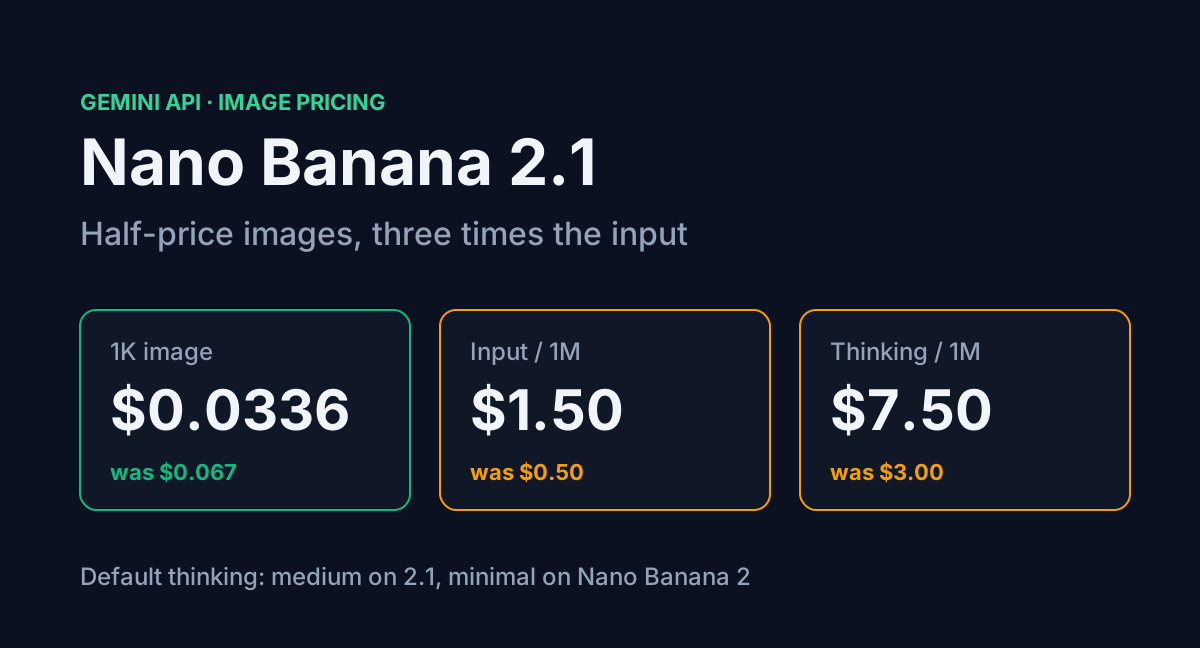
Google's newest image model on the Gemini API is Gemini Nano Banana 2.1 (gemini-nano-banana-2.1), an update to Nano Banana 2 (Gemini 3.1 Flash Image). Google's image docs now say all new projects should use it. The pricing page shows why most people will want to: a 1K output image costs $0.0336, half the $0.067 Nano Banana 2 charges.
The rest of the price table moved the other way. Input is $1.50 per million tokens, three times Nano Banana 2's $0.50. Text and thinking output went from $3 to $7.50. And 2.1 thinks at a "medium" level by default, where Nano Banana 2 defaults to "minimal". For a one-line prompt none of that matters. For an editing pipeline that sends reference images and lets the model think, it eats into the saving.
This post costs a few real workloads on both models, finds the point where 2.1 stops being cheaper, and lists the settings worth changing before you switch.
Table of Contents
- The price table, line by line
- Cost per image at 1K, 2K and 4K
- Three workloads costed
- Where thinking tokens erase the saving
- What 2.1 drops
- Settings to change before you switch
- FAQ
- Conclusion
- Sources
The price table, line by line
Paid tier, per million tokens, from Google's Gemini API pricing page. Neither model has a free API tier.
| Rate | Nano Banana 2.1 | Nano Banana 2 | Nano Banana 2 Lite |
|---|---|---|---|
| Input (text, image, video) | $1.50 | $0.50 | $0.25 |
| Text and thinking output | $7.50 | $3.00 | $1.50 |
| Image output | $30.00 | $60.00 | $30.00 |
| Default thinking level | medium | minimal | minimal |
| Resolutions | 1K, 2K, 4K | 0.5K, 1K, 2K, 4K | 1K only |
The headline cut is on one line, image output. The two lines that grow with prompt size and reasoning both went up.
Cost per image at 1K, 2K and 4K
Google converts the image output rate into per-image prices using a fixed token count per resolution. The token counts for 1K and 2K are the same on both models: 1,120 and 1,680. At 4K they differ. Nano Banana 2.1 uses 3,780 tokens for a 4K image, while Nano Banana 2 uses 2,520.
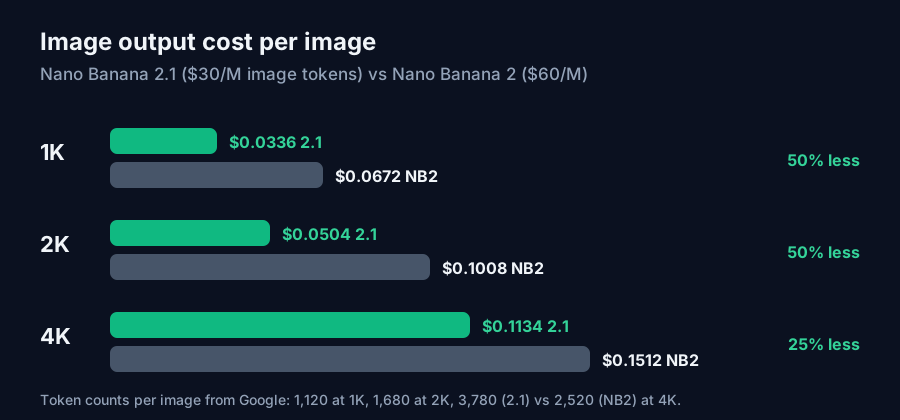
So the "half price" claim holds at 1K and 2K. At 4K the saving drops to 25%, from $0.1512 to $0.1134 per image, because each 4K image costs 50% more tokens on 2.1. (Google's page rounds these to $0.067, $0.101 and $0.151 for Nano Banana 2.)
Batch mode halves image output again, to $15 per million. That puts a 1K image at $0.0168 and a 4K image at $0.0567 if you can wait for results.
Three workloads costed
Each scenario below is one 1K image with a 100-token text prompt and no thinking tokens. Reference images are counted at 1,120 input tokens each, the default image input size the media resolution docs list for Gemini 3 models. If you send them at low resolution (280 tokens), input cost drops by three quarters.
| Workload | Nano Banana 2.1 | Nano Banana 2 | Nano Banana 2 Lite |
|---|---|---|---|
| Text prompt only | $0.0338 | $0.0673 | $0.0336 |
| Edit with 1 reference image | $0.0354 | $0.0678 | $0.0339 |
| 14 reference images | $0.0573 | $0.0751 | $0.0375 |
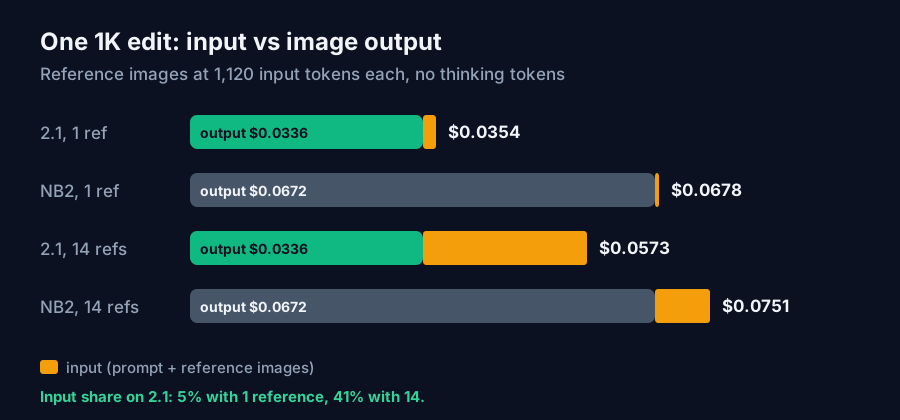
With one reference image, input is about 5% of the bill on 2.1 and the switch nearly halves your cost. With 14 references, input is 41% of the bill. Nano Banana 2.1 is still cheaper, but by 24% rather than 48%.
At volume: a product photo pipeline making 3,000 one-reference edits a month costs $106.29 on Nano Banana 2.1 and $203.43 on Nano Banana 2. Lite would cost $101.71, but it only outputs 1K and has no search grounding.
The break-even on input alone is 33,600 input tokens per image. At that point the extra $1 per million on input matches the $0.0336 saved on output. That is 30 full-resolution reference images, more than the 14 the model accepts, so references alone never make 2.1 the more expensive model.
Where thinking tokens erase the saving
Thinking can make 2.1 more expensive. Google's docs say the interim "thought images" are not charged, but thinking text bills at the text-and-thinking output rate, which is now $7.50 per million. The default level is medium on 2.1. Nano Banana 2 defaults to minimal.
Take the one-reference edit. Nano Banana 2 at minimal thinking costs $0.0678 (assuming minimal adds close to zero tokens). Nano Banana 2.1 costs $0.0354 before thinking. Each 1,000 thinking tokens adds $0.0075 on 2.1.
| Thinking tokens per image on 2.1 | Cost per image | vs Nano Banana 2 at $0.0678 |
|---|---|---|
| 0 | $0.0354 | 48% cheaper |
| 1,000 | $0.0429 | 37% cheaper |
| 2,000 | $0.0504 | 26% cheaper |
| about 4,300 | $0.0678 | same cost |
| 5,000 | $0.0729 | 8% more expensive |
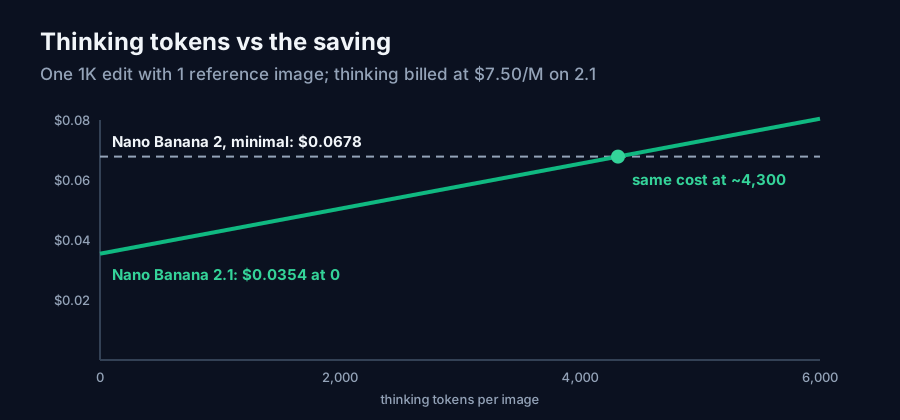
Google doesn't publish how many tokens a medium-level run produces. Check usage on your own requests for a day before you move a pipeline across. In the 3,000-edit example, 2,000 thinking tokens per image raises the monthly bill from $106.29 to $151.29. That is still less than Nano Banana 2, but $45 a month goes on reasoning you may not need.
What 2.1 drops
The image generation docs list one capability Nano Banana 2.1 does not have: the 512px (0.5K) output size. Nano Banana 2 offers it at $0.045 per image. If you make thumbnails or quick drafts at 0.5K, 2.1 at 1K ($0.0336) is still cheaper per image, though you now pay for pixels you then shrink.
Everything else on Google's feature list carries over: up to 14 reference images, 4 characters and 10 objects with high fidelity, Google Web and Image Search grounding, and video input. Grounding is billed separately, with 5,000 free search requests a month shared across Gemini 3 models and $14 per 1,000 after that.
Settings to change before you switch
The model name is the only required change. A request through the Interactions API looks like this:
from google import genai

client = genai.Client()  # reads GEMINI_API_KEY from the environment

interaction = client.interactions.create(
    model="gemini-nano-banana-2.1",
    input="Product shot of a steel water bottle on a wooden desk, soft window light",
    generation_config={"thinking_level": "minimal"},  # default is "medium"
    response_format={
        "type": "image",
        "mime_type": "image/jpeg",
        "aspect_ratio": "1:1",
        "image_size": "1K",
    },
)
print(interaction.usage)  # check thinking and input tokens per image
What to adjust:
- Set
thinking_levelto minimal for routine edits and keep medium or high for dense infographics or text-heavy layouts, where the reasoning helps. - Send reference images at a lower media resolution when the reference only sets colour or style. That cuts each one from 1,120 to 280 input tokens.
- Stay at 2K unless you need 4K. The 2K saving is 50% and the 4K saving is 25%.
- Move anything that isn't interactive to the Batch API. At $15 per million image tokens, a 1K image costs $0.0168.
If you write prompts by hand, our Image Prompt Generator gives you a structured starting prompt, which helps keep the text side short.
FAQ
How much does Nano Banana 2.1 cost per image? $0.0336 at 1K, $0.0504 at 2K and $0.113 at 4K, from $30 per million image output tokens. Input and thinking tokens are billed on top.
Is Nano Banana 2.1 cheaper than Nano Banana 2? For image output, yes: half the price at 1K and 2K, 25% less at 4K. Input costs three times as much and thinking output 2.5 times as much, so heavy reference or reasoning workloads save less.
Does Nano Banana 2.1 support 512px images? No. Google's docs say the 0.5K size is not supported on Nano Banana 2.1. It outputs 1K, 2K and 4K.
Are thinking images billed? Google says interim thought images are not charged. Thinking text tokens are billed at $7.50 per million, and the default thinking level on 2.1 is medium.
Is Nano Banana 2 Lite cheaper still? At 1K it matches 2.1 on image output ($0.0336) and charges less for input ($0.25 per million). It only supports 1K and does not support Google Search grounding.
Conclusion
Nano Banana 2.1 halves the output price of a 1K or 2K image, and for most generation and light editing that is close to the whole bill. The saving shrinks when you send many reference images, render at 4K or leave thinking at its default, because those lines pay the higher rates. Set thinking to minimal for routine work, read the usage field for a day, and price your own mix in the API Cost Calculator, which now lists Nano Banana 2.1 at its 1K rate.
Sources
- Google AI for Developers, Gemini Developer API pricing: Nano Banana 2.1, Nano Banana 2 and Nano Banana 2 Lite rates, per-resolution token counts, batch image output rate, and grounding prices.
- Google AI for Developers, Nano Banana image generation: model descriptions, the recommendation to use Nano Banana 2.1 for new projects, 0.5K support, reference image limits, uncharged thought images, default thinking levels and code samples.
- Google AI for Developers, Media resolution: image input token counts for Gemini 3 models (280, 560, 1,120 and 2,240).
- Per-workload, break-even and monthly costs are calculated by ToolMintX from those rates.


