OpenAI released GPT-6.2 Astra and GPT-6.2 Sol on 17 November 2026. Astra got cheaper: $8 per million input tokens and $40 output, down from $10 and $50 on GPT-6 Astra, and cached input fell from $1 to $0.40. Sol kept the GPT-6.1 Sol rates exactly.
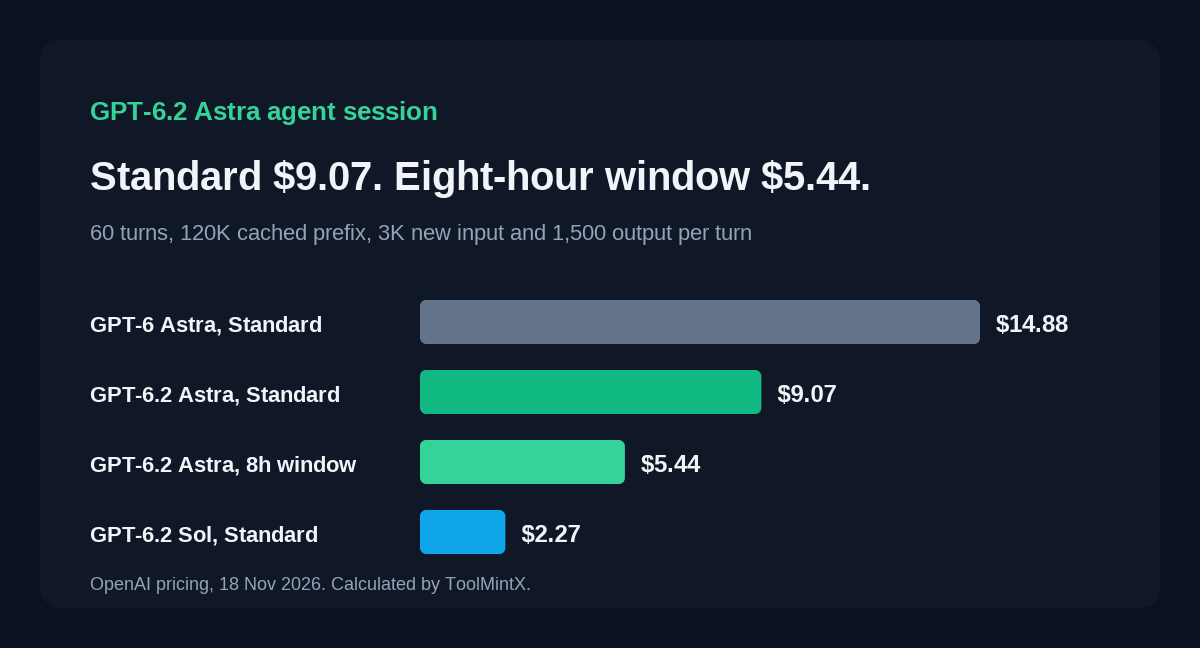
A second changelog entry the same day has a bigger effect on agent bills. Responses API requests can now run in a two-hour or eight-hour background completion window, at 30% and 40% below Standard. I costed one 60-turn agent session on every tier. GPT-6.2 Astra costs $9.07 at Standard and $5.44 in the eight-hour window. The same session on GPT-6 Astra was $14.88. The window also comes with three conditions that the pricing table doesn't mention.
Table of contents
- GPT-6.2 rate card
- One agent session on each tier
- How the background windows work for agents
- A follow-up request that keeps the discount
- The cache does not cross modes
- Reasoning items drop on prefix edits
- Ultrafast doubles in March
- FAQ
- Sources
GPT-6.2 rate card
Standard prices per million tokens, short context (272K input tokens or fewer), from OpenAI's pricing page on 18 November 2026.
| Line | GPT-6.2 Astra | GPT-6 Astra | GPT-6.2 Sol |
|---|---|---|---|
| Input | $8.00 | $10.00 | $2.00 |
| Cached input | $0.40 | $1.00 | $0.10 |
| Cache write, 30 minutes | $10.00 | $12.50 | $2.50 |
| Cache write, 12 hours | $20.00 | $25.00 | $5.00 |
| Output | $40.00 | $50.00 | $10.00 |
| Long context input / output | $16.00 / $60.00 | $20.00 / $75.00 | $4.00 / $15.00 |
Both new models have a 1,050,000-token context window. Maximum input is 922,000 tokens and maximum output is 128,000. Above 272K input tokens, input and cache rates double and output goes to 1.5 times for the whole request, same as the rest of the GPT-6 family.
Input and output fell 20% on Astra. The cached input line fell 60%, and in an agent loop that line is the one you pay most often.
One agent session on each tier
The session is the same one used in the other agent-cost posts on this site, such as the Qwen4-Max post:
- 60 turns
- a 120,000-token prefix (system prompt, tool schemas, files), written once at the 30-minute rate and read from cache on the other 59 turns
- 3,000 new input tokens per turn
- 1,500 output tokens per turn, reasoning included
That's 7.08 million cached prefix tokens, 180,000 new input tokens and 90,000 output tokens.
| Line | GPT-6 Astra | GPT-6.2 Astra | GPT-6.2 Sol |
|---|---|---|---|
| Prefix write (120K) | $1.50 | $1.20 | $0.30 |
| Prefix reads (7.08M) | $7.08 | $2.832 | $0.708 |
| New input (180K) | $1.80 | $1.44 | $0.36 |
| Output (90K) | $4.50 | $3.60 | $0.90 |
| Standard session | $14.88 | $9.07 | $2.27 |
| 2-hour window (30% off) | $10.42 | $6.35 | $1.59 |
| 8-hour window (40% off) | $8.93 | $5.44 | $1.36 |
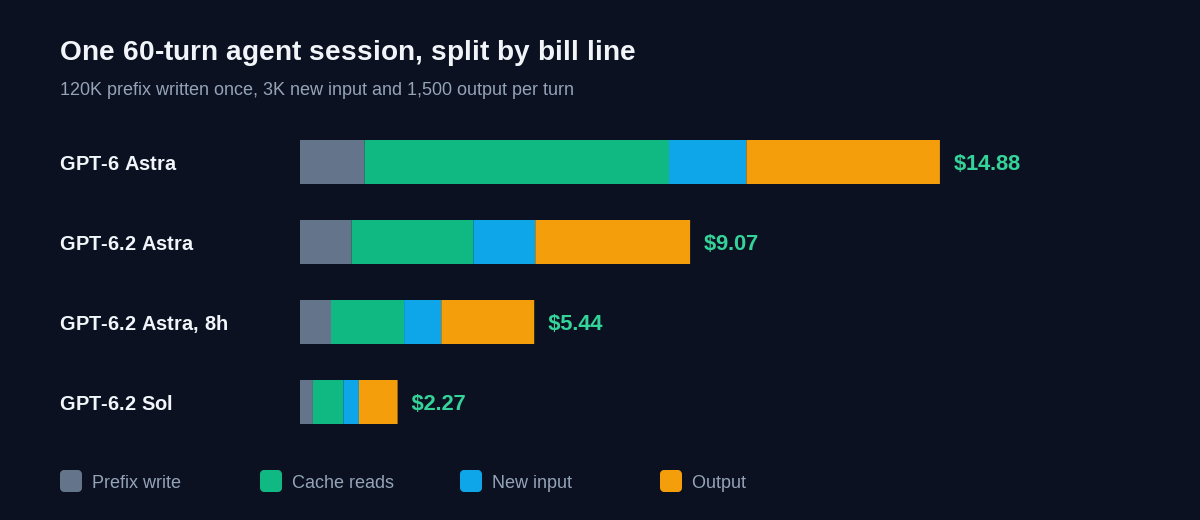
On GPT-6 Astra, cache reads were 47.6% of the bill. On GPT-6.2 Astra they're 31.2%, and output becomes the largest line at 39.7%. GPT-6.2 Astra is now exactly four times GPT-6.2 Sol on every line, so the Sol-or-Astra choice is a plain 4x question.
At 440 sessions a month (20 a day over 22 working days), GPT-6.2 Astra costs $3,991.68 at Standard against $6,547.20 on GPT-6 Astra. Move the same work into the eight-hour window and it's $2,395.01. Sol in the eight-hour window is $598.75.
If your agent thinks hard, output dominates further. At 6,000 output tokens per turn, the Standard session is $19.87 on GPT-6.2 Astra and $4.97 on Sol. The API cost calculator now lists both GPT-6.2 models if you want to plug in your own token counts.
How the background windows work for agents
You opt in per request with background: true and background_options.completion_window set to 2h or 8h. The default window, soonest, has no discount. The beta covers GPT-6.2 Astra, GPT-6.2 Sol, GPT-6.1 Terra and GPT-6 Luna. The guide says the discount applies to "model token rates on each eligible request, including follow-ups", so I applied it to every line in the table above.
Three conditions from the background mode guide decide whether an agent can use it:
- The request must run on Standard processing. Set
service_tiertodefault. Withauto, the request qualifies only if the API happens to pick Standard. - Streaming has to be off. Leave
streamunset or set it tofalse. 2hand8hrequests share the Batch/Background rate limit with Batch API jobs, and input tokens count at submission. A large nightly batch can starve your agent, or the other way round.
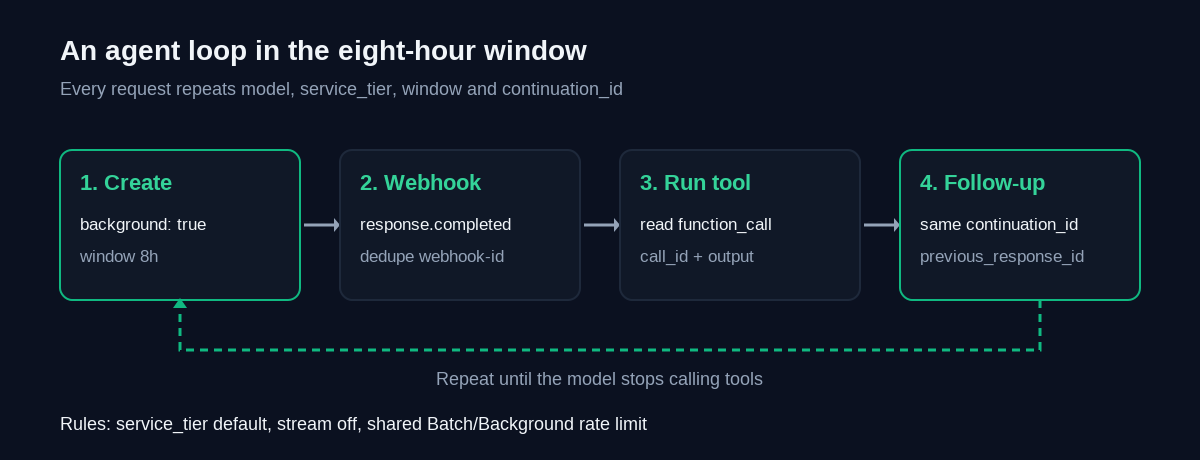
The completion target covers the first response only. The guide says the target "starts when the API accepts the initial request and applies to that response". Follow-ups that reuse the same continuation_id get "higher queue priority", but the docs give no time target for them. A 60-turn loop is 60 requests, so treat the eight-hour window as a fit for overnight jobs that nobody watches. It won't suit an agent someone is waiting on.
Batch costs less again, at 50% off ($4.54 for the Astra session). The guide points to the Batch API for "independent requests you can submit together up front". An agent's next turn depends on the last tool result, so it can't go up front, which is why the background windows exist.
A follow-up request that keeps the discount
A follow-up only gets the discount and the queue priority if it repeats the model, service tier, background flag, window and continuation_id of the first request. This is the second turn of the loop in Python. The key comes from the environment (OPENAI_API_KEY=YOUR_API_KEY).
from openai import OpenAI

client = OpenAI()  # reads OPENAI_API_KEY from the environment

BG = dict(
    model="gpt-6.2-astra",
    service_tier="default",          # discount needs Standard
    background=True,
    background_options={
        "completion_window": "8h",
        "continuation_id": "nightly-review-2026-11-18",  # one ID per run
    },
)

# first turn: save resp.id, then wait for the response.completed webhook
resp = client.responses.create(input=TASK, tools=TOOLS, **BG)

# after the webhook: run the tool the model asked for, then continue
done = client.responses.retrieve(event.data.id)
call = next(i for i in done.output if i.type == "function_call")
follow = client.responses.create(
    previous_response_id=done.id,
    input=[{
        "type": "function_call_output",
        "call_id": call.call_id,
        "output": run_tool(call),
    }],
    tools=TOOLS,
    **BG,
)
Deduplicate webhook deliveries by the webhook-id header, and check that event.data.id matches the response you saved before you act on it. If the stored response expires before the follow-up, drop previous_response_id and send the whole history in input, including the encrypted reasoning items and the original function call. Keep the tool list byte-identical between turns. A JSON formatter with sorted keys shows quickly when two tool payloads differ.
If you schedule the nightly run from a server, the cron expression generator shows the next fire times in your time zone, which helps line the run up with the eight-hour window.
The cache does not cross modes
From the guide: "Standard requests outside the discounted completion windows can't reuse prompt cache entries created by 2h or 8h background requests, even when the prompt is identical."
Picture an agent that works overnight in the eight-hour window and then hands off to a developer who keeps going interactively in the morning. The first Standard turn finds no cache. On GPT-6.2 Astra it writes the 120K prefix again for $1.20, where a read would have cost $0.048. Once per session that's small. But it adds $1.20 for every session that switches mode, so a harness that flips between background and Standard on alternate turns writes the prefix every time. Pick one mode per run.
Reasoning items drop on prefix edits
The GPT-6.2 migration guide adds a rule that's new with this release. The API drops reasoning items when it detects a mid-conversation change to the history (a prefix edit), a model downgrade, or a change of end user or organization. OpenAI warns that answer quality can decline and the model "may use more tokens to repeat earlier work".
That hits agent harnesses that rewrite the system prompt each turn, trim old tool output in place, or route easy turns to a cheaper model. Each of those breaks the cache already. On GPT-6.2 they also cost the model its earlier reasoning. Append to the history, don't edit it, and if you route to Sol for cheap turns, start Sol in its own conversation.
Smaller migration notes:
- Reasoning effort
noneis rejected. If you usenoneorminimaltoday, OpenAI says to uselow. - Tool calling needs the Responses API. Chat Completions still works for requests without tools.
- Coming from GPT-5.5 or earlier,
prompt_cache_retentionbecomesprompt_cache_options.ttlset to"30m".
Ultrafast doubles in March
GPT-6.2 Astra and Sol also run on Ultrafast. It costs 3 times Standard through 28 February 2027 and 6 times from 1 March 2027 (Pacific time). For the Astra session that's $27.22 now and $54.43 in March. Ultrafast is US data residency only. Standard, Fast and Batch run in the US and EU.
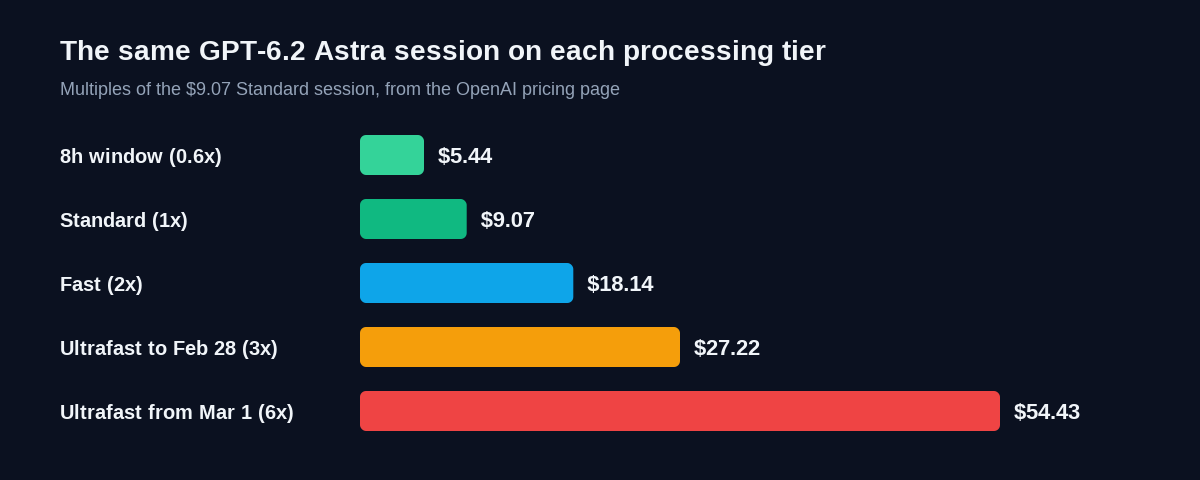
Fast mode is 2 times Standard ($18.14 for the session). Flex isn't listed for either GPT-6.2 model, though GPT-6 Astra and GPT-6.1 Sol both still have it at 50% off.
FAQ
Is GPT-6.2 Sol cheaper than GPT-6.1 Sol?
No. Every Standard, Batch and Fast rate is identical: $2 input, $0.10 cached, $10 output. The change is the background window discount, which GPT-6.1 Sol doesn't get.
Does the 8-hour window work with streaming?
No. Discounted windows need stream unset or false. To stream a background response, use the default soonest window, which has no discount.
Does the 40% stack with Batch?
The docs don't say they stack, and they're separate paths. Batch is 50% off for independent jobs submitted up front. Background windows are for request chains through the Responses API.
Sources
- OpenAI API, Pricing (developers.openai.com/api/docs/pricing, read 18 November 2026): Standard, Batch, Fast, Flex and Ultrafast tables for gpt-6.2-astra, gpt-6.2-sol, gpt-6-astra and gpt-6.1-sol; 272K long-context line; Ultrafast 3x through 28 February 2027 and 6x from 1 March 2027; background window 30% and 40% discounts.
- OpenAI API, Changelog (developers.openai.com/api/docs/changelog): GPT-6.2 Astra and GPT-6.2 Sol released 17 November 2026; two-hour and eight-hour background completion windows in public beta.
- OpenAI API, GPT-6.2 Astra and GPT-6.2 Sol model pages (developers.openai.com/api/docs/models/gpt-6.2-astra, /gpt-6.2-sol): context, max input and output, cache write rates, reasoning effort
nonerejected, Batch 50%, Fast 2x. - OpenAI API, Background mode guide (developers.openai.com/api/docs/guides/background): completion windows, eligible models, Standard tier and no-stream rules, shared Batch/Background rate limit, no cache reuse with Standard requests,
continuation_idfollow-ups, webhook handling. - OpenAI API, Using GPT-6.2 (developers.openai.com/api/docs/guides/latest-model): reasoning items dropped on prefix edits, model downgrade or user change; Responses API for tool calling;
prompt_cache_options.ttl; data residency by tier. - Session, monthly and tier figures are calculated by ToolMintX from the rates above.