AI Models
Gemma 4 12B: Google’s New Laptop-Ready Multimodal AI Model
Google Gemma 4 12B brings encoder-free multimodal reasoning, native audio input, and local agent workflows to 16GB-class laptops.
Image source: Google.
Quick Answer: It Is Gemma 4 12B, Not 412B
Google announced Gemma 4 12B on June 3, 2026 as a new mid-sized member of the Gemma 4 open model family. The name can be easy to compress in search as "Gemma 412B," but the actual model is 12B: a laptop-friendly model designed to sit between the smaller E4B tier and the heavier 26B Mixture-of-Experts model.
The important bit is not just the parameter count. Google is positioning Gemma 4 12B as a practical local model for multimodal agents, with native audio input, image understanding, stronger reasoning, and enough efficiency to run on 16GB-class laptop hardware.
What Makes Gemma 4 12B Different
Gemma 4 12B is Google's first mid-sized Gemma 4 model with native audio input. It also uses a unified, encoder-free architecture for multimodal work. In plain English: the model does not rely on the usual heavy separate encoders to translate vision and audio before the language model can reason over them.
That matters because local AI is usually constrained by memory, latency, and thermal headroom. Removing extra multimodal encoders can make image and audio workflows feel less like cloud-only features and more like tools you can run in a normal desktop setup.
- Vision inputs flow through a lightweight embedding path into the LLM backbone.
- Audio is projected into the same space as text tokens instead of going through a full audio encoder.
- Multi-Token Prediction drafters are included to help reduce generation latency.
- The model is released under Apache 2.0, matching the broader Gemma 4 licensing shift.
Why the 12B Size Is the Sweet Spot
The original Gemma 4 launch gave developers a wide ladder: E2B and E4B for edge devices, 26B MoE for fast higher-quality inference, and 31B dense for heavier reasoning and fine-tuning work. Gemma 4 12B fills the most obvious missing slot: the stronger model you can still reasonably try on a good laptop.
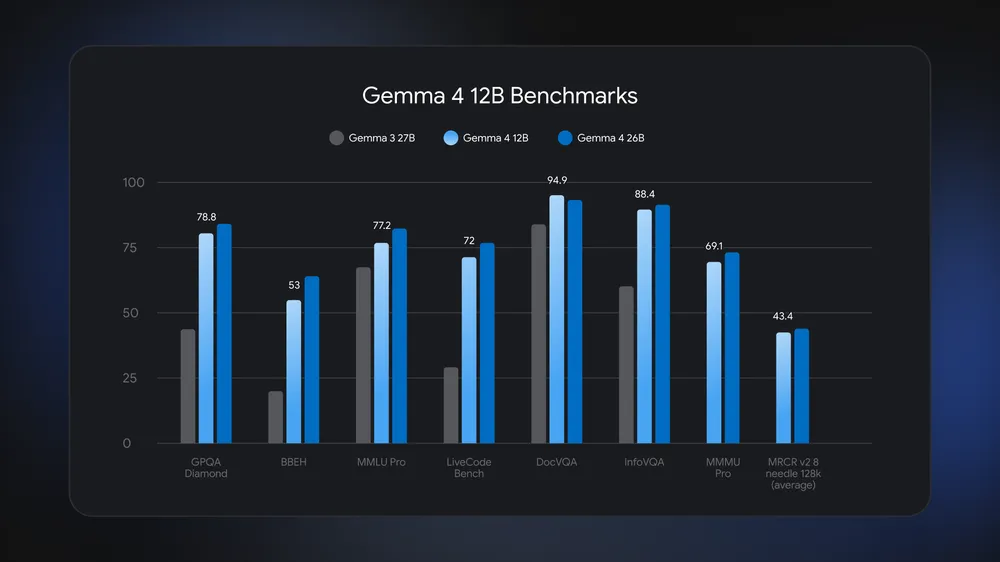
Google says Gemma 4 12B approaches the 26B model on standard benchmarks while using less than half the total memory footprint. That makes it more interesting than a simple new checkpoint. It is a practical answer to a common local AI problem: the tiny model is fast but limited, while the large model is good but awkward to keep running.
Benchmark image source: Google.
Best Use Cases for Gemma 4 12B
Gemma 4 12B looks most useful when the task needs more reasoning than a compact edge model can provide, but does not justify a workstation-only setup. That makes it a strong candidate for developers, creators, and small teams who want local control without constantly fighting hardware limits.
- Local coding assistance with private repositories and command planning.
- Image-heavy research, OCR checks, chart summaries, and screenshot analysis.
- Audio note processing, meeting cleanup, and local voice-driven workflows.
- Agent prototypes that need structured JSON, tool use, and multi-step reasoning.
- Offline assistants for laptops where cloud access is expensive, slow, or sensitive.
It is not a magic replacement for frontier cloud models. The smarter framing is that Gemma 4 12B gives local projects a more credible middle lane: capable enough to be useful, small enough to stay near the user.
How To Try It
Google lists several paths for testing Gemma 4 12B, including LM Studio, Ollama, Google AI Edge Gallery, LiteRT-LM, Hugging Face, Kaggle, llama.cpp, MLX, SGLang, vLLM, and Unsloth. For most local AI users, the fastest practical path will be the runtime they already trust.
Use this decision rule:
- Use LM Studio if you want a desktop app and quick manual testing.
- Use Ollama if your workflow already depends on terminal commands or local API calls.
- Use Hugging Face or Kaggle if you want the official checkpoints for deeper experiments.
- Use MLX if you are testing on Apple Silicon and want an Apple-focused local path.
- Use vLLM or SGLang if you are thinking about higher-throughput serving.
How Much VRAM Does Gemma 4 12B Need?
The honest answer depends on three things: the quantization format you load (Q4, Q8, FP16, BF16), the context length you keep open, and whether you only run inference or also fine-tune the model. A Q4_K_M build of Gemma 4 12B with a short context can fit on a single 16GB laptop GPU, while a BF16 full fine-tuning run with a long context will need a multi-GPU workstation.
Rather than guess, use the AI VRAM Calculator with the Gemma 4 12B IT preset pre-selected. It breaks down weights, KV cache, optimizer states, and activations separately for inference, full fine-tuning, and QLoRA workflows, so you can see exactly which knob moves your memory budget.
Quick VRAM Estimates for Gemma 4 12B
- Q4_K_M inference, 8K context: roughly 8–10 GB VRAM.
- Q8_0 inference, 8K context: roughly 13–15 GB VRAM.
- BF16 inference, 8K context: roughly 24–26 GB VRAM.
- QLoRA fine-tuning (4-bit base, 16-bit adapters), 8K context: roughly 18–22 GB VRAM.
These are planning estimates. Run the calculator with your exact context length, batch size, and precision for a tight number.
Should You Choose Gemma 4 12B Over E4B or 26B?
Choose E4B when speed, battery life, and edge deployment matter most. Choose 26B when you have stronger hardware and want the best quality you can get from the Gemma 4 family without jumping to the 31B dense model. Choose 12B when you want the middle: better reasoning and multimodal breadth than the edge tier, with hardware demands that still make sense on a serious laptop.
That middle tier is exactly why Gemma 4 12B matters. It gives developers a model they can actually keep in their daily loop instead of reserving it for occasional benchmark runs.
Sources
More From ToolMintX
Other Blog Posts

June 2, 2026
NVIDIA RTX Spark AI Laptops and Workstations: What Launched
NVIDIA RTX Spark brings Blackwell AI laptops and compact desktops to Windows, while DGX Spark and DGX Station define the local AI workstation tiers.

May 27, 2026
May 2026 AI Model Watch: Gemini 3.5 Flash, Gemini Omni, and GPT-Realtime
Compare the current AI model wave across fast agents, multimodal media generation, and realtime voice APIs for practical product choices.

May 27, 2026
AI on Android After I/O 2026: AppFunctions, Gemini Nano 4, and Hybrid Agents
Android AI updates now give developers AppFunctions, Gemini Nano 4, ML Kit GenAI, hybrid inference, A2UI, and ADK for app agents.