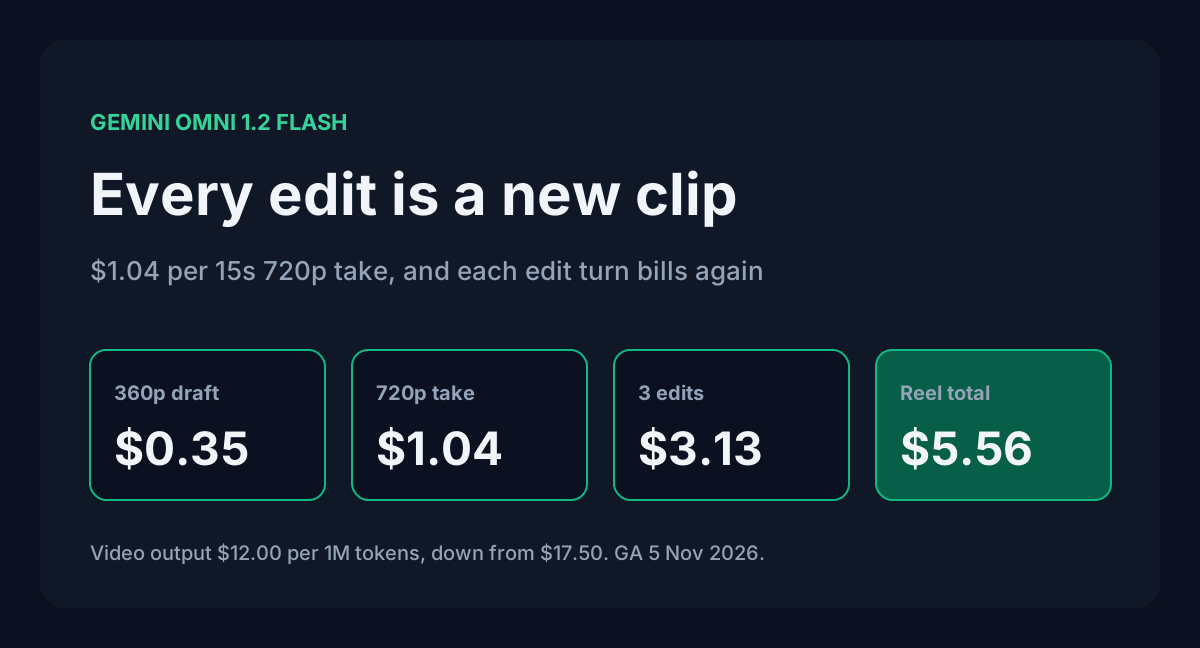
Google made Gemini Omni 1.2 Flash generally available on the Gemini API on 5 November 2026. It makes clips of up to 15 seconds with native audio, and you can keep editing a clip over several turns. Video output dropped from $17.50 to $12.00 per million tokens, which works out to $1.04 for a 15-second 720p clip.
That per-clip price is the number everyone quotes. It's also the wrong number to budget with. Google's guide says each turn in an editing conversation "produces a new video", and billing is on output tokens. So every "make the lighting warmer" is another full clip on the bill. Below is what one finished reel really costs, a cheaper way to work, and the limits that decide how you plan shots.
Table of contents
- Rates on the pricing page
- What one clip costs at each resolution
- Edits are billed as new clips
- A cheaper workflow for one reel
- Limits that shape your shot plan
- Moving off Omni 1.1 and Veo
- FAQ
- Sources
Rates on the pricing page
Omni 1.2 Flash is paid tier only. The free tier column says "Not available" for both input and output.
| gemini-omni-1.2-flash | Paid tier, per 1M tokens |
|---|---|
| Input (text, image, video) | $1.50 |
| Output, text (including thinking tokens) | $9.00 |
| Output, video | $12.00 |
| Used to improve Google products | No |
The video rate is the one that matters. Google converts seconds to tokens at a fixed rate per resolution, so you can price a clip before you send the request. Thinking tokens bill at the $9.00 text rate, and a prompt of a few hundred tokens costs a fraction of a cent at $1.50 per million.
The changelog calls this "30% lower video output pricing". The exact cut from $17.50 to $12.00 is 31.4%.
What one clip costs at each resolution
These token rates are from Google's pricing note. The dollar figures are ToolMintX arithmetic at $12.00 per million output tokens.
| Resolution | Tokens per second | Per second | 10s clip (default) | 15s clip (max) |
|---|---|---|---|---|
| 360p | 1,931 | $0.0232 | $0.23 | $0.35 |
| 720p (default) | 5,792 | $0.0695 | $0.70 | $1.04 |
| 1080p, upsampled | 8,688 | $0.1043 | $1.04 | $1.56 |
| 4K, upsampled | 17,376 | $0.2085 | $2.09 | $3.13 |
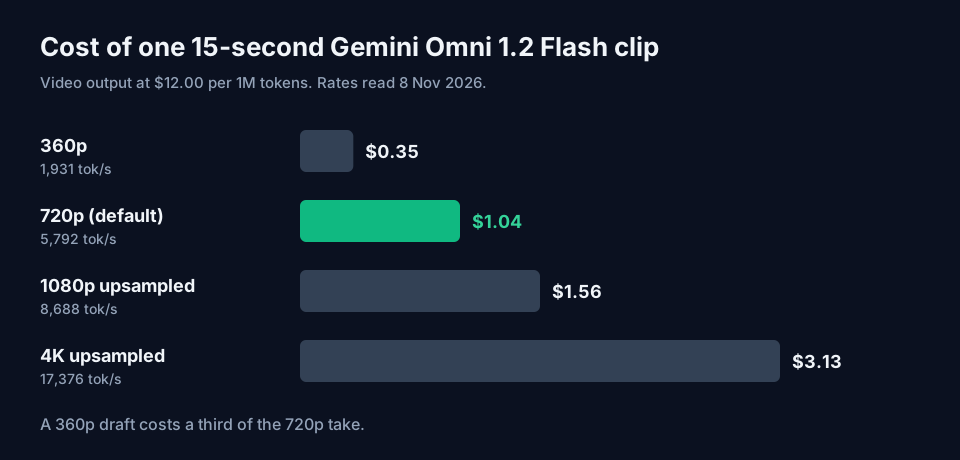
A 15-second 720p clip is 86,880 output tokens. The 360p version is 28,965 tokens and costs a third as much, which is what makes it useful for drafts. If you skip the duration field, the model makes 10 seconds, so set it on purpose. A duration in response_format also overrides any length you wrote into the prompt.
The API cost calculator now lists Omni 1.2 Flash at the 720p rate of $0.0695 per second, next to Pika, Kling and Runway.
Edits are billed as new clips
Conversational editing is the headline feature. You pass previous_interaction_id, ask for a change, and the model returns a new video with the rest of the scene kept. Google's guide is plain about what comes back: "Each turn in the conversation produces a new video."
Video output is billed per token, and an edited 15-second 720p clip is another 86,880 tokens. Swapping a background costs about the same as the first generation did, $1.04. Three rounds of notes on one shot add $3.13.
There's a gap in the docs here. Neither the pricing page nor the guide says whether the earlier video counts as input tokens on an edit turn. Input is $1.50 per million, so it adds little either way, but don't assume it's zero. Read interaction.usage on your first few edit responses and compare it with the figures above.
Extension has the same gap. A clip can grow by 3 to 10 seconds per turn up to 30 seconds total. Google doesn't say whether an extension bills only the new seconds or the whole returned video. Test one extension and read the usage before you plan a 30-second piece around it.
A cheaper workflow for one reel
Take one 15-second Instagram reel. You'll want several prompt tries before one works, then a few rounds of fixes. Here are two ways to get there.
The first way does everything at 720p: four prompt attempts, one keeper, and three edit turns on it. That's 7 clips at $1.04 each, or $7.30.
The second way tries prompts at 360p first. You run four attempts at $0.35 each to settle the wording, camera move and audio direction. Then you make the keeper at 720p and give it the same three edit turns.
| Step | Clips | Rate per 15s | Cost |
|---|---|---|---|
| Prompt drafts at 360p | 4 | $0.35 | $1.39 |
| Final take at 720p | 1 | $1.04 | $1.04 |
| Edit turns at 720p | 3 | $1.04 | $3.13 |
| Total | 8 | $5.56 |
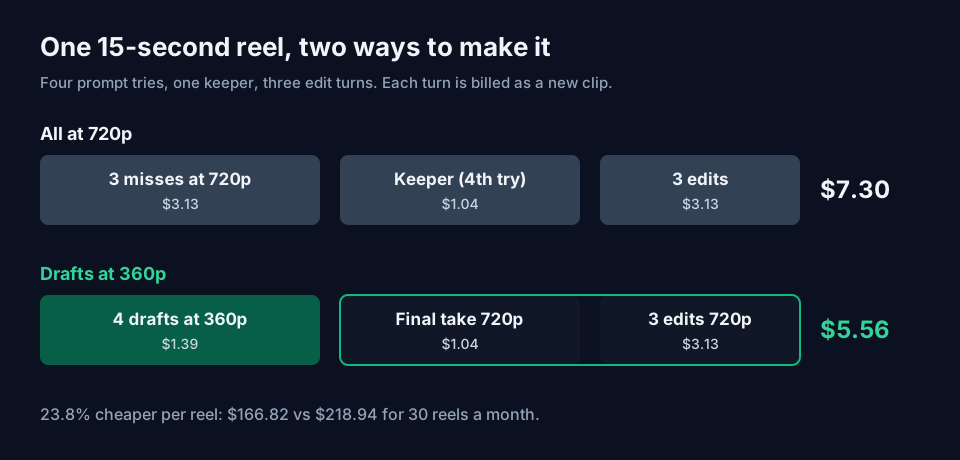
That's $5.56 against $7.30, or 23.8% less, with one more clip generated. Over 30 reels a month the gap is $166.82 versus $218.94.
One caution. A 360p draft tests your prompt, not the exact take. When you rerun the prompt at 720p you get a new generation, so it won't match the draft frame for frame. That's fine for deciding wording and camera direction. It won't lock a specific performance.
Look at where the money goes in the second plan: $3.13 of the $5.56 is edits. The cheapest edit is the one you never run, so get the prompt right at 360p. Google's prompt guide helps here:
- Write "in a single continuous shot" or "no scene cuts" if you want one scene. By default the model tries to cut between a few shots.
- Put negatives in the prompt itself ("No dialogue", "No extra sound effects"). There is no negative prompt field.
- Keep edit prompts short and end them with "Keep everything else the same". Google's examples show long, detailed edit requests causing changes you didn't ask for.
If you finish at 1080p instead, the three edits plus the final take cost $6.26 and the whole reel comes to $7.65. Decide the output resolution before you start editing, since every edit turn bills at it.
The image prompt generator is handy for building the reference stills, and Omni accepts up to 6 reference images per request.
Limits that shape your shot plan
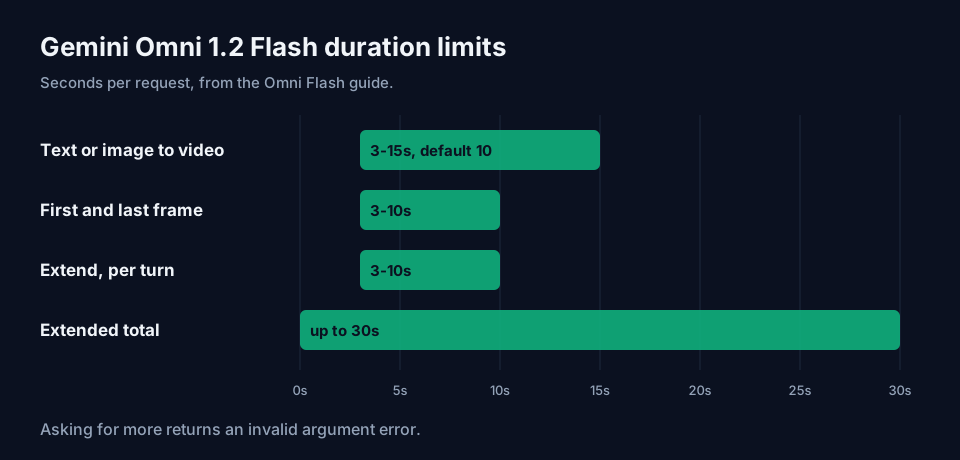
| Feature | Allowed range |
|---|---|
| Text or single image to video | 3 to 15 seconds (default 10) |
| First and last frame interpolation | 3 to 10 seconds |
| Extension per turn | 3 to 10 seconds, 30 seconds total |
| Reference images | Up to 6 (3 per character, 2 characters) |
| Reference videos | 1 of up to 3s for 11-15s clips, up to 3 for 3-10s clips |
| Editing input video | 15 seconds or less |
A few of these will catch people:
- Setting
store=falsespeeds up generation, but the clip can't be edited later throughprevious_interaction_id. Leave storage on for any take you might revise. - Asking for more than 15 seconds returns an invalid argument error. So does passing first and last frames with a duration over 10 seconds.
- Extension only adds to the end, and it only sees the last 10 seconds of the input. A character who left the frame earlier needs to be named again or passed as a reference image.
- Voice editing isn't supported, and you can't upload audio as input. Audio inside a reference video is ignored.
- Editing or extending uploaded videos is blocked in the EEA, Switzerland and the UK. Clips the model generated can still be edited there.
- Only English is fully evaluated. Google says other languages "may work but results can vary". That matters if you want Hindi dialogue in your reel, so test a short 360p clip first.
- System instructions, temperature, top_p and stop sequences aren't supported.
- Videos over 4 MB need
delivery="uri". A laterGETon the interaction returns base64 even then, so save the URI from the first response.
Every clip carries an invisible SynthID watermark.
Moving off Omni 1.1 and Veo
Omni 1.1 Flash stays live for four weeks. From 3 December 2026, requests to gemini-omni-1.1-flash route to 1.2 and bill at the 1.2 rate. Until then 1.1 still charges $17.50 per million video tokens, about $0.10 per second, or $1.52 for a 15-second 720p clip. Nothing forces you to switch early, but each 15-second 720p clip costs $0.48 more on 1.1.
The Veo 3.1 preview models on the Gemini API (veo-3.1-generate-preview, veo-3.1-fast-generate-preview and veo-3.1-lite-generate-preview) shut down on 22 October 2026. Google's deprecations table names gemini-omni-1.2-flash as the replacement for all three. Any script still calling them has been failing for over two weeks.
Omni has one migration catch. Control strings such as <FIRST_FRAME>, <IMAGE_REF_0> and <VIDEO_REF_0> are deprecated. Describe in plain words how each image or video should be used, and only set the task field (text_to_video, image_to_video, reference_to_video, edit, extend) if prompting alone picks the wrong mode.
FAQ
Is Gemini Omni 1.2 Flash free to try? Not on the API. The free tier column on the pricing page reads "Not available". The model page has a "Try it in Google AI Studio" link, but API calls need a paid project.
Does the Batch API discount apply? The Omni rows on the pricing page show only a Standard tab, with no Batch, Flex or Priority rates. Plan with the Standard price.
Can it run locally? No. Omni 1.2 Flash is API only, with no open weights. Provisioned throughput isn't supported either. For open video models you can run on your own GPU, check sizes with the AI VRAM calculator.
Sources
- Google, Gemini Developer API pricing (aistudio.google.com/docs/pricing, read 8 November 2026): Omni 1.2 Flash and 1.1 Flash rates, tokens per second at each resolution, free tier availability.
- Google, Generate and edit videos with Gemini Omni Flash (aistudio.google.com/docs/omni, read 8 November 2026): durations, reference limits, editing and extension rules,
storeanddeliverynotes, limitations, prompt guide. - Google, Gemini API release notes (aistudio.google.com/docs/changelog, read 8 November 2026): 5 November 2026 GA entry and 1.1 routing notice.
- Google, Gemini deprecations (aistudio.google.com/docs/deprecations, read 8 November 2026): Veo preview shutdown dates and Omni release and routing dates.
- Clip, reel and monthly costs are calculated by ToolMintX from the rates above.