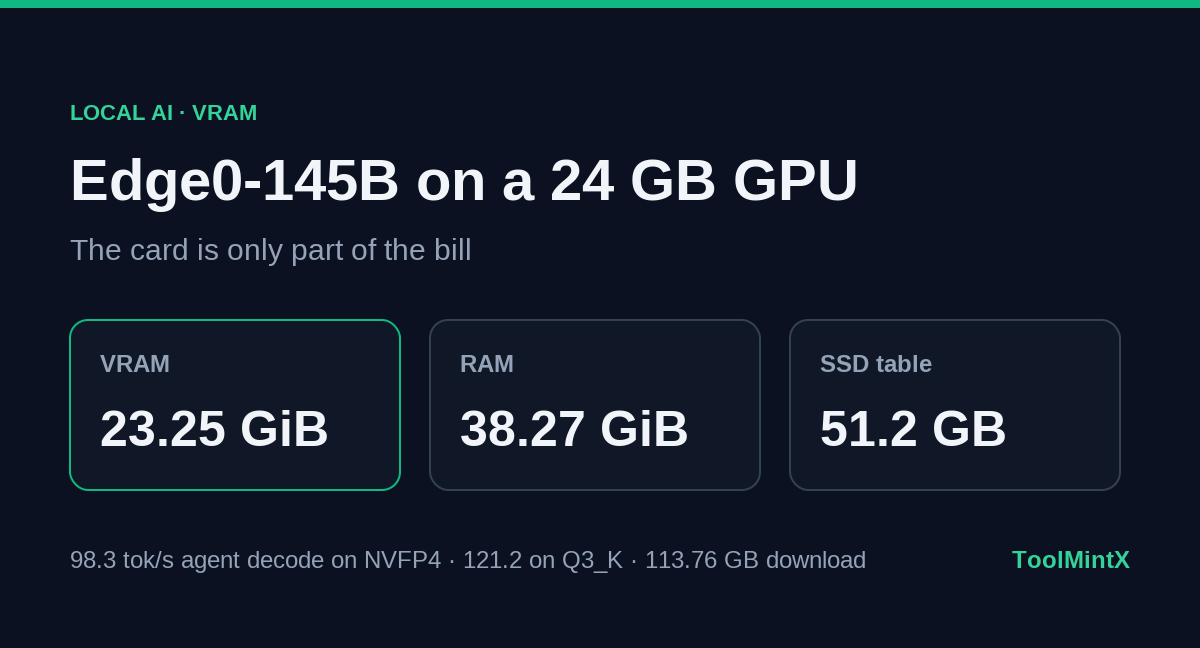
Edge0 put Edge0-145B on Hugging Face on 11 November 2026, and the headline is hard to ignore: a 145B mixture-of-experts model decoding agent turns at 98.3 tokens per second on one 24 GB card. By 16 November the NVFP4 repo had 41,606 downloads and the Q3_K repo 68,644.
The card is real, but the "24 GB" part describes the GPU and nothing else. On that RTX 5090 D the NVFP4 build used 23.25 GiB of VRAM plus 38.27 GiB of system RAM, and the folder you download is 113.76 GB. Close to half of that download is an embedding table that never goes near the GPU. Below is what each build needs from your GPU, RAM and SSD, a launch setup for a 32 GB desktop, and the license line that rules out one common use.
Table of contents
- What Edge0 changed in the base model
- Where the memory goes
- The download is 113.76 GB
- Speed by machine and build
- Which build to pick for your PC
- Running it on a 32 GB RAM desktop
- The license line for coding assistants
- FAQ
- Sources
What Edge0 changed in the base model
Edge0-145B starts from Qwen3.8-Flash-Next. The base config has 48 layers, hidden size 2,560, 512 experts per layer and 10 routed per token, and Edge0 keeps all of that. What it replaced is the expert block itself. Each token is projected down to a latent width of 1,792, the experts run at that width, and the result is projected back up to 2,560. Edge0 calls this a latent MoE and says it post-trained the rebuilt model natively at 4 bits instead of quantizing it afterwards.
| Qwen3.8-Flash-Next | Edge0-145B | Edge0-120B | |
|---|---|---|---|
| Routed expert parameters | 120.8B | 84.6B | 60.4B |
| Expert parameters per token | 2.36B | 1.65B | 1.18B |
| Expert pool on disk, NVFP4 | 63.2 GiB | 44.3 GiB | 31.6 GiB |
| Decode at 16 GiB VRAM + 20 GiB RAM | 18.5 tok/s | 36.8 tok/s | 62.4 tok/s |
| Terminal-bench 2.1 | 83.3 | 86.5 | 75.3 |
The speed row is the reason the model exists. With the same capped memory budget, the 145B decodes 1.99x faster than Qwen's original, because each token drags fewer expert bytes across the PCIe bus. The benchmark row is self-reported. Edge0 also lists deepswe 1.1 at 64.6 against Qwen's 58.7, and nobody outside Edge0 has published a rerun yet.
Two numbers on the card don't agree with the files. The model card says 10.12B active parameters per token, while the repo's model.json says 6.6B. And the card describes each expert as a fixed 1,630,720-byte record. That's true of the Q3_K build (40,076,574,720 bytes over 48 x 512 experts), but the NVFP4 index lists 1,935,376 bytes per expert. Neither changes how you run it. They are worth knowing before you quote the card.
Where the memory goes
Edge0's engine, a fork of Strata called edge0-strata, splits the model across three places. The GPU holds the fixed parts plus as many experts as fit. RAM holds a second, separate set of experts. The SSD holds everything else, including a 51.2 GB per-layer embedding (PLE) table in FP8 that is read straight off the disk.
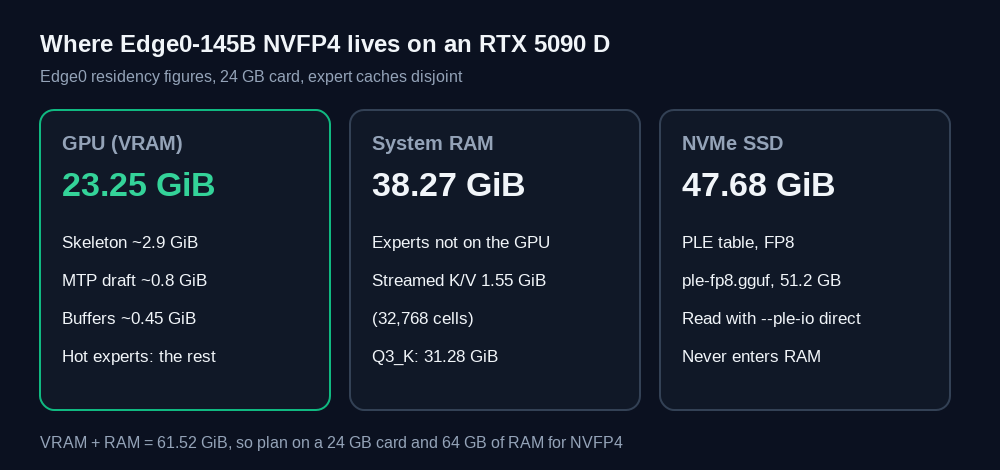
The fixed VRAM footprint, before any expert lands on the card, is listed in the --expert-cache docs: about 2.9 GiB of skeleton projections, 0.8 GiB for the MTP draft model and 0.45 GiB of verify and draft-head buffers, plus the projection buffers. Everything left after --vram-reserve-mib goes to cached experts. The shipped model.json sets that reserve to 700 MiB, which is why the 24 GB card reads 23.25 GiB in use.
With residency on, the GPU and RAM caches hold disjoint expert sets, so nothing is counted twice. Edge0's measured totals:
| Build | Weights | VRAM | RAM | VRAM + RAM |
|---|---|---|---|---|
| 145B NVFP4 | 47.79 GiB | 23.25 GiB | 38.27 GiB | 61.52 GiB |
| 145B Q3_K | 40.81 GiB | 23.14 GiB | 31.28 GiB | 54.42 GiB |
| 120B NVFP4 | 32.96 GiB | 23.02 GiB | 23.40 GiB | 46.42 GiB |
| 120B Q3_K | 27.98 GiB | 22.93 GiB | 18.40 GiB | 41.33 GiB |
So the honest spec for the fast 145B setup is a 24 GB card and 64 GB of system RAM. The 38.27 GiB RAM line alone won't fit in a 32 GB desktop. The 120B Q3_K, at 18.40 GiB of RAM, does.
Context also costs memory you don't see on the GPU. The shipped config sets --max-context 131072 (the architecture supports 262,144), uses an int8 KV cache, and keeps 32,768 KV cells per attention layer in VRAM with --kv-resident 32768. The streamed K/V lives in pinned host RAM, 1.55 GiB at 32,768 cells, on top of the expert cache.
The download is 113.76 GB
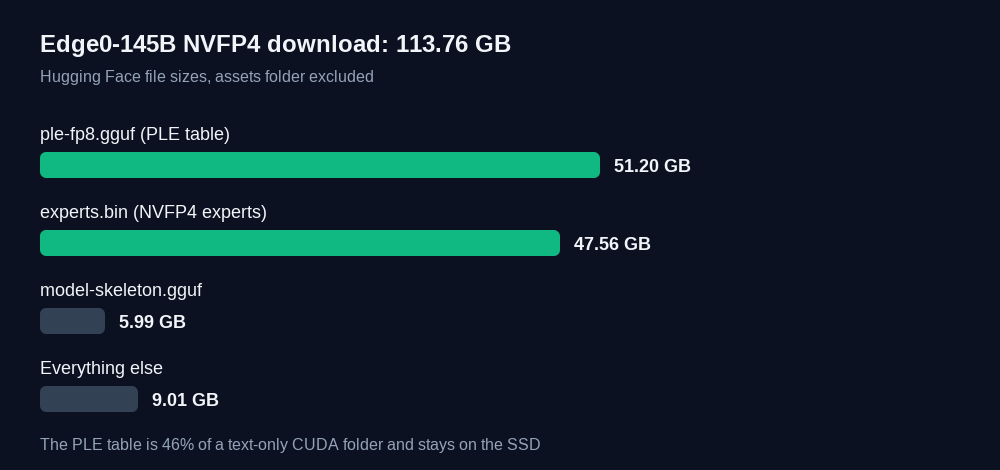
The 145B NVFP4 repo is 113,778,572,151 bytes. Strip out the 16.9 MB assets/ folder of demo video and charts and the model itself is 113.76 GB, or 105.95 GiB. The Q3_K repo is 106.27 GB.
| File | Bytes | What it is |
|---|---|---|
ple-fp8.gguf | 51,200,246,112 | Per-layer embedding table, FP8, read from SSD |
experts.bin | 47,563,800,576 | 48 x 512 NVFP4 experts |
model-skeleton.gguf | 5,991,569,248 | Attention, routing, shared experts, embeddings, output |
latent_dense_q8.bin | 3,743,416,320 | Expert down/up projections, Q8 |
latent_dense_q4.bin | 1,981,808,640 | The same projections, Q4 |
dense.bin | 1,538,625,024 | Rest of the expert pack |
mmproj-BF16.gguf | 907,543,008 | Vision encoder |
mtp/experts.bin | 707,788,800 | Draft model experts for speculative decoding |
You don't need every file. On Linux and Windows the engine defaults to the Q8 projections, and macOS accepts only Q4, so a CUDA user can skip latent_dense_q4.bin. If you only want text, mmproj-BF16.gguf can go too. That brings the NVFP4 folder to 110.87 GB. At 100 Mbps the full repo takes about 2.5 hours to pull.
The PLE table is 46% of what's left, and it has a default worth knowing: --ple-io direct reads it unbuffered, so it never enters RAM. It stays on the SSD for good, which makes the SSD part of your inference path. Put the folder on an NVMe drive, not a USB disk or a SATA hard drive.
Speed by machine and build
These are Edge0's figures in tokens per second. Prefill was measured on 4K and 16K token inputs.
| Machine | Build | 16K prefill | Chat decode | Agent decode |
|---|---|---|---|---|
| RTX 5090 D 24 GB | Q3_K | 3,554.9 | 99.7 | 121.2 |
| RTX 5090 D 24 GB | NVFP4 | 3,165.7 | 79.6 | 98.3 |
| RTX 4090 24 GB | Q3_K | 3,179.4 | 69.9 | 91.7 |
| Apple M2 Ultra (Metal) | Q3_K | 800.3 | 60.9 | 57.0 |
| RTX Spark N1X 60 GiB | NVFP4 | 922.4 | 40.1 | 46.0 |
| RTX Spark N1X 60 GiB | Q3_K | 770.3 | 37.7 | 36.7 |
| 16 GiB VRAM + 20 GiB RAM | Q3_K | 335 | 36.8 | 44.9 |
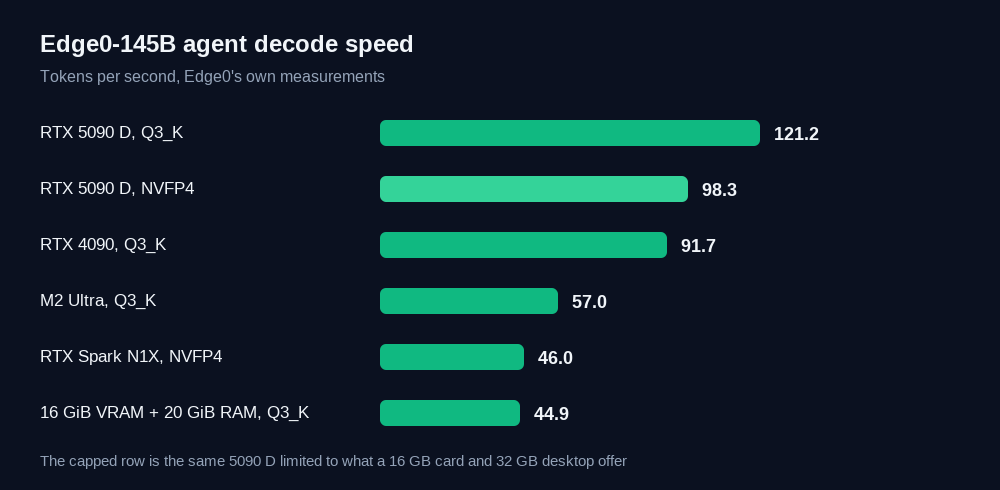
On the 5090 D the Q3_K build is faster than the NVFP4 build this repo is named after: 121.2 against 98.3 tok/s for agent turns, with 7 GiB less RAM. The README doesn't explain why, and the NVFP4 build only beats Q3_K on the RTX Spark. Agent decode beats chat decode on 5 of the 7 rows. Edge0 doesn't say what its agent workload contains.
The last row is the one most people will live in. It's the same RTX 5090 D with VRAM capped by --vram-reserve-mib 8192 and RAM capped at 20 GB by a cgroup with no swap. That's what a 16 GB card in a 32 GB desktop looks like, and it still runs agent turns at 44.9 tok/s.
Which build to pick for your PC
- 24 GB card (RTX 4090, 5090 D) with 64 GB RAM: Q3_K. It's faster on both cards Edge0 tested and needs 31.28 GiB of RAM with residency on. NVFP4 is CUDA-only and wants 38.27 GiB.
- 24 GB card with 32 GB RAM: Q3_K with a capped RAM budget (next section), or the 120B Q3_K, which fits whole at 18.40 GiB of RAM.
- 16 GB card with 32 GB RAM: 145B Q3_K at Edge0's capped setup, 44.9 tok/s agent decode. Linux and Windows need at least 16 GiB of GPU memory and 20 GiB of system memory.
- 12 GB card: not supported by Edge0. A community CMF build for the cortiq runtime (infosave/Edge0-145B-cmf) reports running from 12 GB cards. Edge0 doesn't endorse it and we haven't run it.
- Mac: Q3_K only, on Metal. The M2 Ultra row is 57.0 tok/s agent decode.
Don't bother with the AI VRAM calculator for this one. It assumes every weight sits on the GPU, so it will say a 145B model needs far more than 24 GB, which is true for llama.cpp and Ollama and wrong for edge0-strata. It's still the right tool for checking a dense model you'd run beside Edge0.
Running it on a 32 GB RAM desktop
Build the engine and the launcher first. Clone github.com/Edge0-AI/Edge0, then follow edge0-strata/EDGE0.md and edge0-infer/docs/getting-started.md. CUDA 13 is required on Linux and Windows. Download the Q3_K folder, then check that it's complete before the first launch:
hf download Edge0/Edge0-145B-q3k --exclude "assets/*" --local-dir ./Edge0-145B-q3k
export EDGE0_145B=$PWD/Edge0-145B-q3k
build/cpu/bin/edge0-infer inspect --model "$EDGE0_145B" --json
inspect prints ok: true when every required file is present. Flags don't go on the command line. They live in the args array of the folder's model.json, the same file Edge0 Chat reads. To cap the host-RAM expert cache at 20 GiB and stream the rest from the SSD, add these to args:
"--resident-budget-gib", "20",
"--expert-profile", "./profile.bin"
--resident-budget-gib needs the static expert profile and switches on --mmap-experts and the disjoint GPU/RAM caches by itself. It caps the expert cache only, so the process uses more than 20 GiB in total. Leave the rest of your RAM for the OS and the 1.55 GiB of streamed K/V. A stray comma here makes the engine refuse to start, so paste the file into a JSON formatter before you save it. Then serve:
build/cpu/bin/edge0-infer serve --model "$EDGE0_145B"
# wait for "Listening: http://127.0.0.1:8000 model=edge0_145b"
curl localhost:8000/v1/chat/completions -H 'content-type: application/json' \
  -d '{"model":"edge0_145b","messages":[{"role":"user","content":"hi"}],"max_tokens":64}'
The server speaks both OpenAI and Anthropic APIs, so agent tools that take a base URL can point at it. First load can be slow: --strata-ready-timeout defaults to 1,800 seconds. If replies come back empty, the thinking pass ate your max_tokens. Add "reasoning_effort": "none" to the request, or raise the limit.
The license line for coding assistants
The weights aren't Apache 2.0. Edge0's parts are under the Edge0 Community Model License 1.0, and the Qwen parts stay under the Qwen Community License 1.0, so you follow both. Personal use, research, internal company use and commercial use of the outputs are allowed.
Three things need a separate written license from Edge0: selling or commercially bundling the model, running it as a paid model service for others, and offering an independent commercial coding or office assistant built on it. That last one catches anyone planning to ship a Cursor-style product on top of Edge0. Using it in your own Claude Code or Hermes Agent setup at work is internal use and allowed. Edge0's release-scope file adds that its permission doesn't replace any separate authorization Qwen requires.
FAQ
Does Edge0-145B work in Ollama or LM Studio?
No. It needs edge0-strata, the engine Edge0 built for its latent experts, and the folder isn't a standard GGUF set. edge0-infer starts the engine and exposes OpenAI- and Anthropic-compatible endpoints that other tools can call.
How fast is it with experts on the SSD?
Edge0 doesn't publish a number for pure SSD streaming with --mmap-experts. Its closest measured setup is the 16 GiB VRAM + 20 GiB RAM row, 44.9 tok/s agent decode on Q3_K. Expect lower on a slower NVMe drive.
Should I pick Edge0-120B instead?
Pick it if RAM is your limit. The 120B Q3_K needs 18.40 GiB of RAM beside a 24 GB card and decodes at 62.4 tok/s on the capped 16 + 20 GiB setup. It scores 75.3 on terminal-bench 2.1 against 86.5 for the 145B.
Sources
- Hugging Face,
Edge0/Edge0-145B-NVFP4model card,model.json,native_experts.txt,release-scope.json,LICENSEand file list with sizes (read 16 November 2026): architecture, speed table, residency figures, flags, expert record sizes, download counts. - Hugging Face,
Edge0/Edge0-145B-q3k,Edge0/Edge0-120B-NVFP4andEdge0/Edge0-120B-q3kfile lists and model card (read 16 November 2026): build sizes, 120B residency and benchmarks. - GitHub,
Edge0-AI/Edge0,edge0-infer/docs/edge0-145b.md(read 16 November 2026): requirements,inspect,serve, D/U defaults, ready timeout. - Hugging Face,
Qwen/Qwen3.8-Flash-Nextconfig.json: 48 layers, hidden size 2,560, 512 experts, 10 per token, 262,144 positions.