LM Studio vs Ollama in 2026 is a comparison more people are searching for because local AI has matured from a weekend experiment into a real daily workflow. Both tools help you run models on your own machine, but they are not trying to be the exact same product.
One feels like a polished desktop workbench you can live in. The other feels like a lightweight runtime and API layer you build around. That difference is why users get confused when they ask which one is "better." In practice, the better choice depends less on model quality and more on how you want to work.
The short version is simple: for most everyday local AI users, LM Studio is the better first choice. It gives you a proper desktop app, broad Hugging Face community model discovery, clearer model settings, local server controls, and OpenAI-compatible endpoints without making everything feel like a terminal project. Ollama is still useful, but it is better as a single-machine runtime for developers who want CLI automation and are comfortable adding their own wrapper when they need a richer UI or multi-user layer.
LM Studio vs Ollama in 2026: quick answer
LM Studio and Ollama both let you run large language models locally, but their center of gravity is different.
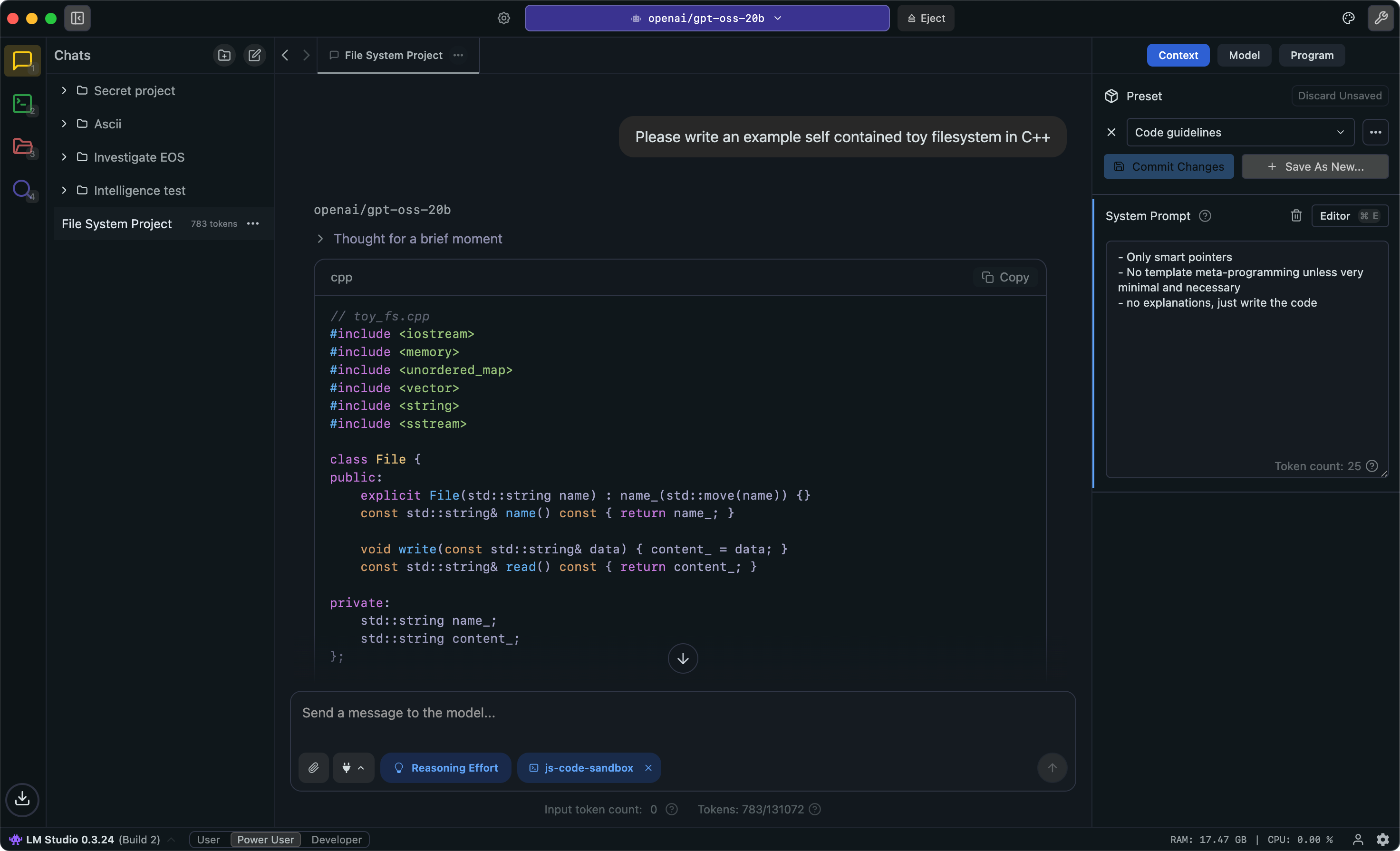
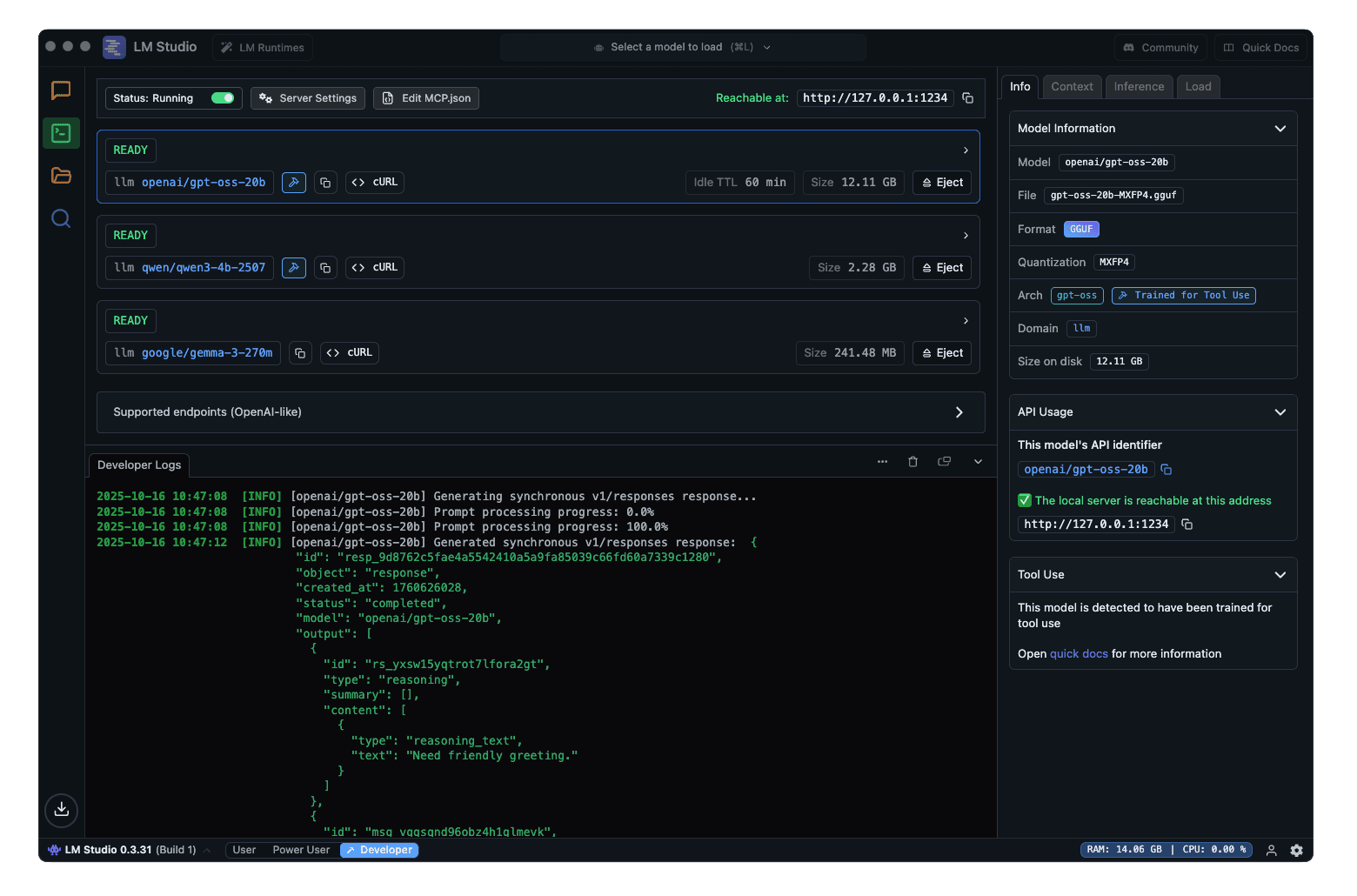
LM Studio is best understood as a desktop workbench plus local API server. It gives you a GUI, a built-in model downloader, Hugging Face community model access, offline chat workflows, support for local inference engines such as llama.cpp and MLX, MCP support inside the app, API tokens, local-network serving, OpenAI-compatible endpoints, Anthropic-compatible endpoints, and manual or just-in-time model loading.
Ollama is best understood as a local model runtime and developer layer. It gives you a simple install flow, a local API, a strong CLI, a curated model library, OpenAI compatibility, official Python and JavaScript libraries, and Modelfiles so you can create reusable model packages. It can load multiple models and process parallel requests when RAM or VRAM allows, and it does support context-length controls through the app, environment variables, API options, and Modelfiles. The catch is usability: compared with LM Studio, those controls are less obvious for normal users, and Ollama is still mainly a local daemon. If you want real multi-user accounts, permissions, dashboards, and team controls, you usually add another app or proxy on top.
| Need | Better pick | Why |
|---|---|---|
| Visual desktop app | LM Studio | Model search, chat, and server controls are visible |
| Broader model discovery | LM Studio | Hugging Face community models are easier to browse and import |
| OpenAI-compatible endpoint | LM Studio | Easier to expose from GUI; Ollama is good if you prefer scripts |
| Multi-model loading | LM Studio | Easier to inspect loaded models, IDs, TTL, and server state |
| CLI workflows | Ollama | ollama run, ollama pull, and Modelfiles are clean |
| Context-length control | LM Studio | Ollama supports it, but LM Studio makes settings easier to see |
| Personal local runtime | Ollama | Lightweight for one machine or one developer stack |
| Shared LAN endpoint | LM Studio | Local-network serving plus API tokens are easier to manage |
| Reusable model package | Ollama | Modelfiles are strong for repeatable setups |
| VRAM planning | Use calculator | Check memory before big models or parallel requests |
Before choosing either one, estimate your GPU memory. A 7B model, a 32K context window, and multiple users are not the same workload. Use the ToolMintX AI VRAM Calculator to compare model size, quantization, context length, and concurrent users before you commit to a setup.
What LM Studio does in 2026
LM Studio has become much more than a simple local chatbot. It is now a local AI desktop app for people who want to discover, test, and run models without living in the terminal all day.
Here is what stands out most:
- Runs local models on Mac, Windows, and Linux
- Supports GGUF models through llama.cpp
- Supports MLX on Apple Silicon Macs
- Includes a built-in model search and download experience backed by Hugging Face community models
- Lets you paste or import Hugging Face model links more naturally than a CLI-only flow
- Lets users chat with documents locally
- Can run as a local server for OpenAI-compatible and Anthropic-compatible app workflows
- Can serve on the local network so another device can call the same workstation
- Supports API tokens for safer shared access
- Can load and identify specific model instances for API use
- Makes context length and other model settings easier to inspect before starting a session
- Supports MCP workflows inside the app
- Can fit both casual desktop use and developer testing
In practical terms, LM Studio is easier to recommend to people who want to browse models, compare variants, test prompts, swap local models, tune context length, and expose a local OpenAI-style endpoint without turning the setup into a terminal-only project. It lowers the friction between curiosity and actual use.
That matters for writers, researchers, analysts, students, privacy-focused users, and developers who still want a comfortable desktop front end. It also matters for a small home or office setup where one stronger machine serves a local endpoint to more than one client device.
What Ollama does in 2026
Ollama takes a different approach. It is designed to make local model serving feel simple, scriptable, and dependable. Its interface is not the product in the same way. The runtime is.
Here is what makes Ollama stand out:
- Provides a local API after installation
- Offers a strong CLI for pulling, running, copying, and managing models
- Includes OpenAI-compatible API support for many existing workflows
- Provides official Python and JavaScript libraries
- Maintains a public model library with tags and variants
- Supports Modelfiles for creating and customizing model packages
- Documents support for structured outputs, tool calling, embeddings, vision, and streaming in app workflows
- Fits editors, scripts, agents, services, homelabs, and internal tools
Ollama is strongest when your goal is not to browse or chat in a desktop app, but to make a local model available to other software. It is especially good when you want one command-line runtime that your editor, automation, Python script, or backend service can call.
One correction is important: Ollama is not limited to exactly one request, one model, or one fixed context length in all cases. Its own docs describe context-length settings, concurrent request handling, OLLAMA_MAX_LOADED_MODELS, OLLAMA_NUM_PARALLEL, and a queue. The practical limitation is memory and product shape. Parallel requests increase context memory, multiple loaded models must fit in RAM or VRAM, and user management is not the center of the product. That is why Ollama feels best as a controlled single-machine runtime unless you add a proper multi-user layer around it.
If LM Studio feels like a local AI desktop environment, Ollama feels like local AI infrastructure.

LM Studio vs Ollama comparison table
| Need or priority | LM Studio | Ollama |
|---|---|---|
| Easiest for non-terminal users | Strong choice | Usable, but less friendly |
| Best desktop GUI experience | Excellent | Limited |
| Built-in model discovery | Excellent through Hugging Face community models | Good, but more curated through library and pull workflow |
| Chat with local documents | Built in | Usually external app or custom stack |
| OpenAI-compatible endpoint | Built into local server workflow | Supported and script-friendly |
| Local network serving | Built into server settings | Possible with host config, but you manage more yourself |
| API authentication | API tokens available in LM Studio | Usually handled by wrapper/proxy/app layer |
| Multiple loaded models | Easier to inspect and manage in UI/API | Supported if memory fits, configured through env/server behavior |
| Context length control | Easier to see and tune in app/server workflows | Supported through app/API/env/Modelfile, but less friendly |
| Multi-user friendliness | Better for a small shared LAN endpoint | Needs Open WebUI, proxy, or your own app for users/auth |
| CLI-first automation | Improving, but not the main identity | Excellent |
| Simple local API for apps | Strong | Strong |
| OpenAI-compatible workflows | Yes | Yes |
| Model customization | Good | Excellent through Modelfile |
| VRAM and context planning | Use UI estimates plus AI VRAM Calculator | Use ollama ps, settings, and AI VRAM Calculator |
| Best for quick experimentation | Excellent | Good |
| Best for repeatable developer pipelines | Good | Excellent |
| Best for users who want one polished app | Excellent | Fair |
Multi-model loading and VRAM: the part people miss
The real LM Studio vs Ollama difference is not simply "GUI vs terminal." It is how clearly each tool helps you manage what is loaded, who is calling it, and how much memory is being burned.
With LM Studio, you can treat your workstation like a local inference box. Load a coding model, an embedding model, or a smaller chat model, expose OpenAI-compatible endpoints, turn on local-network access, and use API tokens when you do not want every request to be anonymous. Because model search and imports lean into the Hugging Face community, you also get a wider practical path to GGUF and MLX variants than a smaller curated library can offer. It is still not a full enterprise inference gateway, but it is friendlier for a small shared setup.
With Ollama, you get a lean runtime. It can keep models loaded, queue requests, and process parallel calls if memory allows. But once you talk about multiple users, permissions, dashboards, usage limits, or team access, you are usually building around Ollama with another layer.
For both tools, VRAM decides what is realistic. More users means more KV cache. Longer context means more memory. Multiple loaded models means model weights stay resident. Before loading a 14B or 32B model for several users, check the numbers with the AI VRAM Calculator.
Who should choose LM Studio
Choose LM Studio if your workflow sounds like this:
- You want a desktop app, not just a runtime
- You like browsing and downloading models visually
- You want to compare model variants before settling on one
- You want local chat and document workflows without building your own stack
- You want local AI with a polished user experience
- You want a local OpenAI-compatible endpoint that other apps can call
- You want a small shared LAN setup with token-based API access
- You want to see loaded models, context, identifiers, and server behavior more clearly
- You want access to the wider Hugging Face community model ecosystem
- You are testing prompts, RAG ideas, or model behavior frequently
- You want a smoother bridge from regular desktop use into local APIs
LM Studio is especially good for people who are serious about local AI but do not want every task to begin in the terminal. It gives you more immediate visibility into what is installed, what is loaded, and what feels good enough for daily work.
For many solo users, that convenience is not a bonus feature. It is the reason they keep using local AI at all.
Who should choose Ollama
Choose Ollama if your workflow sounds like this:
- You want a lightweight local model server you can automate
- You care more about CLI and API stability than GUI comfort
- You want to plug local models into editors, scripts, agents, or internal tools
- You want a clean way to pull, create, copy, and serve models
- You expect to customize settings or model packaging with Modelfiles
- You are building repeatable developer workflows for yourself or a team
- You like the idea of local AI running quietly in the background
- You are comfortable adding Open WebUI, a reverse proxy, or your own app if you need real multi-user controls
Ollama is often the better answer for developers, DevOps-minded users, local AI tinkerers, and anyone who sees model serving as part of a larger system rather than the whole experience.
It is not trying to impress you with a rich desktop shell. It is trying to stay useful in the background.
Which one is better for common use cases?
Best for beginners
LM Studio wins for most beginners because the visual interface reduces setup anxiety and makes model exploration easier.
Best for developers building apps
Ollama usually wins for CLI-heavy developers because its runtime, API patterns, official libraries, and Modelfile workflow make automation easier to maintain. LM Studio is better if the developer also wants a visible local server dashboard and quick model switching.
Best for prompt testing and model comparison
LM Studio usually feels better because you can move through discovery, download, chat, and inspection in one place.
Best for local AI services and scripts
Ollama usually wins for simple personal scripts. LM Studio is better when the local service is shared across multiple apps or devices and you want visible server controls.
Best for privacy-focused everyday use
Both can fit. LM Studio feels better for personal desktop use. Ollama feels better if privacy matters inside a local development or server workflow.
The biggest mistake in the LM Studio vs Ollama debate
The biggest mistake is treating this as a pure feature checklist. In real use, both tools are good enough on core local inference for many users. The better choice usually comes down to your working style.
If you mainly open a desktop app, browse models, test prompts, compare outputs, and work with files, LM Studio will feel more natural.
If you mainly want to expose a local model to code, editors, automations, or repeatable services, Ollama will feel more natural.
In other words, this is not only about what the software can do. It is about where you want the center of your workflow to live.
Should you use both?
Yes, using both is reasonable for advanced users.
A common workflow is to use LM Studio for discovery and evaluation, then use Ollama for repeatable serving. For example, you might try several quantized models in LM Studio, compare responses, decide which one feels reliable, and then set up an Ollama Modelfile for a stable automation or coding workflow.
That is not overkill if local AI is part of your work. It is similar to using one app for design exploration and another tool for production deployment.
Final verdict: LM Studio or Ollama in 2026?
Choose LM Studio if you want the better overall local AI app: strong Hugging Face community model discovery, visible model settings, chat workflows, document interaction, OpenAI-compatible endpoints, local-network serving, and friendlier shared workstation behavior.
Choose Ollama if you want a runtime-first local AI layer for scripting, app integration, automation, model packaging, and repeatable developer workflows on one machine.
If you only want one tool and you are not sure, pick LM Studio first. Add Ollama later when you specifically need CLI automation, Modelfiles, or a lightweight background daemon.
FAQ
Is LM Studio better than Ollama for beginners?
Yes. LM Studio is usually easier for beginners because its visual interface makes Hugging Face model search, downloads, context settings, and testing more approachable.
Is Ollama better than LM Studio for developers?
For CLI-heavy developers, yes. Ollama is often the better fit for scripts, APIs, automation, Modelfiles, and repeatable local model serving. For developers who want a visible local server dashboard, LM Studio is often more comfortable.
Can both LM Studio and Ollama run models locally in 2026?
Yes. Both are built around local model workflows, although they present that capability in different ways.
Does LM Studio have an API like Ollama?
Yes. LM Studio can run a local server with OpenAI-compatible endpoints, so existing app workflows can often point to a local base URL.
Can Ollama handle multiple users?
Ollama can handle concurrent requests when memory allows, but it is not a full multi-user product by itself. For accounts, permissions, and shared dashboards, use a wrapper such as Open WebUI, a proxy, or your own app. This is why many users experience Ollama as a single-user local runtime.
Does Ollama let you set context length?
Yes, but it is not as obvious as LM Studio for many users. Ollama supports context length through its app settings, OLLAMA_CONTEXT_LENGTH, API options such as num_ctx, and Modelfiles. LM Studio makes these model/session settings easier to discover in a visual workflow.
Why does LM Studio have a model-discovery advantage?
LM Studio works closely with Hugging Face community model flows for GGUF and MLX models. That makes it easier to browse, import, and test many community model variants without waiting for a smaller curated library entry.
Which tool is better for serving multiple local devices?
LM Studio is usually easier for a small LAN setup because it has local network serving, API token authentication, and visible server settings. Ollama can also be exposed on a network, but you manage more of the auth and user layer yourself.
How do I know whether my GPU has enough VRAM?
Use the ToolMintX AI VRAM Calculator. Model size, quantization, context length, and concurrent users all change memory needs.
When should I use both LM Studio and Ollama?
Using both makes sense if you want LM Studio for model exploration and desktop testing, and Ollama for automation or serving models to other tools.
Sources
- LM Studio Docs: Welcome to LM Studio
- LM Studio Docs: Offline operation
- LM Studio Docs: Tool use
- LM Studio Docs: Local LLM API server
- LM Studio Docs: Authentication
- LM Studio Docs: Manage models in memory
- Hugging Face Docs: GGUF usage with LM Studio
- Ollama Docs: Documentation home
- Ollama Docs: Context length
- Ollama Docs: OpenAI compatibility
- Ollama Docs: Concurrent requests and loaded models
- Ollama Docs: Modelfile reference


