
Short Intro
Moonshot AI's Kimi K2.6 has arrived as a serious open-model release for developers who care about long-horizon coding, agent workflows, and multimodal reasoning. The headline is exciting, but the practical question is more useful: how should you actually use this model today without getting trapped by unrealistic local setup expectations?
Table of Contents
- What Kimi K2.6 actually is
- Why this release matters
- The deployment reality most posts skip
- How to use Kimi K2.6 in practice
- Step-by-step setup paths
- Practical examples
- How ToolMintX readers can fit this into a workflow
- FAQ
- Conclusion
What Kimi K2.6 Actually Is
Moonshot describes Kimi K2.6 as an open-source, native multimodal agentic model built for long-horizon coding, autonomous execution, and orchestrated sub-agent workflows. According to the official model card on Hugging Face, it uses a Mixture-of-Experts architecture with 1 trillion total parameters, 32 billion activated parameters, and a 256K context window. Moonshot also says the model supports image and video input, tool use, and reasoning-oriented operation modes.
That matters because Kimi K2.6 is not positioned as a lightweight chatbot. It is clearly being presented as a model for serious agent systems, code generation, and complex task execution.
Moonshot's own API platform also positions K2.6 as its latest and most capable model, with an OpenAI-compatible and Anthropic-compatible API surface. That makes adoption easier for teams that already have existing client code and do not want to rebuild their integration layer from scratch.
As of May 3, 2026, Moonshot's public platform page lists K2.6 pricing at $0.95 per million input tokens, $4.00 per million output tokens, and $0.16 per million cached input tokens. For teams evaluating hosted versus self-managed usage, that is a more practical starting point than benchmark charts alone.
Why This Release Matters
There are plenty of open models now, but not all of them are worth attention. Kimi K2.6 stands out for three reasons.
1. It is trying to win on workflow depth, not just chatbot quality
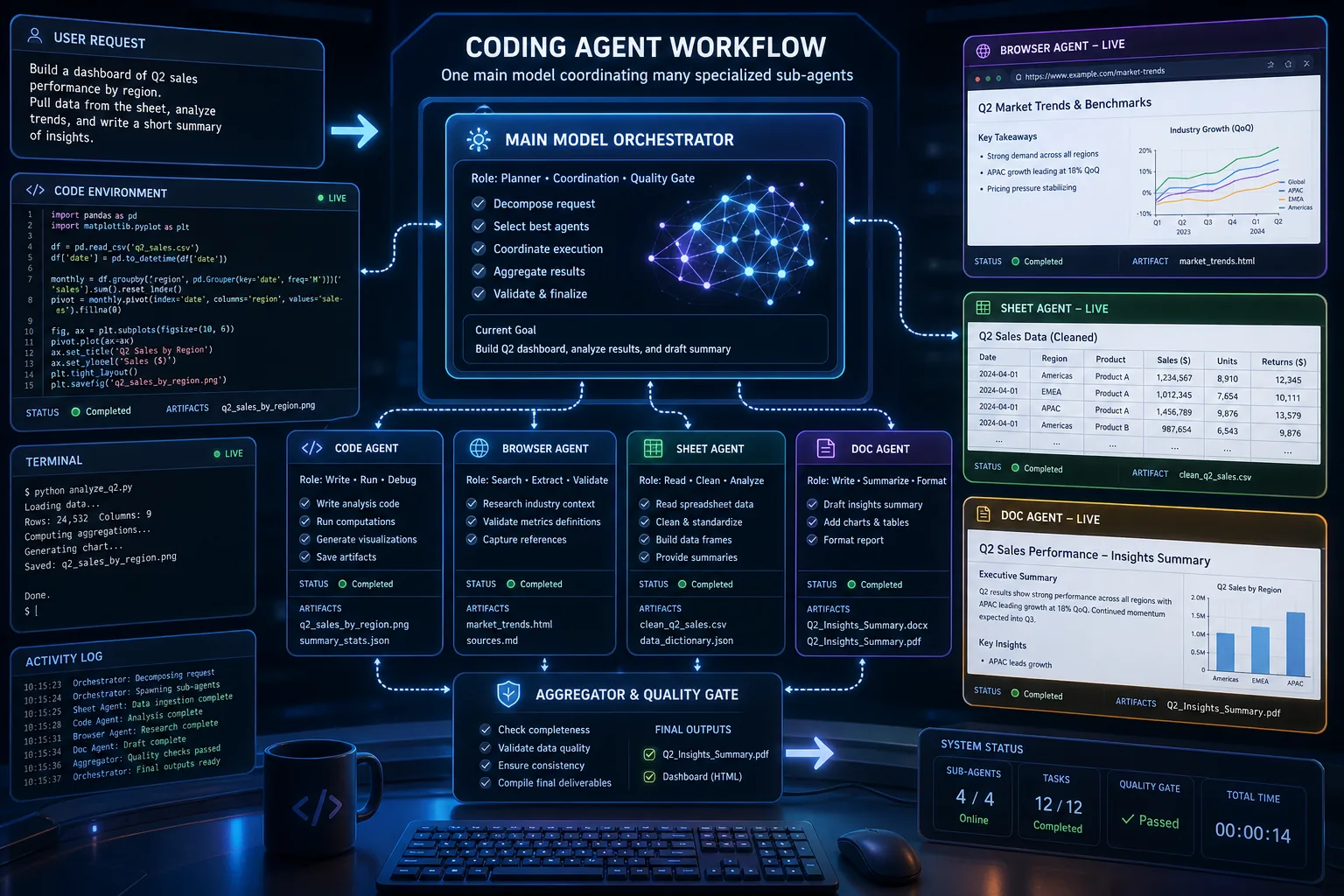
The model card puts unusual emphasis on long-horizon coding, design generation, autonomous execution, and swarm-style orchestration. That is important because many AI users now care less about single answers and more about whether a model can stay coherent across a bigger job.
2. It is open enough to be deployed flexibly
Moonshot has published the model on Hugging Face and documents deployment through vLLM, SGLang, and KTransformers. That is a practical signal. A model only becomes useful to infrastructure teams when it can fit into real serving stacks, observability pipelines, and cost planning.
3. It looks built for tool-using agents
The official documentation discusses reasoning parsers, tool-call parsers, preserve-thinking mode, and model verification tools. Even if you never build a fully autonomous agent, these are signs that Moonshot expects K2.6 to be used as part of a broader system, not as a one-box demo.
Moonshot also reports strong benchmark results in the official model card, including agentic and coding tasks. Those numbers are vendor-reported, so they should be read carefully, but the broader point still holds: K2.6 is being aimed at demanding developer workflows rather than casual Q&A.
The Deployment Reality Most Posts Skip
This is the part many readers need most.
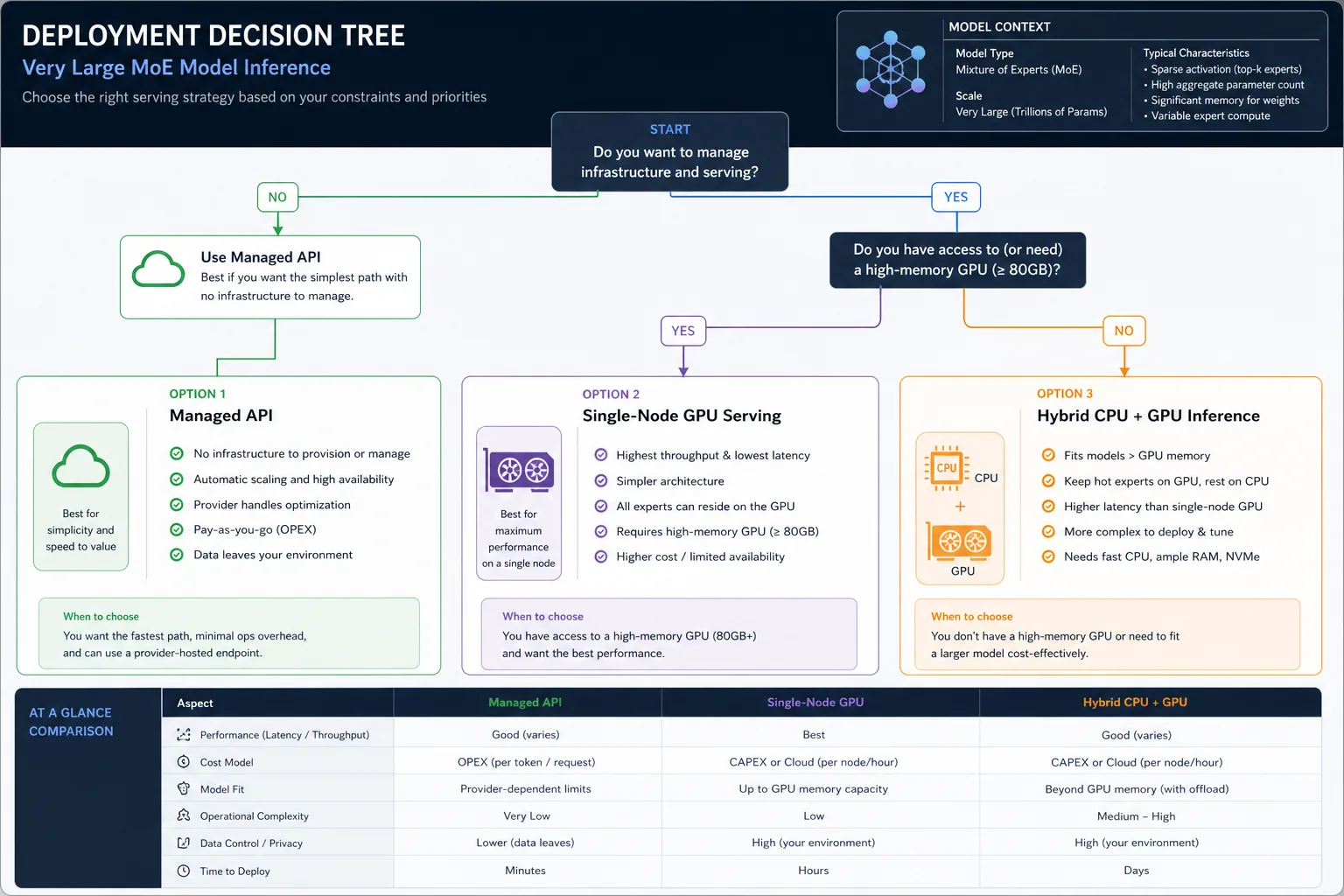
Kimi K2.6 is open, but that does not mean it is a casual laptop model. The official deployment guidance includes examples for serving it on a single H200 node with tensor parallelism across 8 GPUs for both vLLM and SGLang. That does not automatically define the minimum hardware for every scenario, but it clearly shows the model's intended deployment class.
In plain terms, Kimi K2.6 sits much closer to server infrastructure than to plug-and-play desktop experimentation.
That leads to a better decision framework:
Use the API if:
- you want fast evaluation without infrastructure work
- you are testing prompts, tools, or agents
- you need multimodal support quickly
- your team values time-to-first-result over self-hosting
Self-host with vLLM or SGLang if:
- you already manage serious GPU infrastructure
- you need deeper control over routing, data handling, or latency
- you are building a production workflow around coding or agent tasks
- you can afford the operational complexity
Treat community quantizations carefully if:
- you want to experiment locally
- you understand that support, quality, and performance may differ from the official setup
- you are comfortable validating outputs instead of assuming equivalence
This is where practical engineering judgment matters more than model hype.
How To Use Kimi K2.6 In Practice
The smartest way to approach Kimi K2.6 is to separate evaluation, workflow fit, and deployment.
Start with evaluation
Before thinking about self-hosting, test whether the model is actually good at your kind of work. For example:
- repository bug fixing
- multi-file refactors
- browser-assisted research
- document extraction from images
- structured agent tasks with tool calls
If it does not outperform your current stack on real tasks, there is no reason to chase an expensive deployment path.
Then test workflow fit
Kimi K2.6 looks strongest when the task is bigger than one answer. It makes more sense for:
- autonomous coding sessions
- tool-using research agents
- multimodal document processing
- structured orchestration across apps or services
If your use case is simple chat, short summaries, or lightweight classification, you may be paying for capability you do not need.
Only then pick a deployment route
Moonshot recommends three main engine paths:
- vLLM for mature GPU serving workflows
- SGLang for a stable supported route with K2.6 cookbook guidance
- KTransformers for hybrid CPU+GPU inference scenarios
The official README also notes that video chat is still experimental and supported only in Moonshot's official API for now. That is exactly the kind of detail teams should notice before promising features internally.
Step-by-step explanation
Path 1: Fastest route using Moonshot's API
- Create access on Moonshot's open platform.
- Reuse your existing OpenAI-style client if your stack already supports that interface.
- Start with a small but representative task set: code generation, bug fixing, tool calling, and one multimodal test.
- Compare reliability, latency, and cost before making any infrastructure decision.
- Keep a benchmark notebook or spreadsheet so you do not rely on memory or hype.
This is the best path for most teams in the first week.
Path 2: Self-host with vLLM
- Prepare server-grade GPU infrastructure.
- Install a supported vLLM build.
- Follow Moonshot's guidance for the required parser flags for tool use and reasoning handling.
- Validate basic chat, then tool calling, then long-context workloads.
- Stress-test the model with the kind of tasks you actually plan to run in production.
Path 3: Self-host with SGLang
- Install a stable SGLang version that supports K2.6.
- Use Moonshot's cookbook-linked guidance instead of guessing flags.
- Run a minimal serve configuration first.
- Test long outputs, multi-step reasoning, and tool-calling correctness.
- Watch memory behaviour and throughput before moving to production traffic.
Practical Examples
Example 1: Coding agent evaluation
Give K2.6 a real repository task such as fixing a failing test, refactoring a module, or adding a small feature. Check whether it keeps context across multiple files and whether it asks for the right tools at the right time.
Example 2: Multimodal technical review
Feed the model screenshots, interface mocks, or a product diagram and ask it to generate implementation notes, acceptance criteria, or QA cases. This is a better test of real utility than a generic "describe this image" prompt.
Example 3: Structured research workflow
Use K2.6 for a task that mixes web search, reasoning, and deliverable generation. For example, have it compare competing APIs, summarize pricing, and output a draft decision memo.
How ToolMintX Readers Can Fit This Into a Workflow
Kimi K2.6 pairs naturally with practical utility workflows. If you are using ToolMintX for developer-side helpers, this kind of model becomes more useful when your workflow includes clean JSON handling, quick text cleanup, file comparison, data extraction, and shareable output formatting. In other words, the model should sit inside a workflow, not replace one.
That is the right mindset for open-model adoption in 2026.
FAQ
Is Kimi K2.6 a local laptop model?
Not in the way most people mean it. The official deployment examples point to serious GPU infrastructure. Community quantizations may help experimentation, but that is a different class of use.
Does Kimi K2.6 support multimodal input?
Yes. Moonshot documents image and video input support, although video support is described as experimental and limited to the official API for now.
Which inference engines does Moonshot recommend?
Moonshot currently recommends vLLM, SGLang, and KTransformers.
Should I self-host it immediately?
Usually no. Test the API first, confirm workflow fit, then decide whether self-hosting is worth the cost and operational effort.
Is Kimi K2.6 better than every closed model?
That is too broad to say honestly. Moonshot reports strong results, but the right question is whether it performs better for your real tasks at your acceptable cost and latency.
Conclusion
Kimi K2.6 is one of the more interesting open-model launches of the moment because it is not pretending to be a toy. It is aimed at agentic coding, multimodal work, and serious deployment paths. That said, the smartest way to use it is not to rush into self-hosting because the weights are public. Start with real-task evaluation, move to workflow validation, and only then decide whether infrastructure is justified.
If K2.6 fits your work, it could become a powerful part of a modern developer stack. If not, the API-first evaluation path will save you a lot of wasted GPU time.


