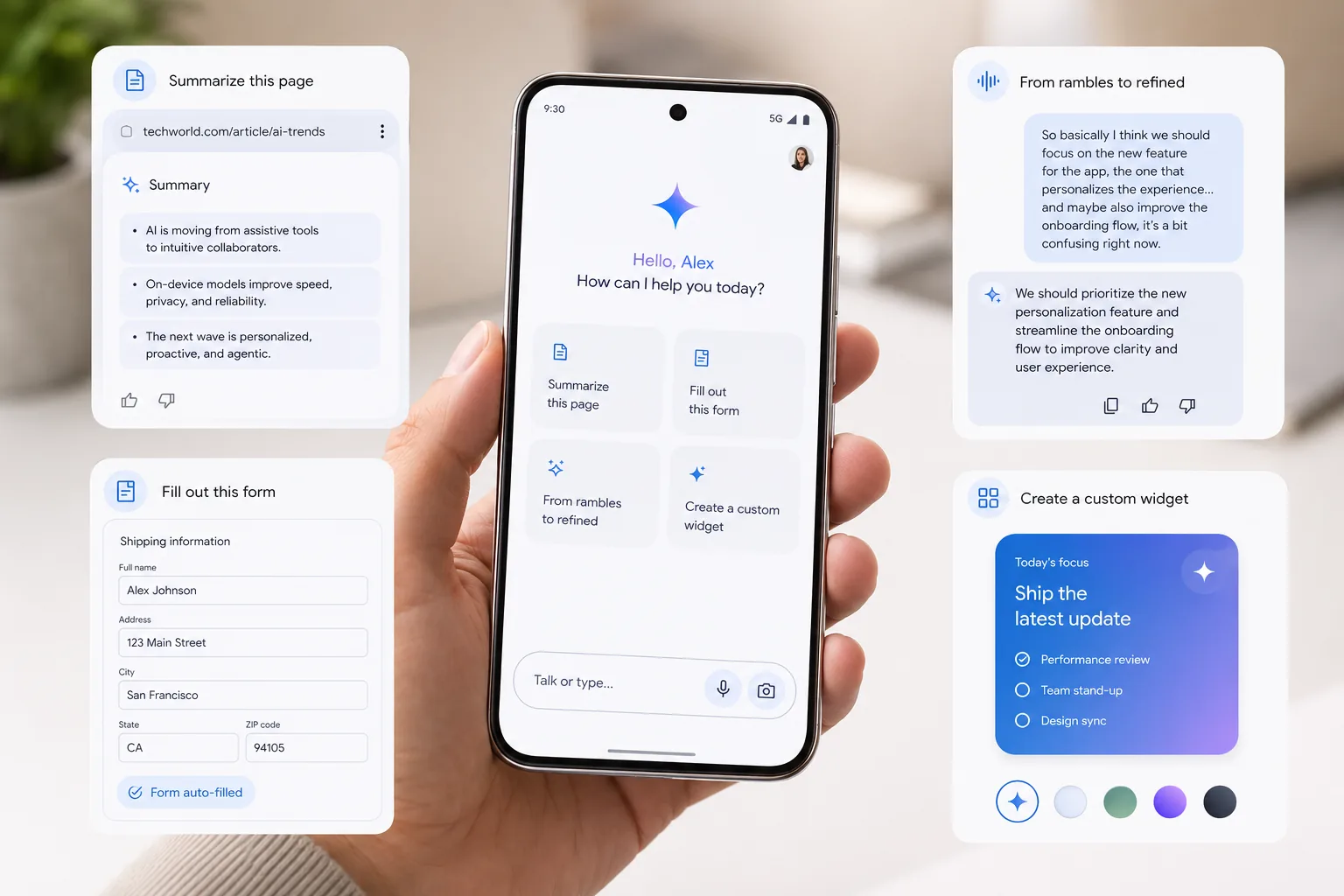
Google is using the week of Google I/O 2026 to make a bigger claim about Android. In its official Gemini Intelligence announcement and Android Developers guidance, the company framed Android as an intelligence system: your phone should not just run apps, it should help finish tasks for you. That is the pitch behind Gemini Intelligence on Android, a new layer of on-device and connected AI features that Google introduced on May 12, 2026, ahead of Google I/O on May 19-20, 2026.
The short version is simple. Gemini Intelligence on Android is designed to help with repetitive work like summarizing pages, filling forms, turning messy speech into polished text, and eventually handling multi-step actions across apps. Google says the first wave starts this summer on the latest Samsung Galaxy and Google Pixel phones, with broader expansion to watches, cars, glasses, and laptops later in 2026.
If you are wondering whether this is another flashy demo or a real upgrade worth caring about, here is what matters.
What Gemini Intelligence on Android actually is
Gemini Intelligence on Android is Google’s new umbrella for premium Gemini-powered experiences on high-end Android devices. Instead of being a single app feature, it is a set of system-level capabilities that connect Gemini to Chrome, Autofill, Gboard, widgets, and selected app workflows.
In practical terms, Google is moving Android toward a more proactive model:
- Gemini can help automate repetitive tasks across apps.
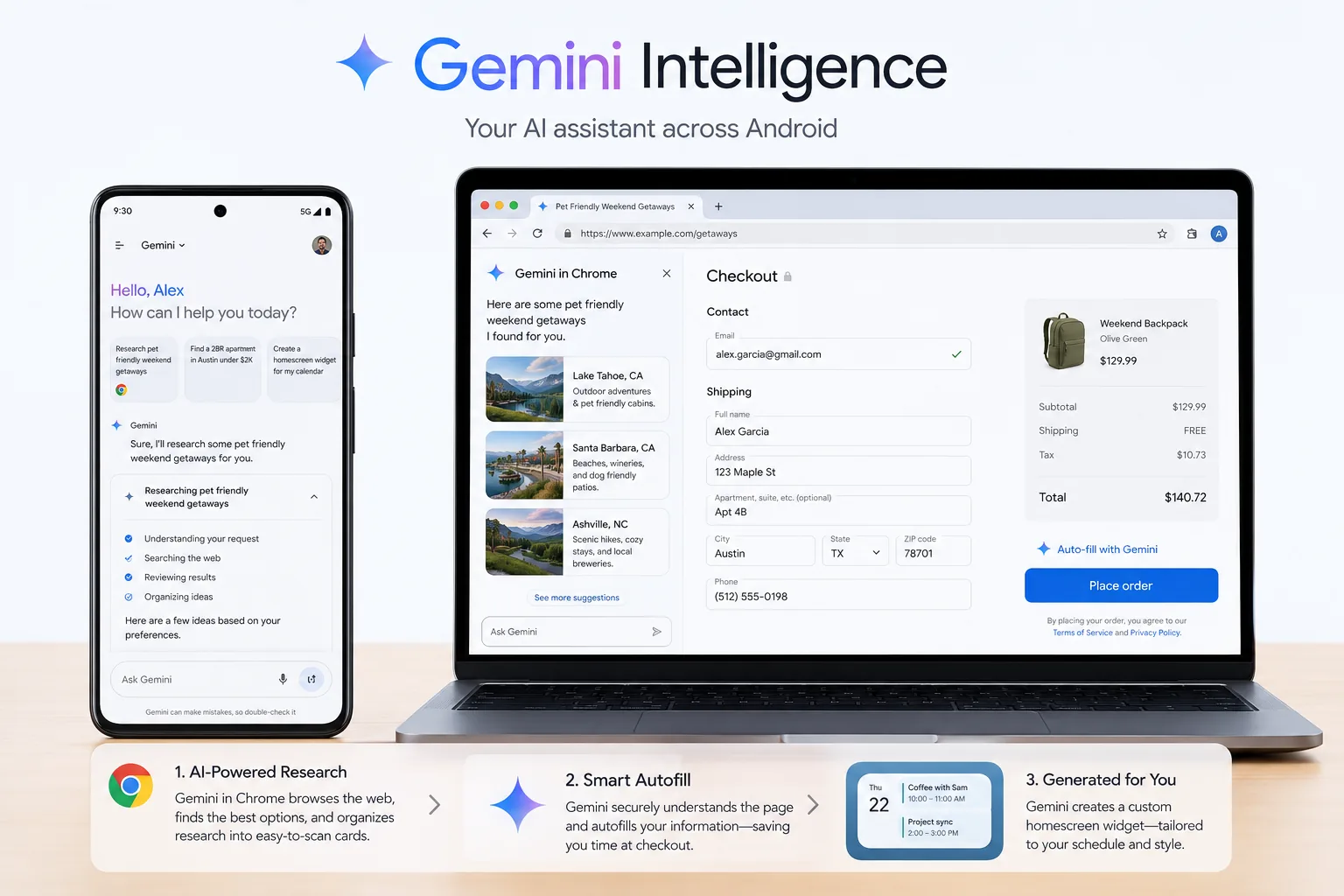
- Chrome on Android gets AI help for research, summaries, and routine browsing actions.
- Autofill becomes more context-aware for complex forms.
- Gboard gains Rambler, which cleans up spoken thoughts into clearer written messages.
- Android gets a generative widget feature called Create My Widget.
That mix is important because it turns Gemini from a chatbot you open into something that can quietly reduce phone busywork.
Which phones get Gemini Intelligence first
Google has confirmed the broad rollout starts with the latest Samsung Galaxy and Google Pixel phones this summer. It has also named the Galaxy S26 and Pixel 10 family as early devices used for the first multi-step automation experiences.
For readers trying to track the rollout, this is the clearest current picture:
| Feature or rollout item | First confirmed devices | Timing | What to know |
|---|---|---|---|
| Core Gemini Intelligence wave | Latest Samsung Galaxy and Google Pixel phones | Summer 2026 | Google has not published a long public eligibility list yet |
| Multi-step task beta in Gemini app | Pixel 10, Pixel 10 Pro, Samsung Galaxy S26 series | Launching soon | Early beta begins in the U.S. and Korea |
| Gemini in Chrome on Android | Android devices in the rollout wave | Late June 2026 | Includes research help, summaries, and Chrome auto browse |
| Broader Gemini Intelligence expansion | Watches, cars, glasses, laptops | Later in 2026 | Google says the platform expands beyond phones |
There is another useful clue on Android’s official Gemini Intelligence page. Google says these features are meant for devices with advanced on-device AI capability, a flagship-class chip, and at least 12GB of RAM. That strongly suggests older or midrange phones will miss some of the best features even if they still get regular Gemini access.
The Gemini Intelligence features that matter most
1. Multi-step tasks across apps
This is the part Google most wants people to remember. In Google’s early examples, you can long-press the power button and ask Gemini to do things like book a ride, reorder food, or use information from one app to complete an action in another.
Google says these automations run in a secure virtual window, start only on your command, and can be monitored through live notifications. That matters because trust will decide whether people actually use agent-like actions on a phone.
The first version still sounds narrow, which is normal for a launch wave. But if it works reliably, this could become one of the biggest shifts in Android usability since voice assistants first went mainstream.
2. Gemini in Chrome and auto browse
Google says Gemini in Chrome on Android starts rolling out in late June 2026. The goal is to help with research, comparison shopping, summaries, and routine tasks like booking or reserving.
This looks more practical than flashy. Mobile browsing is where many people waste time jumping between tabs, copying details, and checking the same information repeatedly. If Gemini can summarize pages accurately and help compare options without getting in the way, it could become one of the most-used parts of the rollout.
3. Smarter Autofill for complex forms
Google is also connecting Gemini to Autofill with Google. The company says this is opt-in and uses relevant information from your connected apps to complete more of the small fields that make mobile forms frustrating.
That may sound minor, but it solves a real pain point. Filling travel, shopping, booking, and application forms on a phone is one of the least pleasant parts of mobile computing. This is the kind of feature that can become quietly valuable if it is accurate.
4. Rambler in Gboard
Rambler is one of the more human ideas in the launch. Instead of dictation that simply transcribes exactly what you said, Rambler is meant to clean up the way people naturally speak. Google says it can remove filler language, keep the important details, and even handle mixed-language messaging more naturally.
For people who think out loud, that could be more useful than it sounds. It turns voice input from raw dictation into something closer to assisted writing.
5. Create My Widget
Create My Widget lets you describe the kind of widget you want and have Android generate a more personalized home screen element. It is a smaller feature than automation or Chrome assistance, but it hints at where Android is going: interfaces that adapt to what you ask for instead of forcing everyone into the same layout.

Why the hardware requirements matter
One detail many people will miss is that Gemini Intelligence is not being framed as a universal Android feature. Google is attaching it to high-end hardware requirements, including newer Nano models on device, a flagship system-on-chip, strong media performance, and 12GB or more of RAM.
That means the real split is not just Android versus iPhone. It is premium Android versus older Android.
If you use a recent flagship phone, Gemini Intelligence could feel like a meaningful reason to stay in the Android ecosystem. If you use a midrange model, you may end up seeing marketing for features that never fully arrive on your device.
Should you care right now
Gemini Intelligence on Android looks promising for three groups in particular:
- People who already buy flagship Galaxy or Pixel phones.
- Busy mobile users who handle bookings, shopping, forms, and research on their phones.
- Anyone who wants AI features that feel built into the OS instead of trapped inside one chat window.
You should be more cautious if you have an older device, dislike giving assistants app-level access, or mainly use AI on desktop. Google’s rollout language is still selective, and the strongest capabilities are clearly tied to newer hardware.
Final take
Gemini Intelligence on Android is one of Google’s clearest attempts yet to make AI feel useful at the operating-system level. As of May 19, 2026, the most important facts are that the rollout starts with select Galaxy and Pixel phones this summer, Chrome support begins in late June, and the earliest multi-step task experiences are tied to Pixel 10 and Galaxy S26 devices.
If Google gets the reliability right, Gemini Intelligence on Android could become more than an I/O headline. It could be the beginning of a more action-oriented Android experience where your phone helps finish work instead of only helping you search for it.
FAQs
What is Gemini Intelligence on Android?
Gemini Intelligence on Android is Google’s new set of premium AI features that connect Gemini to Android system experiences like Chrome, Autofill, Gboard, widgets, and app actions.
Which phones get Gemini Intelligence first?
Google says the first wave starts with the latest Samsung Galaxy and Google Pixel phones in summer 2026, with early multi-step task betas on Pixel 10, Pixel 10 Pro, and Samsung Galaxy S26 devices.
When is Gemini in Chrome coming to Android?
Google says Gemini in Chrome on Android begins rolling out in late June 2026.
Does Gemini Intelligence require special hardware?
Yes. Google’s official Android page says Gemini Intelligence is tied to advanced device requirements including flagship-class hardware and at least 12GB of RAM.
Is Gemini Intelligence the same as the Gemini app?
No. The Gemini app is part of the experience, but Gemini Intelligence is broader. It refers to system-level Android features that use Gemini across apps and device workflows.


