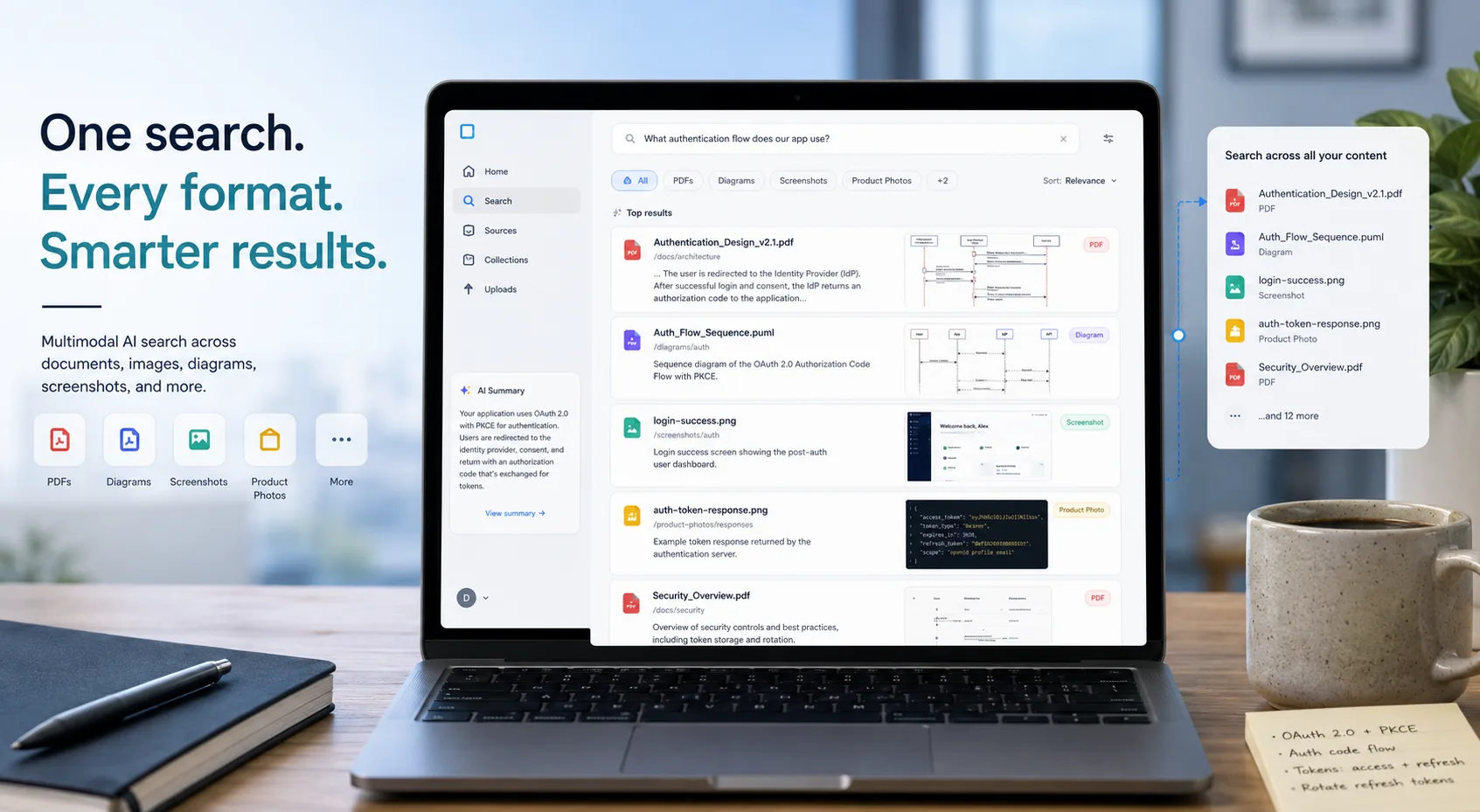
Google's Gemini API File Search just became much more useful for teams building real-world retrieval systems. In its May 5, 2026 update, Google expanded File Search so it can work across images and text together, while also adding custom metadata filtering and page-level citations.
That sounds like a tidy developer update on paper. In practice, it changes the kind of retrieval app a small team can ship without stitching together OCR, visual embeddings, vector storage, source citation logic, and manual metadata layers.
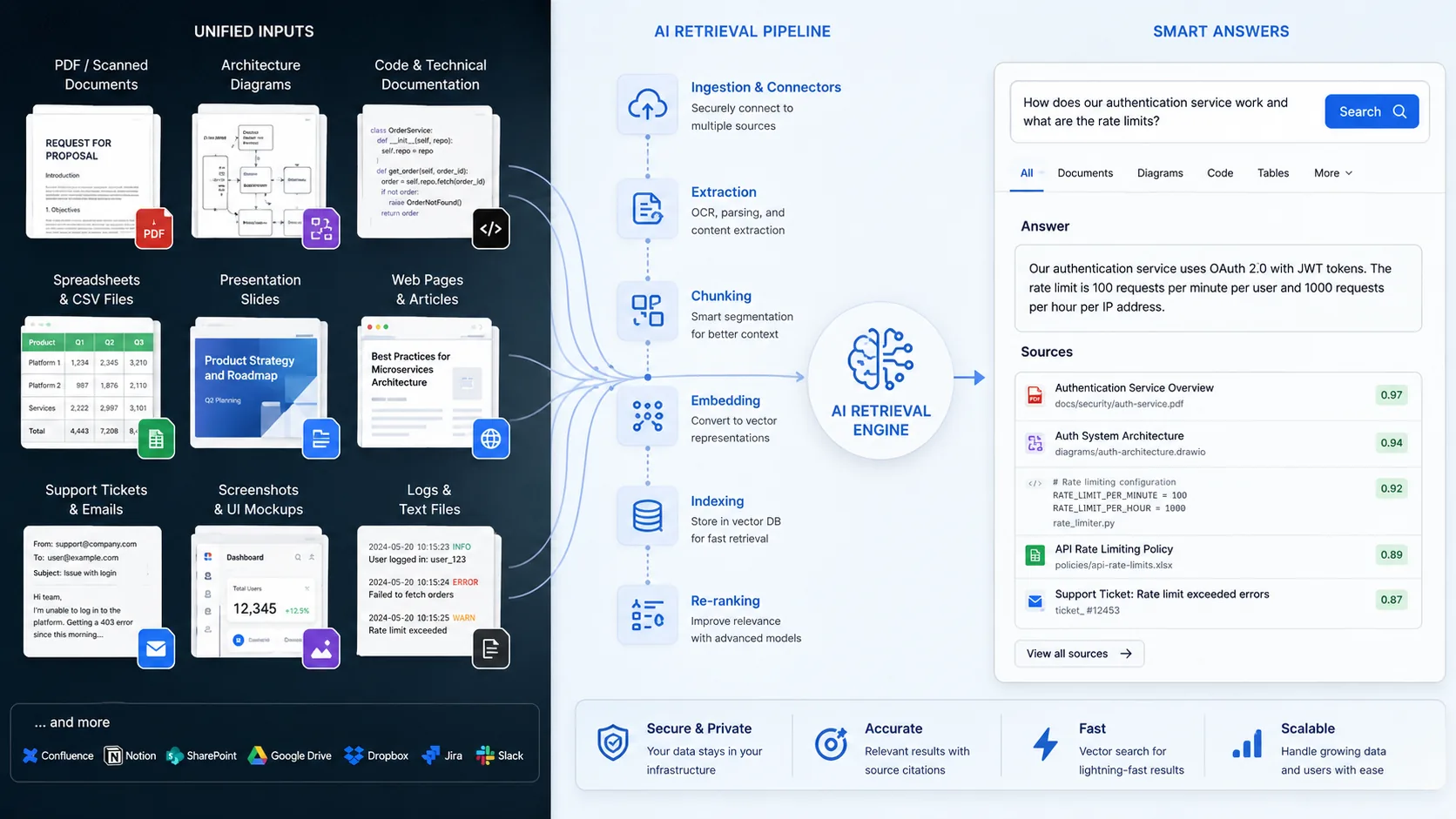
The big story is simple: File Search is no longer only about finding the right paragraph in a document. It is moving closer to becoming a practical retrieval layer for messy, mixed business data, where screenshots, diagrams, PDFs, scans, slide exports, and written notes all need to live in the same search flow.
What changed in Gemini API File Search
Google's official Gemini API File Search announcement lists three major additions:
| New capability | What it does | Why it matters |
|---|---|---|
| Multimodal retrieval | Searches text and image content together | Lets apps find visual context, not just filenames or captions |
| Custom metadata filtering | Adds key-value filters such as department, status, or author | Reduces noisy retrieval in large stores |
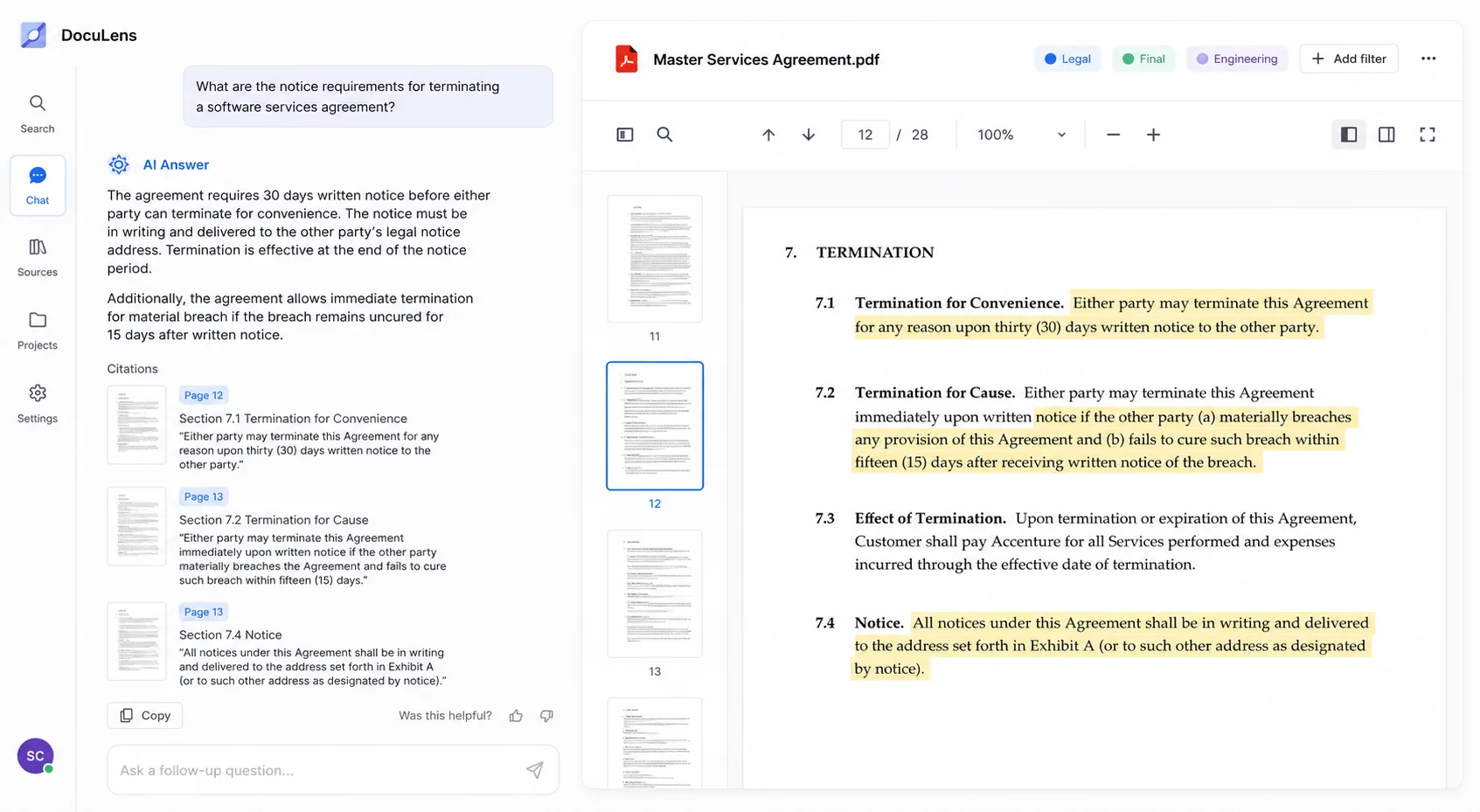
| Page citations | Returns page references for grounded answers | Makes outputs easier to verify and trust |
That mix matters because most RAG projects do not fail on generation alone. They fail because retrieval gets noisy, brittle, expensive, or hard to verify once the corpus grows beyond a demo folder.
Why multimodal RAG is the real upgrade
Until now, many teams had to combine separate systems for text retrieval and image understanding. One layer indexed PDFs, another handled image embeddings, another stored metadata, another handled OCR, and then the developer had to stitch the answer path back together in the app.
Google is trying to remove some of that plumbing.
With the new update, Gemini API File Search can understand images and text in the same retrieval workflow. Google says the capability is powered by Gemini Embedding 2, which lets the system map different content types into a shared retrieval space. In plain English, your app can search for meaning across file formats instead of depending only on exact keywords.
That opens several practical use cases:
- searching a design archive for a visual style rather than a filename
- finding a product screenshot that contains a specific UI state
- retrieving diagrams, scans, and tables that support a text answer
- grounding support or compliance tools in both documents and image-heavy records
- building internal assistants that can reason across mixed project material
For developers, that is more interesting than a generic "AI can search images" headline. It means fewer hand-built workarounds when your data is not neat.
The biggest winner: messy knowledge bases
The most immediate value is not for flashy demo apps. It is for teams sitting on files that nobody can search well.
Think about common company data:
- PDFs with dense policy text
- screenshots from QA or support teams
- architecture diagrams
- scanned paperwork
- pitch decks exported as images
- marketing asset libraries
- technical reports with charts and tables
These are exactly the assets that become painful in keyword-first systems. If your app can search all of that with one layer and still return grounded citations, the product becomes much more credible.
That is why this update feels larger than the announcement format suggests. Google is not just improving answer quality. It is trying to make multimodal RAG less custom and less expensive to build.
Custom metadata filters make retrieval more usable
The second update may be less flashy, but it could matter even more in production.
Google now lets developers attach custom metadata to indexed files. The company gives examples like department: Legal and status: Final. That means an app can narrow retrieval before the model even starts answering.
This is important because retrieval systems usually get worse as the corpus grows. If everything lives in one store, the model often sees too much and starts surfacing irrelevant documents. Metadata filters let you scope a query to the slice of information the user actually needs.
Examples:
- only search approved policy documents
- only search product assets from a specific campaign
- only search engineering diagrams from one service
- only search files tagged for customer support
- only search final documents, not drafts
In other words, this update helps with precision, not just capability.
Page citations could be the trust feature that matters most
The third addition is page-level citations, and this is the part that makes the update easier to recommend for serious use.
When a model answers from a long PDF, the user usually wants proof. Google says File Search now captures page numbers for indexed information and can tie a response back to source locations. That gives developers a way to build interfaces where users can verify the answer without rereading an entire document.
For practical apps, that is a big deal.
Good RAG is not just about sounding accurate. It is about helping the user confirm accuracy quickly. A support rep, analyst, student, lawyer, operations lead, or engineer should be able to jump to the exact place where the answer came from.
Page citations make that workflow much more natural.
What developers should do next
If you already use Gemini API File Search, this is a good moment to rethink your retrieval design instead of treating the update as a checkbox feature.
1. Revisit your store structure
If you previously split visual assets and documents into separate systems, test whether a unified File Search workflow now performs better for your use case.
2. Add metadata early
Do not wait until your store becomes noisy. Plan tags such as team, status, product line, document type, region, source, approval state, or customer segment from the beginning.
3. Redesign the answer UI around citations
If page citations are available, expose them clearly. Verified answers are more useful than polished answers that cannot be traced.
4. Test where multimodal retrieval actually helps
Not every workflow needs it. It will matter most when users search across diagrams, screenshots, scans, reports, and image-heavy records.
5. Watch cost and store hygiene
Google's docs still matter here. Embedding creation, model tokens, retention patterns, and duplicate files can all affect cost or quality. Teams should test retrieval quality alongside indexing strategy instead of assuming "more files" automatically means "better answers."
Is this enough to replace a full RAG stack?
Not always, and that is worth saying clearly.
Some teams will still want their own vector infrastructure, custom ranking layers, advanced document processing, hybrid keyword plus vector search, or strict data residency controls. Others will need tool combinations that File Search does not support.
But that does not make this update small. It makes it practical.
For a lot of builders, the real win is that Gemini API File Search now covers more of the stack they actually need:
- mixed-modality retrieval
- scoped filtering
- grounded citations
- lower setup friction
- fewer custom moving parts
That is enough to move many projects from prototype to internal pilot faster.
Conclusion: Gemini API File Search just became easier to build around
The best way to read this launch is not "Google added a few RAG features." It is that Gemini API File Search is becoming a more complete retrieval layer for modern apps that live on messy, mixed data.
Multimodal retrieval helps developers search images and text together. Metadata filters help cut noise before it becomes a product problem. Page citations help answers earn trust. Put those three together, and this update becomes one of the more practical AI developer releases of the week.
If you build search, knowledge, support, research, or workflow tools, this is the kind of update worth testing right away.
FAQ
What is Gemini API File Search?
Gemini API File Search is Google's retrieval tool for building RAG workflows. It imports, chunks, and indexes files so Gemini models can answer with relevant source context.
What does multimodal mean in Gemini API File Search?
It means the tool can now retrieve information from images and text together, which is useful for screenshots, diagrams, scanned files, and image-heavy archives.
Why are metadata filters important in RAG apps?
Metadata filters reduce noisy results by limiting retrieval to the right subset of files, such as one department, status, product line, or content type.
How do page citations help users?
They let users verify where an answer came from by pointing to the exact page in the source document, which improves trust and speeds up fact-checking.
Is Gemini API File Search enough for every RAG stack?
No. Some teams will still need custom ranking, external infrastructure, or more advanced document pipelines, but the update makes many common RAG workflows easier to ship.


